
 資料結構
資料結構 網路
網路 關係資料庫管理系統 (RDBMS)
 作業系統
作業系統 Java
Java MS Excel
 iOS
iOS HTML
HTML CSS
CSS Android
 Python
 C語言程式設計
 C++
C++ C#
C# MongoDB
 MySQL
MySQL Javascript
 PHP
PHP 物理學
物理學 化學
化學 生物學
生物學 數學
數學 英語
英語 經濟學
經濟學 心理學
心理學 社會學
社會學 服裝設計
服裝設計 法律研究
法律研究Clementine 1.3:一款面向Linux的現代音樂播放器
Clementine是一款免費的跨平臺開源Qt音樂播放器,其開發靈感來源於Amarok 1.4。最新的穩定版本1.3在經過一年的開發後釋出,它支援Vk.Com和Seafile,幷包含無數的改進和錯誤修復。本文介紹如何安裝Clementine音樂播放器。
功能
- 搜尋和播放本地音樂庫
- 收聽Spotify、Grooveshark、SomaFM等線上電臺
- 播放來自Dropbox、Google Drive、OneDrive、Amazon Cloud等雲端儲存的歌曲
- 建立智慧播放列表和動態播放列表
- 將音樂傳輸到iPod、iPhone、Android和其他移動裝置或儲存裝置等
安裝Clementine
要安裝Clementine,您應該新增穩定的PPA,如下所示:
$ sudo add-apt-repository ppa:me-davidsansome/clementine
示例輸出如下:
More info: https://launchpad.net/~me-davidsansome/+archive/ubuntu/clementine
Press [ENTER] to continue or ctrl-c to cancel adding it

gpg: keyring `/tmp/tmppbof_syf/secring.gpg' created
gpg: keyring `/tmp/tmppbof_syf/pubring.gpg' created
gpg: requesting key 044A3B98 from hkp server keyserver.ubuntu.com
gpg: /tmp/tmppbof_syf/trustdb.gpg: trustdb created
gpg: key 044A3B98: public key "Launchpad Clementine Stable" imported
gpg: Total number processed: 1
gpg: imported: 1 (RSA: 1)
OK
現在更新索引,如下所示:
$ sudo apt-get update
要安裝Clementine,請使用以下命令:
$ sudo apt-get install clementine
示例輸出如下:
Reading package lists... Done
Building dependency tree
Reading state information... Done
The following packages were automatically installed and are no longer required:
apport-hooks-elementary contractor javascript-common libgda-5.0-4
libgda-5.0-common libgranite-common libgranite3 libgsignon-glib1
libindicate5 libjs-jquery libnoise-core0 libtagc0
Use 'sudo apt autoremove' to remove them.
The following additional packages will be installed:
libcrypto++9v5 libechonest2.3 liblastfm1 libqjson0 libqt4-opengl
projectm-data
The following NEW packages will be installed:
clementine libcrypto++9v5 libechonest2.3 liblastfm1 libqjson0 libqt4-opengl
projectm-data
0 upgraded, 7 newly installed, 0 to remove and 142 not upgraded.
Need to get 7,212 kB of archives.
After this operation, 32.8 MB of additional disk space will be used.
Do you want to continue? [Y/n] y
Get:1 http://in.archive.ubuntu.com/ubuntu xenial/universe amd64 libqjson0 amd64 0.8.1-3 [63.7 kB]
Get:2 http://ppa.launchpad.net/me-davidsansome/clementine/ubuntu xenial/main amd64 clementine amd64 1.3.1~xenial [5,418 kB]
Get:3 http://in.archive.ubuntu.com/ubuntu xenial/universe amd64 libcrypto++9v5 amd64 5.6.1-9 [885 kB]
............................................................................................
要開啟Clementine,請使用以下命令:
$ clementine
示例輸出如下:
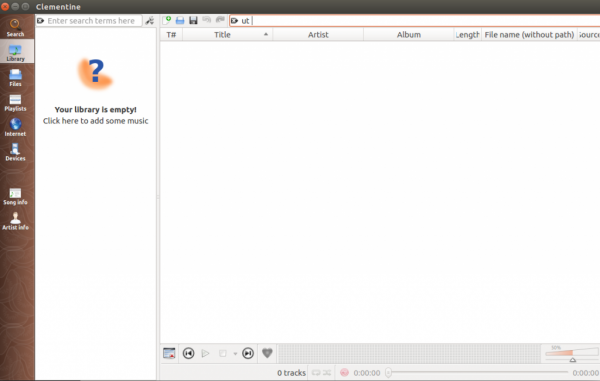
要獲取更多關於Clementine的資訊,請使用以下命令:
$ clementine -h
示例輸出如下:
Usage: clementine [options] [URL(s)]

Player options:
-p, --play             Start the playlist currently playing
-t, --play-pause       Play if stopped, pause if playing
-u, --pause            Pause playback
-s, --stop             Stop playback
-r, --previous         Skip backwards in playlist
-f, --next             Skip forwards in playlist
-v, --volume           Set the volume to percent
--volume-up            Increase the volume by 4%
--volume-down          Decrease the volume by 4%
--volume-increase-by   Increase the volume by percent
--volume-decrease-by   Decrease the volume by percent
--seek-to              Seek the currently playing track to an absolute position
--seek-by              Seek the currently playing track by a relative amount
--restart-or-previous  Restart the track, or play the previous track if within 8 seconds of start.

Playlist options:
-a, --append          Append files/URLs to the playlist
-l, --load            Loads files/URLs, replacing current playlist
-k, --play-track      Play the th track in the playlist

Other options:
-o, --show-osd          Display the on-screen-display
-y, --toggle-pretty-osd Toggle visibility for the pretty on-screen-display
-g, --language          Change the language
    --quiet             Equivalent to --log-levels *:1
    --verbose           Equivalent to --log-levels *:3
    --log-levels        Comma separated list of class:level, level is 0-3
    --version           Print out version information
閱讀完本文後,您將瞭解“如何在Linux上安裝Clementine 1.3”。在我們的後續文章中,我們將分享更多基於Linux的技巧和提示。敬請期待!

更新於:2020年1月20日
瀏覽量:159

廣告