
 資料結構
資料結構 網路
網路 RDBMS
RDBMS 作業系統
作業系統 Java
Java MS Excel
 iOS
iOS HTML
HTML CSS
CSS Android
 Python
 C 程式語言
 C++
C++ C#
C# MongoDB
 MySQL
MySQL Javascript
 PHP
PHP 物理
物理 化學
化學 生物
生物 數學
數學 英語
英語 經濟學
經濟學 心理學
心理學 社會學
社會學 時尚學
時尚學 法律研究
法律研究我們可以透過在 Java 中從使用者請求輸入來從 JOptionPane 讀取嗎?
是的,我們可以從 JOptionPane 讀取。在此,我們將在一個字串變數中獲取 showInputDialog() 的結果 −
String input = JOptionPane.showInputDialog("Enter the C++ lessons you covered till now?");在獲取結果後,我們將使用 parseInt() 將其轉換為整數,然後在控制檯中顯示它 −
int res = Integer.parseInt(input);
System.out.println("Lessons covered = "+res);
以下是一個透過從使用者請求輸入來從 JOptionPane 讀取的示例 −
示例
package my;
import java.awt.BorderLayout;
import java.awt.Color;
import java.awt.GridBagLayout;
import java.awt.GridLayout;
import java.net.URL;
import javax.swing.ImageIcon;
import javax.swing.JLabel;
import javax.swing.JOptionPane;
import javax.swing.JPanel;
public class SwingDemo {
   public static void main(String[] args) throws Exception {
      ImageIcon icon = new ImageIcon(new URL("http −//tutorialspoint.tw/images/C-PLUS.png"));
      JLabel label = new JLabel(icon);
      JPanel panel = new JPanel(new GridBagLayout());
      panel.add(label);
      panel.setOpaque(true);
      panel.setBackground(Color.ORANGE);
      JPanel textPanel = new JPanel(new GridLayout(10, 5));
      for (int i = 0; i < 20; i++) {
         textPanel.add(new JLabel("Learn C++"));
      }
      JPanel panel2 = new JPanel(new BorderLayout());
      panel2.add(textPanel);
      panel2.add(panel, BorderLayout.EAST);
      JOptionPane.showMessageDialog(null, panel2, "Course",JOptionPane.DEFAULT_OPTION);
      String input = JOptionPane
      .showInputDialog("Enter the C++ lessons you covered till now?");
      int res = Integer.parseInt(input);
      System.out.println("Lessons covered = "+res);
   }
}
輸出
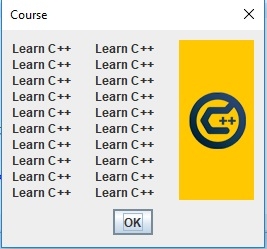
如果單擊上面的確定,將如下圖所示從使用者請求輸入 −
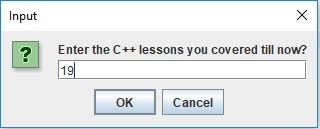
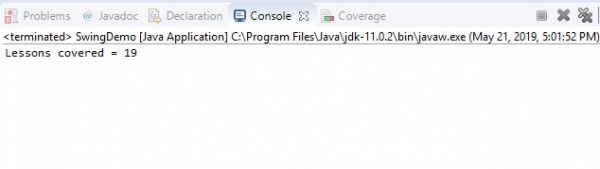
現在,當按 ENTER 時,上面新增的課程編號將如下圖所示顯示在控制檯中 −

更新於: 30-Jul-2019
206 次瀏覽

廣告