
 資料結構
資料結構 網路技術
網路技術 關係資料庫管理系統
 作業系統
作業系統 Java
Java MS Excel
 iOS
iOS HTML
HTML CSS
CSS Android
 Python
 C 程式設計
 C++
C++ C#
C# MongoDB
 MySQL
MySQL Javascript
 PHP
PHP 物理學
物理學 化學
化學 生物學
生物學 數學
數學 英語
英語 經濟學
經濟學 心理學
心理學 社會學
社會學 服裝設計
服裝設計 法律研究
法律研究Selenium 能否在單個瀏覽器中使用多執行緒?
Selenium 可以在 TestNG 框架的幫助下在一個瀏覽器使用多執行緒。TestNG 提供了並行執行功能,該功能基於 Java 多執行緒概念工作。
為了根據各種引數執行測試,TestNG 有一個包含配置的XML 檔案。屬性parallel 和 thread−count 用於並行執行。
parallel 屬性可以有以下值 -
類 - 在一個執行緒內執行一個類中的所有測試。
例項 - 在一個執行緒內執行同一例項中的所有方法。
測試 - 在一個執行緒內執行同一標記中的所有方法。
方法 - 在不同的執行緒中執行方法。
thread−count 屬性確定執行測試時希望擁有的執行緒數。
示例
import org.testng.annotations.Test;
import org.testng.annotations.AfterClass;
public class TestNG14 {
   @Test
   public void testCase1() {
      System.out.println("This is the first Test Case");
   }
   @Test
   public void testCase2() {
      System.out.println("This is the second Test Case");
   }
   @Test
   public void testCase3() {
      System.out.println("This is the third Test Case");
   }
   //executed after all methods in the same class
   @AfterClass
   public void afterClass() {
      System.out.println("This will execute after the Class");
   }
}
示例
xml 檔案的程式碼實現。
<!DOCTYPE suite SYSTEM "https://testng.org/testng−1.0.dtd" >
<!−−parallel set to methods with thread count 2−−>
<suite name="Test−Suite" parallel="methods" thread−count="2">
   <test name="Tutorialspoint Test" >
      <classes>
         <class name="TestNG14" />
      </classes>
   </test>
</suite>
輸出
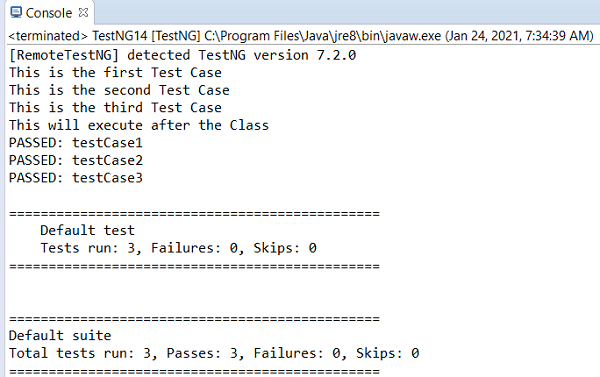
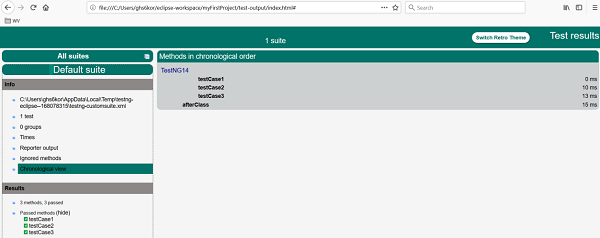
TestNG 以報告形式顯示結果。

更新於: 2021 年 2 月 2 日
3K+ 觀看次數

廣告