
 資料結構
資料結構 網路
網路 關係資料庫管理系統
 作業系統
作業系統 Java
Java MS Excel
 iOS
iOS HTML
HTML CSS
CSS Android
 Python
 C 語言程式設計
 C++
C++ C#
C# MongoDB
 MySQL
MySQL Javascript
 PHP
PHP 物理學
物理學 化學
化學 生物學
生物學 數學
數學 英語
英語 經濟學
經濟學 心理學
心理學 社會學
社會學 服裝設計
服裝設計 法律研究
法律研究MATLAB 中的黑白視錯覺
利用黑白圖案產生扭曲、運動或其他任何令人著迷的視覺效果的視覺現象被稱為黑白視錯覺。這些黑白圖案利用我們眼睛和大腦處理視覺資訊的方式,並創造出一種錯覺來誤導我們的感知。
黑白視錯覺使用各種以特定風格排列的黑色和白色圖案、形狀和線條。這些排列是為了創造運動、扭曲、深度等錯覺。
在本文中,我們將學習如何使用 MATLAB 程式設計建立不同型別的黑白視錯覺。
示例
以下 MATLAB 程式碼將生成一個簡單的方形黑白視錯覺。
% Define the size of illusion box
BoxSize = 400;
% Create a grid of coordinates
[a, b] = meshgrid(1:BoxSize, 1:BoxSize);
% Specify the optical illusion parameters
% Define number of pattern cycles
cycle = 50;
% Define intensity of the illusion
intensity = 150;
% Create a black and white optical illusion pattern
illusion_pattern = cos(2 * pi * a / cycle) + cos(2 * pi * b / cycle);
% Control the intensity of the illusion pattern
illusion_pattern = illusion_pattern * intensity;
% Perform normalization of pattern values to the range [0, 1]
illusion_pattern = (illusion_pattern - min(illusion_pattern(:))) / (max(illusion_pattern(:)) - min(illusion_pattern(:)));
% Display the black and white optical illusion
imshow(illusion_pattern, 'InitialMagnification', 'fit'); title('Black and White Optical Illusion');
輸出
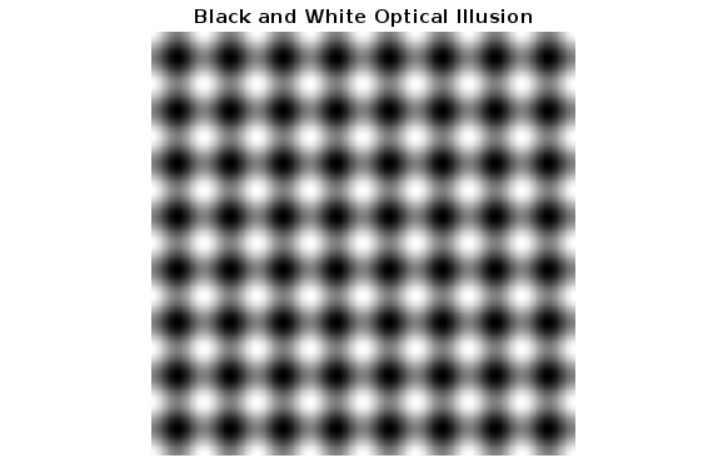
解釋
在這個 MATLAB 程式中,我們生成了一個黑白視錯覺。在上面的 MATLAB 程式碼中,我們首先定義了一個大小為 400 畫素的方框,並將其儲存在“BoxSize”變數中。然後,我們呼叫“meshgrid”函式來建立圖案的座標網格。接下來,我們指定視錯覺的引數“cycle”和“intensity”。其中,“cycle”引數確定圖案中的週期數,“intensity”引數確定錯覺的強度或幅度。
然後,我們指定一個公式來生成黑白視錯覺圖案,並將結果儲存在“illusion_pattern”變數中。然後,我們規範化圖案的值,以確保它們在 [0, 1] 範圍內;
最後,我們使用“imshow”函式顯示生成的黑白視錯覺。
注意 – 您可以更改錯覺引數“cycle”和“intensity”的值以生成此視錯覺的不同變體。
示例
以下 MATLAB 程式碼演示瞭如何在影像上建立黑白視錯覺。
% MATLAB Program to create black and white optical illusion on image
% Read the input image
img = imread('https://tutorialspoint.tw/matlab/images/matlab-mini-logo.jpg');
% Transform the input image to binary image
img2 = im2bw(img);
% Create a complemented image of the binary image
img3 = imcomplement(img2);
% Display the original, binary, and complemented image
subplot(1, 3, 1); imshow(img); title('Original Image');
subplot(1, 3, 2); imshow(img2); title('Binary Image');
subplot(1, 3, 3); imshow(img3); title('Complemented Image');
輸出

解釋
在這個 MATLAB 程式中,我們首先使用“imread”函式讀取輸入影像。然後,我們使用“im2bw”函式將輸入影像轉換為二值影像。接下來,我們使用“imcomplement”函式建立二值影像的補影像。最後,我們使用“imshow”函式顯示原始影像、二值影像和補影像,並附帶相應的標題。
這就是我們在 MATLAB 中如何在影像上建立黑白視錯覺的方法。
結論
總之,在本文中,我們討論了使用 MATLAB 程式設計建立原始黑白視錯覺和影像上的黑白視錯覺。以上兩個 MATLAB 程式演示瞭如何使用簡單的程式碼建立黑白錯覺。

84 次瀏覽
