
 資料結構
資料結構 網路
網路 關係型資料庫管理系統
 作業系統
作業系統 Java
Java MS Excel
 iOS
iOS HTML
HTML CSS
CSS Android
 Python
 C 程式設計
 C++
C++ C#
C# MongoDB
 MySQL
MySQL Javascript
 PHP
PHP 物理
物理 化學
化學 生物
生物 數學
數學 英語
英語 經濟學
經濟學 心理學
心理學 社會學
社會學 時尚研究
時尚研究 法律研究
法律研究ArduinoJSON:資料過濾
顧名思義,ArduinoJSON 庫有助於你在 Arduino 上處理 JSON 物件。要安裝它,請轉到庫管理器並搜尋 ArduinoJSON。安裝 Benoit Blanchon 開發的庫。
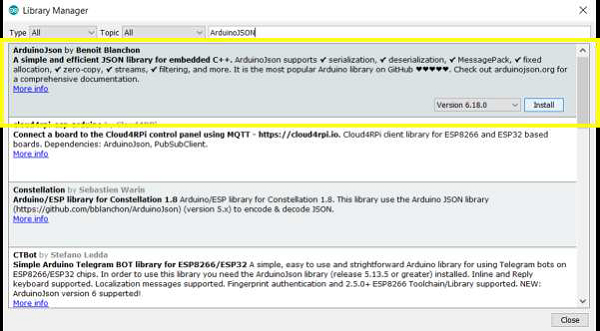
這是文件非常齊全的庫之一。事實上,它有自己的網站 - https://arduinojson.org/。你可以在該網站上找到許多問題的答案。
在本文中,我們將瞭解如何從較大的 JSON 中過濾資料並生成較小的 JSON。
下載 ArduinoJSON 庫後,轉到:檔案→示例→ArduinoJSON
示例
我們應該檢視的示例是 JsonFilterExample。程式碼如下:
#include <ArduinoJson.h>

void setup() {
   // Initialize serial port
   Serial.begin(9600);
   while (!Serial) continue;

   // The huge input: an extract from OpenWeatherMap response
   const __FlashStringHelper* input_json = F("{\"cod\":\"200\",\"message\":0,\"list [{\"dt\":1581498000,\"main\":{"
   "\"temp\":3.23,\"feels_like\":- 3.63,\"temp_min\":3.23,\"temp_max\":4.62,"

"\"pressure\":1014,\"sea_level\":1014,\"grnd_level\":1010,\"humidity\":" "58,\"temp_kf\":-
1.39},\"weather\":[{\"id\":800,\"main\":\"Clear\","
   "\"description\":\"clear "

"sky\",\"icon\":\"01d\"}],\"clouds\":{\"all\":0},\"wind\":{\"speed\":6." "19,\"deg\":266},\"sys\":{\"pod\":\"d\"},\"dt_txt\":\"2020-02-12 "

"09:00:00\"},{\"dt\":1581508800,\"main\":{\"temp\":6.09,\"feels_like\":-
"
"1.07,\"temp_min\":6.09,\"temp_max\":7.13,\"pressure\":1015,\"sea_"
   "level\":1015,\"grnd_level\":1011,\"humidity\":48,\"temp_kf\":- 1.04},

"\"weather\":[{\"id\":800,\"main\":\"Clear\",\"description\":\"clear "

"sky\",\"icon\":\"01d\"}],\"clouds\":{\"all\":9},\"wind\":{\"speed\":6."
   "64,\"deg\":268},\"sys\":{\"pod\":\"d\"},\"dt_txt\":\"2020-02-12 "

"12:00:00\"}],\"city\":{\"id\":2643743,\"name\":\"London\",\"coord\":{"
   "\"lat\":51.5085,\"lon\":- 0.1257},\"country\":\"GB\",\"population\":"

"1000000,\"timezone\":0,\"sunrise\":1581492085,\"sunset\":1581527294}}");

   // The filter: it contains "true" for each value we want to keep
   StaticJsonDocument<200> filter;
   filter["list"][0]["dt"] = true;
   filter["list"][0]["main"]["temp"] = true;

   // Deserialize the document
   StaticJsonDocument<400> doc;
   deserializeJson(doc, input_json, DeserializationOption::Filter(filter));
   // Print the result
   serializeJsonPretty(doc, Serial);
}

void loop() {
   // not used in this example
}
如你所見,在草圖的開頭,一個非常大的 JSON 載入到快閃記憶體中。這是一個非常大的 JSON。如果你以漂亮的格式視覺化它,它看起來是這樣的:
{
   "cod":"200",
   "message":0,
   "list":[
      {
         "dt":1581498000,
         "main":{
            "temp":3.23,
            "feels_like":-3.63,
            "temp_min":3.23,
            "temp_max":4.62,
            "pressure":1014,
            "sea_level":1014,
            "grnd_level":1010,
            "humidity":58,
            "temp_kf":-1.39
         },
         "weather":[
            {
               "id":800,
               "main":"Clear",
               "description":"clear sky",
               "icon":"01d"
            }
         ],
         "clouds":{
            "all":0
         },
         "wind":{
            "speed":6.19,
            "deg":266
         },
         "sys":{
            "pod":"d"
         },
         "dt_txt":"2020-02-12 09:00:00"
      },
      {
         "dt":1581508800,
         "main":{
            "temp":6.09,
            "feels_like":-1.07,
            "temp_min":6.09,
            "temp_max":7.13,
            "pressure":1015,
            "sea_level":1015,
            "grnd_level":1011,
            "humidity":48,
            "temp_kf":-1.04
         },
         "weather":[
            {
               "id":800,
               "main":"Clear",
               "description":"clear sky",
               "icon":"01d"
            }
         ],
         "clouds":{
            "all":9
         },
         "wind":{
            "speed":6.64,
            "deg":268
         },
         "sys":{
            "pod":"d"
         },
         "dt_txt":"2020-02-12 12:00:00"
      }
   ],
   "city":{
      "id":2643743,
      "name":"London",
      "coord":{
         "lat":51.5085,
         "lon":-0.1257
      },
      "country":"GB",
      "population":1000000,
      "timezone":0,
      "sunrise":1581492085,
      "sunset":1581527294
   }
}
現在,我們不希望 JSON 文件中包含所有這些資料。因此,我們定義要保留的鍵的過濾器。如你所見,我們希望保留來自“list”陣列的“dt”鍵,以及來自“list”陣列的“main”鍵的巢狀“temp”鍵。因此,我們建立一個新的 JSON 文件過濾器,其中包含這些鍵。
StaticJsonDocument<200> filter;
filter["list"][0]["dt"] = true;
filter["list"][0]["main"]["temp"] = true;
過濾器 JSON 將如下所示:
{
   "list": [
      {"dt":true}
      { "main": {
         {"temp": true}
      }
   ]
}
在 deserializeJson 函式中,我們添加了第三個引數,該引數實現了此過濾器。
deserializeJson(doc, input_json, DeserializationOption::Filter(filter));
輸出
現在,當我們在序列埠監視器上列印此 JSON 文件時,輸出如下:
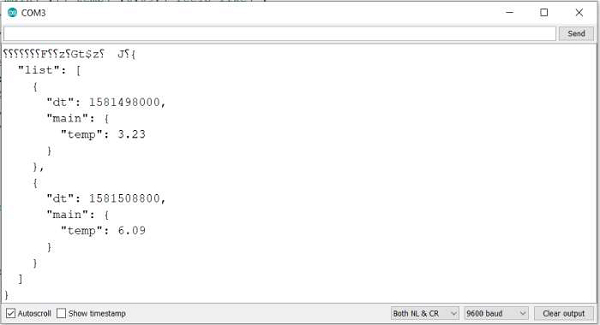
如你所見,輸出中僅存在你指定的鍵。因此,使用過濾功能將非常大的 JSON 減少到較小的 JSON。這節省了空間並降低了複雜性。
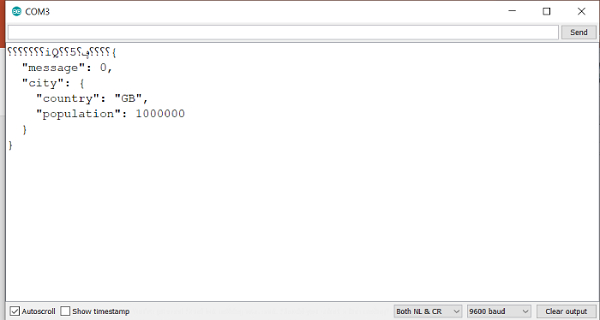
再舉一個例子,如果你想保留“message”鍵以及來自“city”鍵的“country”和“population”鍵,你的過濾器 JSON 將如下所示:
StaticJsonDocument<200> filter;
filter["message"] = true;
filter["city"]["country"] = true;
filter["city"]["population"] = true;
序列埠監視器輸出將如下所示:

更新於: 2021年7月26日
733 次瀏覽

廣告