
 資料結構
資料結構 網路
網路 關係資料庫管理系統
 作業系統
作業系統 Java
Java MS Excel
 iOS
iOS HTML
HTML CSS
CSS Android
 Python
 C 語言程式設計
 C++
C++ C#
C# MongoDB
 MySQL
MySQL Javascript
 PHP
PHP 物理
物理 化學
化學 生物
生物 數學
數學 英語
英語 經濟學
經濟學 心理學
心理學 社會學
社會學 時尚研究
時尚研究 法律研究
法律研究在 Django 中新增 DeleteView
DeleteView 是 Django 中的一個檢視,用於從前端刪除任何模型資料。它是一個內建檢視,可以輕鬆應用。它在刪除檢視方面就像管理員頁面一樣。在實際專案中非常有用。
首先,建立一個 Django 專案和一個應用。我建立的專案名為 "tutorial11",應用名為 "modelFormsDemo"。
現在,讓我們做一些基本的事情。在 settings.py 中新增應用 -
INSTALLED_APPS+ = ['modelFormsDemo']
在專案的 urls.py 中 -
from django.contrib import admin
from django.urls import path,include

urlpatterns = [
   path('admin/', admin.site.urls),
   path('', include('modelFormsDemo.urls'))
]
這裡我們包含了應用的 url。
在應用的 urls.py 中 -
from django.urls import path,include
from . import views

urlpatterns = [
   path('', views.home,name="home"),
   path('student/delete//', views.StudentDeleteView.
as_view(),name="delete"),
   path('success/',views.success,name='success')
]
這裡我們建立了 3 個 URL:一個用於渲染前端,DeleteView 用於刪除,Success 用於刪除後重定向。
示例
在 models.py 中,新增以下內容 -
from django.db import models

# Create your models here.
class Student(models.Model):
   name=models.CharField(max_length=100)
   standard=models.CharField(max_length=100)
   section=models.CharField(max_length=100)
這裡我們建立了一個簡單的模型。
在 views.py 中,新增以下內容 -
from django.shortcuts import render
from .forms import StudentForm
from django.views.generic.edit import DeleteView
from .models import Student
from django.urls import reverse_lazy

# Create your views here.
def home(request):
   if request.method=='POST':
      form=StudentForm(request.POST)
      if form.is_valid():
         form.save()
   stuForm=StudentForm()
   return render(request,'home.html',{"stu_form":stuForm})
class StudentDeleteView(DeleteView):
   model=Student
   template_name='delete_view.html'
   success_url=reverse_lazy("success")
這裡,在 home 檢視中,我們渲染了前端,在 DeleteView 中,我們渲染了 delete_view.html,它將提示確認刪除。
在應用目錄中建立 forms.py 並編寫以下內容 -
from django import forms
from .models import Student

class StudentForm(forms.ModelForm):
   class Meta:
      model=Student
      fields=['name', 'standard', 'section']
這裡我們建立了簡單的表單,我們將在 home 檢視中渲染它。
現在建立一個 templates 資料夾,並在其中新增三個檔案 home.html、delete_view.html 和 success.html。
在 home.html 中 -
<!DOCTYPE html>
<html>
   <head>
      <title>TUT</title>
   </head>
   <body>
      {% for fm in stu_form %}
      <form method="post">
         {%csrf_token%}
         {{fm.errors}}<br>
         {{fm.label}}:{{fm}}<br>
      {%endfor%}
         <button type="submit">Submit</button>
      </form>
   </body>
</html>
在 delete_view.html 中 -
<!DOCTYPE html>
<html>
   <head>
      <title>TUT</title>
   </head>
   <body>
      <form method="post">{% csrf_token %}
         <p>Are you sure you want to delete "{{ object }}"?</p>
         <input type="submit" value="Confirm">
      </form>
   </body>
</html>
在 success.html 中 -
<!DOCTYPE html>
<html>
   <head>
      <title>TUT</title>
   </head>
   <body>
      <h2>Success</h2>
   </body>
</html>
所有這三個都是我們正在渲染的 HTML 檔案。home.html 用於新增學生,delete_view.html 用於刪除學生,success.html 用於重定向。
現在您可以繼續檢查輸出。
輸出
Home.html -

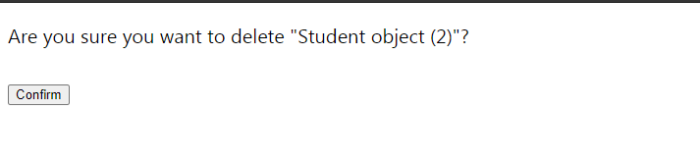
如果您訪問 http://127.0.0.1:8000/student/delete/(學生物件ID)/,那麼您將看到我們的 delete_view.html。
Delete_view.html -

2K+ 瀏覽量
