
 資料結構
資料結構 網路
網路 關係型資料庫管理系統 (RDBMS)
 作業系統
作業系統 Java
Java MS Excel
 iOS
iOS HTML
HTML CSS
CSS Android
 Python
 C 程式設計
 C++
C++ C#
C# MongoDB
 MySQL
MySQL Javascript
 PHP
PHP 物理學
物理學 化學
化學 生物學
生物學 數學
數學 英語
英語 經濟學
經濟學 心理學
心理學 社會學
社會學 服裝設計
服裝設計 法律研究
法律研究Django 中的 Google 身份驗證
在許多開發者網站上,我們都能看到 Google 社交身份驗證,這非常方便。在本文中,我們將瞭解如何建立一個 Django Google 登入專案。
首先,訪問 https://console.cloud.google.com/apis/dashboard並建立一個專案。
轉到 OAuth 同意螢幕並建立一個螢幕,然後儲存並繼續。
轉到憑據,點選“建立憑據”,然後點選“OAuth 客戶端 ID”。
然後,選擇 Web 應用程式,並新增以下兩個 URL:
- http://127.0.0.1:8000/
- http://127.0.0.1:8000/accounts/github/login/callback/
現在,您將獲得一個客戶端 ID 和一個金鑰,請將它們安全地儲存在您的檔案中。
示例
建立一個 Django 專案和一個應用程式。
在 **settings.py** 中:
SITE_ID = 1
LOGIN_REDIRECT_URL = "/"

INSTALLED_APPS = [
   'django.contrib.admin',
   'django.contrib.auth',
   'django.contrib.contenttypes',
   'django.contrib.sessions',
   'django.contrib.messages',
   'django.contrib.staticfiles',
   "django.contrib.sites", # <--
   "allauth", # <--
   "allauth.account", # <--
   "allauth.socialaccount", # <--
   "allauth.socialaccount.providers.google",
   "googleauthentication" #this is my app name ,you can name your app anything you want
]
SOCIALACCOUNT_PROVIDERS = {
   'google': {
      'SCOPE': [
         'profile',
         'email',
      ],
      'AUTH_PARAMS': {
         'access_type': 'online',
      }
   }
}

#add this in the end of file
AUTHENTICATION_BACKENDS = (
   "django.contrib.auth.backends.ModelBackend",
   "allauth.account.auth_backends.AuthenticationBackend",
)
在這裡,我們定義了一個重定向 URL。在 INSTALLED_APPS 中,我們定義了我們將用於身份驗證的重要後端。然後,我們定義了社交賬戶提供商,它將告訴我們應該使用什麼進行登入(這裡我們使用 Google)。我們還定義了它應該儲存使用者的哪些資料。
現在,在專案的 **urls.py** 中,新增以下內容:
from django.contrib import admin
from django.urls import path,include

urlpatterns = [
   path('admin/', admin.site.urls),
   path("accounts/", include("allauth.urls")), #most important
   path('',include("googleauthentication.urls")) #my app urls
]
在這裡,我們添加了需要新增的預設路徑;它是 allauth 庫路徑,用於啟用 Google 登入。第二個是我們建立的應用程式路徑。
在應用程式的 **urls.py** 中:
from django.urls import path
from . import views
urlpatterns = [
   path('',views.home),
]
在這裡,我們設定了我們的 **urls** 並將我們的檢視渲染到主頁 url 上。
在 **views.py** 中:
from django.shortcuts import render

# Create your views here.
def home(request):
   return render(request,'home.html')
我們只是在這裡渲染了前端。
在應用程式的主目錄中建立一個 **templates** 資料夾,並新增一個名為 **home.html** 的檔案,內容如下:
<!DOCTYPE html>
<html>
   <head>
      <title>Google Registration</title>
   </head>
   <body>
      {% load socialaccount %}
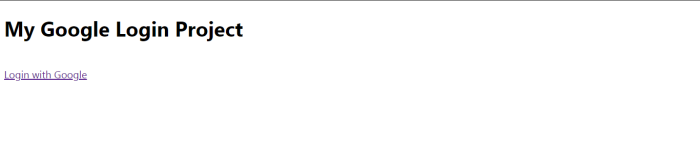
      <h1>My Google Login Project</h1>
      <a href="{% provider_login_url 'google'%}?next=/">Login with Google</a>
   </body>
</html>
在這裡,我們渲染了 JS 並載入了 **allauth** 庫到前端。在 **<a>** 中,我們提供了 Google 登入頁面,在該頁面上我們設定了我們的預設 Google 登入頁面。
現在,在終端上執行以下命令:
python manage.py makemigrations
python manage.py migrate
接下來,建立一個 **超級使用者**。
python manage.py createsuperuser
然後,啟動伺服器並轉到管理面板。轉到站點並新增一個具有 url 名稱和顯示名稱的站點:http://127.0.0.1:8000
轉到社交應用程式並新增應用程式。選擇您之前新增的站點:
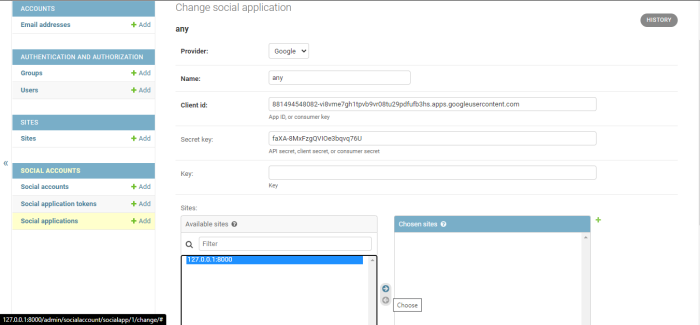
這將在您的 Django 專案中註冊 Google 作為身份驗證後端。一切設定就緒,現在您可以繼續檢查輸出。
輸出

2K+ 閱讀量
