
 資料結構
資料結構 網路
網路 關係型資料庫管理系統
 作業系統
作業系統 Java
Java MS Excel
 iOS
iOS HTML
HTML CSS
CSS Android
 Python
 C 程式設計
 C++
C++ C#
C# MongoDB
 MySQL
MySQL Javascript
 PHP
PHP 物理學
物理學 化學
化學 生物學
生物學 數學
數學 英語
英語 經濟學
經濟學 心理學
心理學 社會學
社會學 服裝設計
服裝設計 法律研究
法律研究有哪些不同的標籤用於定義 HTML 頁面中的特殊元資訊?
元資料是指關於資料的資訊。HTML 中的 <meta> 標籤提供了關於 HTML 文件的完整資訊。
在製作網頁或網站時新增元標籤是一個好習慣,因為搜尋引擎使用此元標籤來了解有關網站的資訊。在搜尋特定網站時,它也有幫助,搜尋結果頁面將顯示在搜尋結果中。這些標籤基本上用於新增作者姓名、鍵值對來描述 HTML 文件的屬性,例如過期日期、作者姓名等,即用於指定字元集、頁面描述和視口設定。
此標籤的屬性承載了與網頁相關的所有資訊。
我們可以根據資訊包含一個或多個元標籤,它不會影響網頁文件的物理外觀。
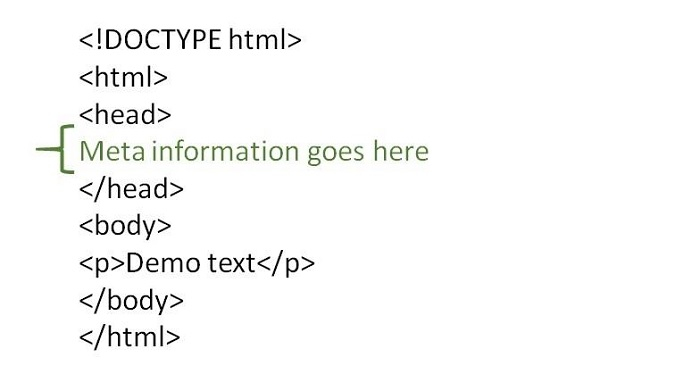
<meta> 標籤接受四個屬性。
name - 用於定義屬性的名稱。
http-equiv - 用於獲取 HTTP 響應訊息頭。
content - 用於指定屬性值。
charset - 用於指定 HTML 檔案的字元編碼。
<meta> 標籤的內容在瀏覽器中不可見。它們只是為了提供有關 HTML 文件的其他資訊而新增的。
<meta> 標籤被新增到我們的 HTML 文件中是為了進行搜尋引擎最佳化。
<meta> 標籤新增到 <head> 內。
語法
以下是 HTML 中元標籤的語法。
<meta attribute-name="value">
示例 1
以下是一些新增元資訊和使用 <meta> 標籤的不同方法,例如:
關鍵字 - 與屬性對應的值定義了搜尋引擎的關鍵字。
<meta name="keywords" content="HTML, CSS, JavaScript">
字元集 - 與屬性對應的值定義了字元集 - HTML 文件的字元編碼。
<meta charset="UTF-8">
以下是 HTML 中元標籤的示例,新增關鍵字和字元集的元資訊。
<!DOCTYPE html>
<html>
<head>
   <meta charset="UTF-8">
   <meta name="keywords" content="meta tag">
</head>
<body>
   <p>In this example we have added two meta tags. For</p>
   <ol>
      <li>character_set</li>
      <li>keyword</li>
   </ol>
   <p>Meta tag contents are not visible on your browser.They are just added to give additional information about the HTML document. The mata tag is added inside the head tag</p>
</body>
</html>
以下是上述示例程式的輸出。
示例 2
以下是一些新增元資訊和使用 <meta> 標籤的不同方法,例如:
作者 - 使用以下語法新增網頁的 作者。
<meta name="author" content="Amit">
描述 - 使用以下語法定義網頁的 描述。
<meta name="description" content="Learn from Text and Video Tutorials">
以下是 HTML 中元標籤的示例。
<!DOCTYPE html>
<html>
<head>
   <meta name="description" content="meta tag in HTML">
   <meta name="author" content="lokesh">
</head>
<body>
   <p>In this example we have added two meta tags. For</p>
   <ol>
      <li>description</li>
      <li>author name</li>
   </ol>
   <p>Meta tag contents are not visible on your browser. They are just added to give additional information about the HTML document. The mata tag is added inside the head tag</p>
</body>
</html>
以下是上述示例程式的輸出。
示例 3
以下是 HTML 中元標籤的語法。
重新整理 - 與屬性對應的值定義了重新整理 - 每隔指定時間(以秒為單位)重新整理文件。
<meta http-equiv="refresh" content="30">
視口 - 與屬性對應的值定義了視口 - 佈局根據裝置的大小和功能進行更改。
<meta name="viewport" content="width=device-width, initial-scale=1.0">
以下是 HTML 中元標籤的示例。
<!DOCTYPE html>
<html>
<head>
   <meta http-equiv="refresh" content="30">
   <meta name="viewport" content="width=device-width, initial-scale=1.0">
</head>
<body>
   <p>In this example we have added two meta tags. For</p>
   <ol>
      <li>refresh - for refreshing the page </li>
      <li>viewport - layout changes based on the size and capabilities of the device </li>
   </ol>
   <p>Meta tag contents are not visible on your browser. They are just added to give additional information about the HTML document. The mata tag is added inside the head tag</p>
</body>
</html>
以下是上述示例程式的輸出。
我們可以根據資訊包含一個或多個元標籤,它不會影響網頁文件的物理外觀。
示例 4
以下是一些新增元資訊和使用 <meta> 標籤的不同方法,例如:
作者 - 使用以下語法新增網頁的 作者。
<meta name="author" content="Amit">
描述 - 使用以下語法定義網頁的 描述。
<meta name="description" content="Learn from Text and Video Tutorials">
關鍵字 - 使用以下語法向網頁新增 關鍵字。
<meta name="keyword" content="Java, WordPress, Drupal, Android, iOS">
設定視口 - 視口用於控制移動瀏覽器上的佈局。它用於 <meta> 標籤內部,以便向瀏覽器提供有關如何控制網頁尺寸和縮放的指令。
<meta name="viewport" content="width=device-width, initial-scale=1.0">
以下是 HTML 中元標籤的示例。
<!DOCTYPE html>
<html>
<head>
   <meta charset="UTF-8">
   <meta name="description" content="meta tag in the web document">
   <meta name="keywords" content="HTML,CSS">
   <meta name="author" content="lokesh">
   <meta name="viewport" content="width=device-width, initial-scale=1.0">
</head>
<body>
   <p>Meta tag contents are not visible on your browser. They are just added to give additional information about the HTML document. </p>
</body>
</html>
以下是上述示例程式的輸出。

364 次檢視
