
 資料結構
資料結構 網路
網路 關係資料庫管理系統 (RDBMS)
 作業系統
作業系統 Java
Java MS Excel
 iOS
iOS HTML
HTML CSS
CSS Android
 Python
 C語言程式設計
 C++
C++ C#
C# MongoDB
 MySQL
MySQL Javascript
 PHP
PHP 物理學
物理學 化學
化學 生物學
生物學 數學
數學 英語
英語 經濟學
經濟學 心理學
心理學 社會學
社會學 時尚研究
時尚研究 法律研究
法律研究Java中GridBagConstraints類的重要性是什麼?
GridBagLayout是一個非常靈活的佈局管理器,它允許我們使用約束來設定元件之間的相對位置。每個GridBagLayout使用一個動態的矩形單元格網格,每個元件佔據一個或多個單元格,稱為其顯示區域。由GridBagLayout管理的每個元件都與一個GridBagConstraints例項相關聯,該例項指定元件在其顯示區域內的佈局方式。
GridBagConstraints
我們可以透過設定一個或多個公共例項變數來自定義GridBagConstraints物件。這些變數指定元件的位置、大小、增長因子、錨點、內邊距、填充和間距。
- gridx:一個整數值,指定元件佔據的最左單元格。gridx指定元件將放置的列。
- gridy:一個整數值,指定元件佔據的最上單元格。gridy指定元件將放置的行。
- gridheight:一個整數值,指定元件佔據的垂直單元格數。
- gridwidth:一個整數值,指定元件佔據的水平單元格數。
- ipadx:一個整數值,指定要新增到每個控制元件的內部水平填充量。
- ipady:一個整數值,指定要新增到每個控制元件的內部垂直填充量。
- insets:一個Insets物件,指定要在單元格每一側留出的空空間量。
- weightx:一個雙精度值,指定如果生成的佈局在水平方向上小於分配的區域,則如何分配額外的水平空間。
- weighty:一個雙精度值,指定如果生成的佈局在垂直方向上小於分配的區域,則如何分配額外的垂直空間。
- anchor:一個整數值,指定元件在單元格內的對齊方式。
- fill:一個整數值,指定如何處理單元格中的額外空間。
- RELATIVE:對於gridx和gridy欄位,此欄位指定元件將放置在最後新增的元件旁邊。對於gridwidth和gridheight欄位,此欄位指定元件將是行或列中倒數第二個元件。
- REMAINDER:對於gridwidth和gridheight欄位,此欄位指定元件是行或列中的最後一個元件。
示例
import java.awt.*;
import javax.swing.*;
public class GridBagLayoutTest {
   public static void main(String[] a) {
      JFrame frame = new JFrame("GridBagLayout Test");
      Container myPane = frame.getContentPane();
      myPane.setLayout(new GridBagLayout());
      GridBagConstraints c = new GridBagConstraints();
      setMyConstraints(c,0,0,GridBagConstraints.CENTER);
      myPane.add(getFieldPanel(),c);
      setMyConstraints(c,0,1,GridBagConstraints.CENTER);
      myPane.add(getButtonPanel(),c);
      frame.setDefaultCloseOperation(JFrame.EXIT_ON_CLOSE);
      frame.setSize(300, 250);
      frame.setLocationRelativeTo(null);
      frame.setVisible(true);
   }
   private static JPanel getFieldPanel() {
      JPanel p = new JPanel(new GridBagLayout());
      p.setBorder(BorderFactory.createTitledBorder("Details"));
      GridBagConstraints c = new GridBagConstraints();
      setMyConstraints(c,0,0,GridBagConstraints.EAST);
      p.add(new JLabel("Name:"),c);
      setMyConstraints(c,1,0,GridBagConstraints.WEST);
      p.add(new JTextField(16),c);
      setMyConstraints(c,0,1,GridBagConstraints.EAST);
      p.add(new JLabel("System:"),c);
      setMyConstraints(c,1,1,GridBagConstraints.WEST);
      p.add(getSystemPanel(),c);
      setMyConstraints(c,0,2,GridBagConstraints.EAST);
      p.add(new JLabel("Language:"),c);
      setMyConstraints(c,1,2,GridBagConstraints.WEST);
      p.add(getLanguagePanel(),c);
      setMyConstraints(c,0,3,GridBagConstraints.EAST);
      p.add(new JLabel("Year:"),c);
      setMyConstraints(c,1,3,GridBagConstraints.WEST);
      p.add(new JComboBox(new String[] {"2019","2020","2021"}),c);
      return p;
   }
   private static JPanel getButtonPanel() {
      JPanel p = new JPanel(new GridBagLayout());
      p.add(new JButton("OK"));
      p.add(new JButton("Cancel"));
      return p;
   }
   private static JPanel getSystemPanel() {
      JRadioButton winButton = new JRadioButton("Windows",true);
      JRadioButton macButton = new JRadioButton("Mac",false);
      ButtonGroup systemGroup = new ButtonGroup();
      systemGroup.add(winButton);
      systemGroup.add(macButton);
      JPanel p = new JPanel(new GridBagLayout());
      p.add(winButton);
      p.add(macButton);
      return p;
   }
   private static JPanel getLanguagePanel() {
     JPanel p = new JPanel(new GridBagLayout());
      p.add(new JCheckBox("Java",true));
      p.add(new JCheckBox("Python",true));
      p.add(new JCheckBox("Spark",false));
      return p;
   }
   private static void setMyConstraints(GridBagConstraints c, int gridx, int gridy, int anchor) {
      c.gridx = gridx;
      c.gridy = gridy;
      c.anchor = anchor;
   }
}
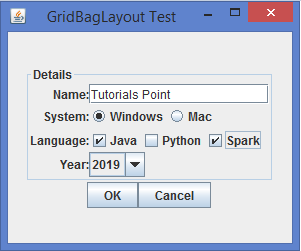
輸出

更新於:2020年2月7日
2K+ 瀏覽量

廣告