
 資料結構
資料結構 網路
網路 RDBMS
RDBMS 作業系統
作業系統 Java
Java MS Excel
 iOS
iOS HTML
HTML CSS
CSS Android
 Python
 C 程式設計
 C++
C++ C#
C# MongoDB
 MySQL
MySQL Javascript
 PHP
PHP 物理
物理 化學
化學 生物
生物 數學
數學 英語
英語 經濟學
經濟學 心理學
心理學 社會研究
社會研究 時尚研究
時尚研究 法律研究
法律研究Cucumber 中的 Example 關鍵字是什麼?
藉助關鍵字 Examples,我們可以執行資料驅動測試。我們還可以藉助關鍵字 Scenario Outline 在多個值上執行相同的 Scenario。
需要考慮的資料集將按一個接一個的 | 符號分隔放入 Examples 部分下方。因此,如果有三行,我們將從單個場景執行三個測試用例。
此外,Given 步驟還有 <> 分隔符。它指向 Examples 表格的標題。在將步驟與步驟定義匹配之前,SpecFlow 將值放入此表中。
要驗證登入模組,需要執行以下步驟 -
- 使用者鍵入使用者名稱和密碼。
- 驗證使用者應能夠登入。
我們將把上述步驟合併到 Feature File 中。
特徵檔案
特性:使用者憑據
場景概要:登入模組
如果使用者鍵入 <username> 和 <password>
然後使用者應該能夠登入
示例
| 使用者名稱 | 密碼 |
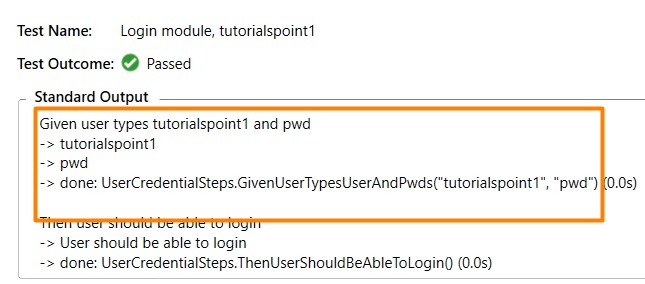
| tutorialspoint1 | 密碼 |
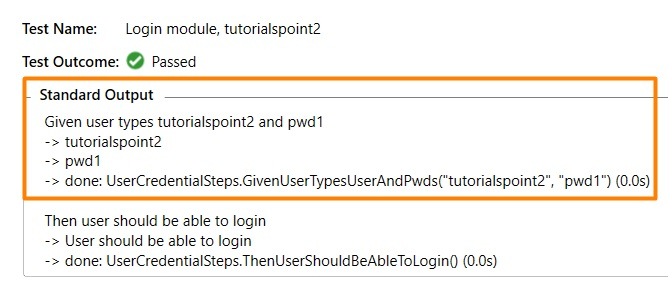
| tutorialspoint2 | 密碼1 |
示例
步驟定義檔案
using System;
using TechTalk.SpecFlow;
namespace SpecFlowProject1.Features {
   [Binding]
   public class UserCredentialSteps    {
      //regular expression used to point to data
      [Given(@"user types (.*) and (.*)")]
      public void GivenUserTypesUserAndPwds(string username, string password) {
         Console.WriteLine(username);
         Console.WriteLine(password);
      }
      [Then(@"user should be able to login")]
      public void ThenUserShouldBeAbleToLogin() {
         Console.WriteLine("User should be able to login");
      }
   }
}
輸出

更新日期: 18-11-2021
5K+ 瀏覽次數

廣告