
 資料結構
資料結構 網路
網路 關係資料庫管理系統
 作業系統
作業系統 Java
Java MS Excel
 iOS
iOS HTML
HTML CSS
CSS Android
 Python
 C 語言程式設計
 C++
C++ C#
C# MongoDB
 MySQL
MySQL Javascript
 PHP
PHP 物理學
物理學 化學
化學 生物學
生物學 數學
數學 英語
英語 經濟學
經濟學 心理學
心理學 社會學
社會學 服裝設計
服裝設計 法律學
法律學什麼是深複製?用 Java 的例子解釋一下。
在記憶體中建立現有物件的精確副本稱為克隆。
類 java.lang.Object 的 clone() 方法接受一個物件作為引數,建立並返回它的副本(克隆)。
為了使用此方法,您需要確保您的類實現了 Cloneable 介面。
示例
import java.util.Scanner;
public class CloneExample implements Cloneable {
   private String name;
   private int age;
   public CloneExample(String name, int age){
      this.name = name;
      this.age = age;
   }
   public void displayData(){
      System.out.println("Name : "+this.name);
      System.out.println("Age : "+this.age);
   }
   public static void main(String[] args) throws CloneNotSupportedException {
      Scanner sc =new Scanner(System.in);
      System.out.println("Enter your name ");
      String name = sc.next();
      System.out.println("Enter your age ");
      int age = sc.nextInt();
      CloneExample std = new CloneExample(name, age);
      System.out.println("Contents of the original object");
      std.displayData();
      System.out.println("Contents of the copied object");
      CloneExample copiedStd = (CloneExample) std.clone();
      copiedStd.displayData();
   }
}
輸出
Enter your name
Krishna
Enter your age
20
Contents of the original object
Name : Krishna
Age : 20
Contents of the copied object
Name : Krishna
Age : 20
淺複製
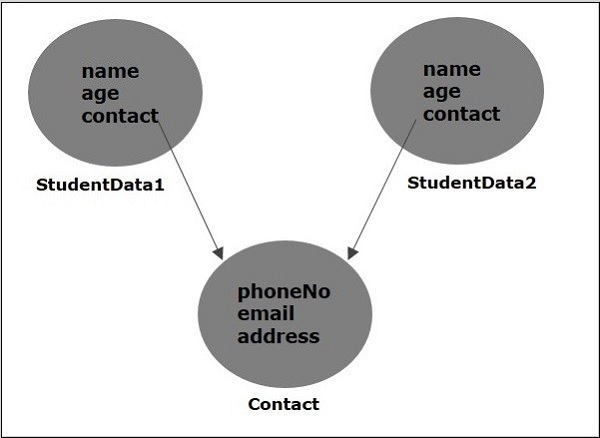
每當您嘗試使用淺複製建立物件的副本時,原始物件的全部欄位都會被精確複製。但是,如果它包含任何物件作為欄位,則只複製對這些物件的引用,而不是完整的物件。
這意味著,如果您對包含任何物件作為欄位的物件執行淺複製,由於淺複製中只複製了引用,因此原始物件和複製物件在內部指向相同的引用,並且,如果您使用複製物件對資料進行任何更改,它們也會反映在原始物件中。
注意 - 預設情況下,clone() 方法執行淺複製。
深複製
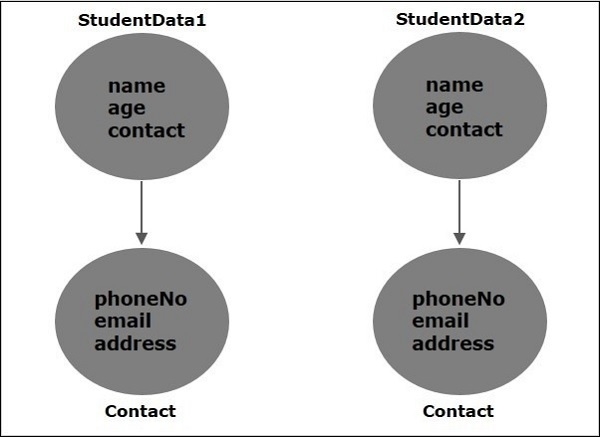
每當您嘗試建立物件的副本時,在深複製中,原始物件的全部欄位都會被精確複製,此外,如果它包含任何物件作為欄位,則也會建立這些物件的副本(使用 clone() 方法)。
這意味著,如果您對包含引用(物件)的物件執行深複製,則原始物件和複製物件引用不同的物件,並且,如果您對複製物件的資料進行任何更改,則不會反映在原始物件中。
執行欄位複製
覆蓋 clone 方法,並在其中使用 clone() 方法複製引用欄位,如下所示:
protected Object clone() throws CloneNotSupportedException{
   StudentData student = (StudentData) super.clone();
   student.contact = (Contact) contact.clone();
   return student;
}
示例
在下面的示例中,StudentData 類包含一個字串變數(name),一個整數變數(age)和一個物件(Contact)。
在 main 方法中,我們正在建立 StudentData 類的物件並複製它。從複製的物件中,我們正在更改所用引用的資料(欄位值)(Contact 物件)。然後,我們首先列印複製物件的資料,然後列印原始物件的資料。
由於我們進行了深複製(透過覆蓋 clone() 方法),您可以觀察到所做的更改不會反映在原始物件中。
import java.util.Scanner;
class Contact implements Cloneable{
   private long phoneNo;
   private String email;
   private String address;
   public void setPhoneNo(long phoneNo) {
      this.phoneNo = phoneNo;
   }
   public void setEmail(String email) {
      this.email = email;
   }
   public void setAddress(String address) {
      this.address = address;
   }
   Contact(long phoneNo, String email, String address ){
      this.phoneNo = phoneNo;
      this.email = email;
      this.address = address;
   }
   public void displayContact() {
      System.out.println("Phone no: "+this.phoneNo);
      System.out.println("Email: "+this.email);
      System.out.println("Address: "+this.address);
   }
   protected Object clone() throws CloneNotSupportedException{
      return super.clone();
   }
}
public class StudentData implements Cloneable {
   private String name;
   private int age;
   private Contact contact;
   public StudentData(String name, int age, Contact contact){
      this.name = name;
      this.age = age;
      this.contact = contact;
   }
   public void displayData(){
      System.out.println("Name : "+this.name);
      System.out.println("Age : "+this.age);
      contact.displayContact();
   }
   protected Object clone() throws CloneNotSupportedException{
      StudentData student = (StudentData) super.clone();
      student.contact = (Contact) contact.clone();
      return student;
   }
   public static void main(String[] args) throws CloneNotSupportedException {
      Scanner sc =new Scanner(System.in);
      System.out.println("Enter your name ");
      String name = sc.next();
      System.out.println("Enter your age ");
      int age = sc.nextInt();
      System.out.println("#############Contact details#############");
      System.out.println("Enter your phone number: ");
      long phoneNo = sc.nextLong();
      System.out.println("Enter your Email ID: ");
      String email = sc.next();
      System.out.println("Enter your address: ");
      String address = sc.next();
      System.out.println(" ");
      //Creating an object of the class
      StudentData std = new StudentData(name, age, new Contact(phoneNo, email, address));
      //Creating a clone of the above object
      StudentData copiedStd = (StudentData) std.clone();
      //Modifying the data of the contact object
      copiedStd.contact.setPhoneNo(000000000);
      copiedStd.contact.setEmail("XXXXXXXXXX");
      copiedStd.contact.setAddress("XXXXXXXXXX");
      System.out.println("Contents of the copied object::");
      copiedStd.displayData();
      System.out.println(" ");
      System.out.println("Contents of the original object::");
      std.displayData();
   }
}
輸出
Enter your name
Krishna
Enter your age
20
#############Contact details#############
Enter your phone number:
9848022338
Enter your Email ID:
krishna_example@gmail.com
Enter your address:
Hyderabad

Contents of the copied object::
Name : Krishna
Age : 20
Phone no: 0
Email: XXXXXXXXXX
Address: XXXXXXXXXX

Contents of the original object::
Name : Krishna
Age : 20
Phone no: 9848022338
Email: krishna_example@gmail.com
Address: Hyderabad

更新於:2019-07-30
6K+ 瀏覽量

廣告