
 資料結構
資料結構 網路
網路 RDBMS
RDBMS 作業系統
作業系統 Java
Java MS Excel
 iOS
iOS HTML
HTML CSS
CSS Android
 Python
 C 程式設計
 C++
C++ C#
C# MongoDB
 MySQL
MySQL JavaScript
 PHP
PHP 物理
物理 化學
化學 生物
生物 數學
數學 英語
英語 經濟
經濟 心理學
心理學 社會學
社會學 時尚
時尚 法律
法律Tkinter Menu 中的“tearoff”屬性有什麼作用?
使用 Tkinter.Menu,我們可以建立選單和子選單。此外,還有一些其他屬性可與 Tkinter 選單一起使用。
Tearoff 屬性使得視窗中的選單可以撕掉。tearoff 屬性接受一個布林值以將選單從主視窗或父視窗中分離出來。使用 tearoff 屬性,我們有兩種選擇,
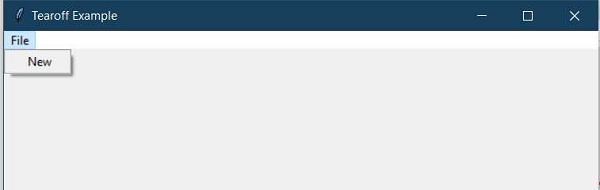
如果 tearoff=0,則使選單貼上到視窗。
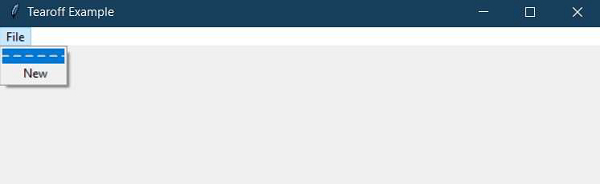
如果 tearoff=1,則在選單上顯示一個“----”空虛線,我們可以透過它將選單從視窗中分離出來。
示例
#Importing the tkinter library
from tkinter import *
win= Tk()
win.title("Tearoff Example")
win.geometry("600x500")

#Define a Function for Menu Selection Event
def mytext():
   lab= Label(win,text= "You have made a selection", font=('Helvetica',20)).pack(pady=20)

#Create a Menubar
menu_bar = Menu(win)

#Make the menus non-tearable
file_menu = Menu(menu_bar, tearoff=0)

#Tearable Menu
#file_menu= Menu(menu_bar, tearoff=1)
file_menu.add_command(label="New",command=mytext)
# all file menu-items will be added here next
menu_bar.add_cascade(label='File', menu=file_menu)
win.config(menu=menu_bar)

mainloop()
輸出
執行以上程式碼段將生成輸出,並顯示一個帶選單的視窗。
因此,對於不可撕開和可以撕開的選單(tearoff=0 和 tearoff=1),輸出如下 −

更新於: 06-03-2021
773 次瀏覽

廣告