
 資料結構
資料結構 網路
網路 RDBMS
RDBMS 作業系統
作業系統 Java
Java MS Excel
 iOS
iOS HTML
HTML CSS
CSS Android
 Python
 C 程式設計
 C++
C++ C#
C# MongoDB
 MySQL
MySQL Javascript
 PHP
PHP 物理
物理 化學
化學 生物
生物 數學
數學 英語
英語 經濟
經濟 心理學
心理學 社會學
社會學 時尚研究
時尚研究 法律研究
法律研究用 C# 按行讀取文字檔案有哪些比較快的方式?
按行讀取文字檔案的方法有很多。其中包括 StreamReader.ReadLine、File.ReadLines 等。我們考慮本地計算機中有一文字檔案,其中包含如下行。
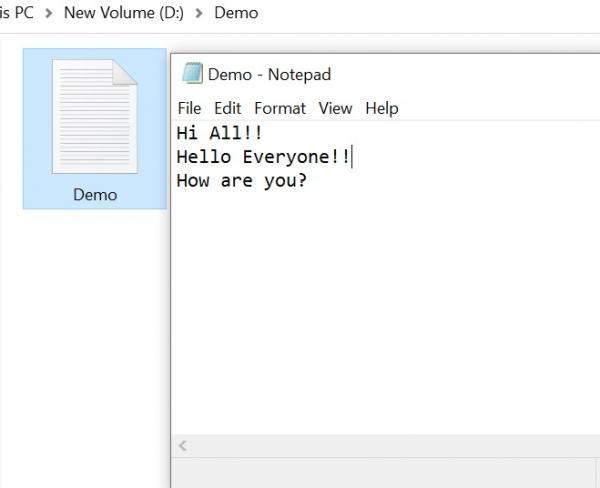
使用 StreamReader.ReadLine -
C# StreamReader 用於讀取流中的字元,採用指定編碼。StreamReader.Read 方法從輸入流中讀取下一個字元或下一組字元。StreamReader 從 TextReader 繼承,後者提供讀取字元、塊、行或所有內容的方法。
示例
using System;
using System.IO;
using System.Text;
namespace DemoApplication{
   public class Program{
      static void Main(string[] args){
         using (var fileStream = File.OpenRead(@"D:\Demo\Demo.txt"))
         using (var streamReader = new StreamReader(fileStream, Encoding.UTF8)){
            String line;
            while ((line = streamReader.ReadLine()) != null){
               Console.WriteLine(line);
            }
         }
         Console.ReadLine();
      }
   }
}
輸出
Hi All!!
Hello Everyone!!
How are you?
使用 File.ReadLines
File.ReadAllLines() 方法開啟一個文字檔案,將該檔案的所有行都讀入到一個 IEnumerable<string>,然後關閉該檔案。
示例
using System;
using System.IO;
namespace DemoApplication{
   public class Program{
      static void Main(string[] args){
         var lines = File.ReadLines(@"D:\Demo\Demo.txt");
         foreach (var line in lines){
            Console.WriteLine(line);
         }
         Console.ReadLine();
      }
   }
}
輸出
Hi All!!
Hello Everyone!!
How are you?
使用 File.ReadAllLines
這與 ReadLines 非常相似。但是,它返回 String[] 而不是 IEnumerable<String>,以便我們能夠隨機訪問行。
示例
using System;
using System.IO;
namespace DemoApplication{
   public class Program{
      static void Main(string[] args){
         var lines = File.ReadAllLines(@"D:\Demo\Demo.txt");
         for (var i = 0; i < lines.Length; i += 1){
            var line = lines[i];
            Console.WriteLine(line);
         }
         Console.ReadLine();
      }
   }
}
輸出
Hi All!!
Hello Everyone!!
How are you?

更新於: 2020-09-24
2 千 次以上觀看

廣告