
 資料結構
資料結構 網路
網路 關係資料庫管理系統
 作業系統
作業系統 Java
Java MS Excel
 iOS
iOS HTML
HTML CSS
CSS Android
 Python
 C 語言程式設計
 C++
C++ C#
C# MongoDB
 MySQL
MySQL Javascript
 PHP
PHP 物理學
物理學 化學
化學 生物學
生物學 數學
數學 英語
英語 經濟學
經濟學 心理學
心理學 社會學
社會學 時尚研究
時尚研究 法律研究
法律研究Laravel 中的命名路由是什麼?
在 Laravel 中,路由定義在 routes/ 資料夾內。專案中所需的所有路由都定義在 routes/web.php 中。
示例 1
定義路由的一個簡單示例如下所示:
Route::get('/', function () {
   return view('welcome');
});
所以現在當你訪問頁面https://:8000/時,你將被重定向到 view(‘welcome’)。
命名路由是指帶有名稱的路由。為定義的路由指定一個名稱,然後可以在使用者想要執行重定向時使用該名稱。
示例 2
這是一個命名路由的示例
使用函式
Route::get('test/student', function() {
   //
})->name('student_test');
使用控制器
Route::get('test/student', [StudentController::class, 'test'] )->name('student_test');
輸出
在上面的示例中,路由 test/student 被賦予了一個名為 student_test 的名稱。當你檢查輸出時,它將如下所示
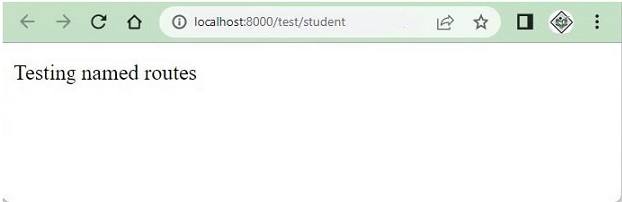
示例 3
當你列出路由時,name 列將為命名路由顯示一個名稱。
命令:PHP artisan route: list
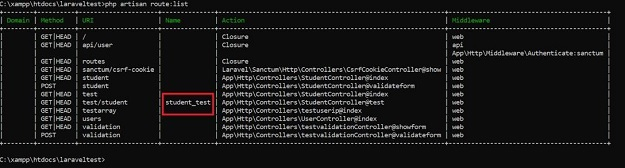
test/student 的名稱將被顯示。
示例 4
獲取命名路由的 URL。
在這個示例中,我們將看到如何使用路由名稱獲取 URL。
Route::get('test/student', function() {
   $url=route('student_test');
   return $url;
})->name('student_test');
輸出
當你訪問 URL:http://127.0.0.1:8000/test/student 時,它將給出如下所示的輸出
http://127.0.0.1:8000/test/student
示例 5
命名路由中的引數。
在這個示例中,我們將看到如何訪問傳遞給命名路由的引數。
Route::get('test/{studentid}/student', function($studentid) {
   $url=route('student_test',['studentid'=>1]);
   return $url;
})->name('student_test');
輸出
當你訪問 URL:http://127.0.0.1:8000/test/1/student 時的輸出如下
http://127.0.0.1:8000/test/1/student

更新於: 2022-08-30
3K+ 次瀏覽

廣告