
 資料結構
資料結構 網路
網路 RDBMS
RDBMS 作業系統
作業系統 Java
Java MS Excel
 iOS
iOS HTML
HTML CSS
CSS Android
 Python
 C語言程式設計
 C++
C++ C#
C# MongoDB
 MySQL
MySQL Javascript
 PHP
PHP 物理學
物理學 化學
化學 生物學
生物學 數學
數學 英語
英語 經濟學
經濟學 心理學
心理學 社會學
社會學 時尚研究
時尚研究 法律研究
法律研究Linux五大最佳文字編輯器
文字編輯器是一種用於修改簡單文字記錄的程式。這類軟體通常被稱為“記事本”應用程式,以微軟記事本為參照。本文介紹了“Linux五大最佳文字編輯器”。
Vi編輯器
Vim是一個預先設定的文字編輯器,向上相容Vi。它可以用來編輯各種純文字內容。對於編輯程式來說,它非常有用。
要開啟Vi編輯器,請使用以下命令:
$vi
示例輸出應如下所示:
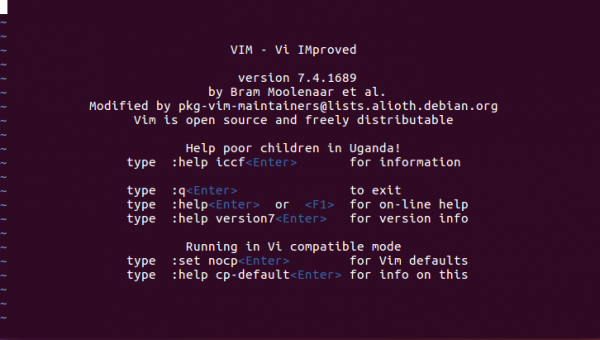
要獲取有關Vi編輯器的更多資訊,請使用以下命令:
$ vi --help
示例輸出應如下所示:
VIM - Vi IMproved 7.4 (2013 Aug 10, compiled Nov 24 2016 16:44:48)

usage: vim [arguments] [file ..] edit specified file(s)
or: vim [arguments] - read text from stdin
or: vim [arguments] -t tag edit file where tag is defined

Arguments:
--               Only file names after this
-v               Vi mode (like "vi")
-e               Ex mode (like "ex")
-E               Improved Ex mode
-s               Silent (batch) mode (only for "ex")
-y               Easy mode (like "evim", modeless)
-R               Readonly mode (like "view")
-Z               Restricted mode (like "rvim")
-m               Modifications (writing files) not allowed
-M               Modifications in text not allowed
-b               Binary mode
-C               Compatible with Vi: 'compatible'
-N               Not fully Vi compatible: 'nocompatible'
-V[N][fname]     Be verbose [level N] [log messages to fname]
-n               No swap file, use memory only
-r               List swap files and exit
-r (with file name)Recover crashed session
-LSame as -r
-T    Set terminal type to
--not-a-termSkip warning for input/output not being a terminal
-u             Use instead of any .vimrc
--nopluginDon't load plugin scripts
-p[N]         Open N tab pages (default: one for each file)
-o[N]         Open N windows (default: one for each file)
-O[N]         Like -o but split vertically
+             Start at end of file
+             Start at line
--cmd Execute before loading any vimrc file
-c Execute after loading the first file
-S Source file after loading the first file
-s Read Normal mode commands from file
-w Append all typed commands to file
-W Write all typed commands to file
-h or --helpPrint Help (this message) and exit
--versionPrint version information and exit
Nano編輯器
Nano是一個小型、免費且友好的編輯器,旨在替代percent,percent是包含在非免費Pine軟體包中的預設編輯器。除了複製percent的外觀和感覺之外,nano還實現了Pico編輯器中缺少的一些功能。
要開啟nano編輯器,請使用以下命令:
$ nano
示例輸出應如下所示:
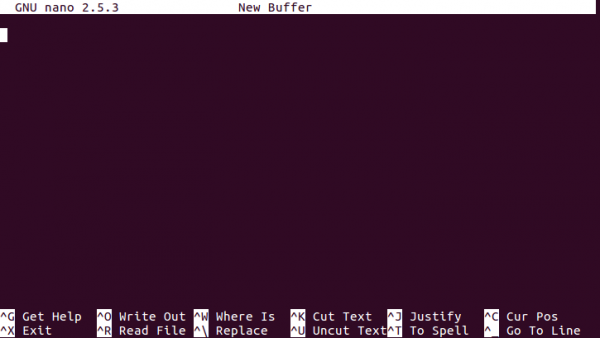
Sublime Text編輯器
Sublime Text是一款用於程式碼、標記和散文的全球文字編輯器。您會喜歡其流暢的使用者介面、出色的功能和強大的效能。
要安裝Sublime Text編輯器,請使用以下命令:
$ sudo add-apt-repository ppa:webupd8team/sublime-text-3
$ sudo apt-get update
$ sudo apt-get install sublime-text-installer
要開啟Sublime Text編輯器,請使用以下命令:
$ subl
示例輸出應如下所示:

要了解更多關於Sublime Text編輯器的資訊,請閱讀本文:
Gedit文字編輯器
Gedit是GNOME桌面環境的預設文字編輯器,也是GNOME核心功能的一部分。Gedit被設計為一個常規的文字編輯器,它強調簡單易用,具有簡潔易懂的GUI,與GNOME專案的理念一致。它包含用於修改原始碼和結構化文字(如標記語言)的工具。要安裝Gedit編輯器,需要啟用支援的儲存庫,如下所示:
$ sudo add-apt-repository ppa:ricotz/staging

$ sudo add-apt-repository ppa:gnome3-team/gnome3

$ sudo add-apt-repository ppa:gnome3-team/gnome3-staging

$ sudo add-apt-repository ppa:ricotz/testing

$ sudo apt-get update

$ sudo apt-get install gedit
要開啟Gedit文字編輯器,請使用以下命令:
$ gedit
示例輸出應如下所示:
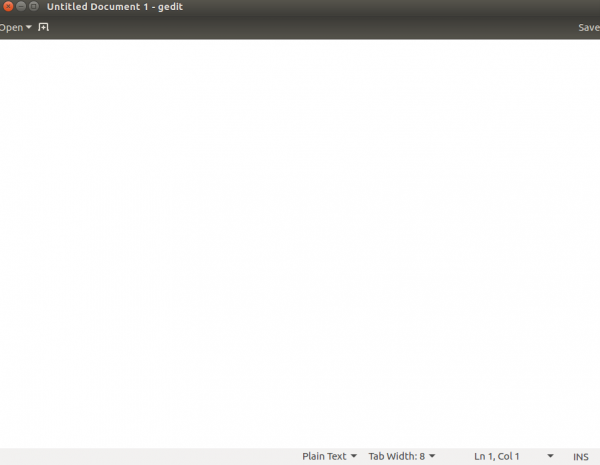
Etherpad Lite文字編輯器
Etherpad是一個基於Web的開原始檔編輯器,允許您即時協作編輯檔案。使用Etherpad,多個使用者可以編輯一個文字檔案。
要安裝Etherpad Lite文字編輯器,需要Node.js。要安裝Node.js,請閱讀以下文章:
在Linux上安裝Node.js
要安裝Etherpad Lite,請使用以下命令:
$ sudo apt-get install gzip curl python libssl-dev pkg-config build-essential git

$ git clone http://github.com/ether/etherpad-lite.git

$ cd etherpad-lite/bin

/etherpad-lite/bin$ ./run.sh
要訪問Etherpad Lite,請使用以下URL:
https://:9001/
示例輸出應如下所示:

透過本文,您將能夠理解“Linux五大最佳文字編輯器”。在我們的後續文章中,我們將提供更多基於Linux的技巧和竅門。敬請關注!

1K+瀏覽量
