
 資料結構
資料結構 網路
網路 關係資料庫管理系統
 作業系統
作業系統 Java
Java MS Excel
 iOS
iOS HTML
HTML CSS
CSS Android
 Python
 C 程式設計
 C++
C++ C#
C# MongoDB
 MySQL
MySQL Javascript
 PHP
PHP 物理
物理 化學
化學 生物
生物 數學
數學 英語
英語 經濟學
經濟學 心理學
心理學 社會研究
社會研究 時尚研究
時尚研究 法律研究
法律研究Arduino 中的字串比較
用於比較整數的運算子,如 <、>、>=、<=、==、!=,也可用於比較字串。請注意,字串比較區分大小寫,且依賴於字元的 ASCII 順序。因此,根據 ASCII 表,“A”排在“a”前面。因此“a”>“A”。
舉例
來看一下以下示例。
void setup() {
   Serial.begin(9600);
   Serial.println();
   String s1 = "Hello";
   String s2 = "hello";
   String s3 = "100";
   String s4 = "90";
   if (s1 > s2) {
      Serial.println("s1 is greater than s2");
   } else if(s2 > s1) {
      Serial.println("s2 is greater than s1");
   }
   if (s3 > s4) {
      Serial.println("s3 is greater than s4");
   } else if(s4 > s3) {
      Serial.println("s4 is greater than s3");
   }
}
void loop() {
}
輸出
序列監視器輸出如下所示 −
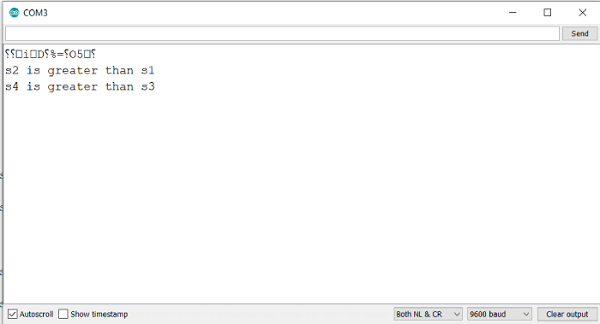
如您所見,s2 大於 s1,因為在 ASCII 系統中,“h”的十進位制等效值比“H”高。同樣,s4 大於 s3,因為在 ASCII 系統中,“9”位於“1”之後。
它還表明比較逐個字元進行。一個字串的第一個字元與另一個字串的第一個字元比較,以此類推。雖然整數 90 小於整數 100,但字串“90”大於字串“100”。

更新於: 24-Jul-2021
415 次瀏覽

廣告