
 資料結構
資料結構 網路
網路 RDBMS
RDBMS 作業系統
作業系統 Java
Java MS Excel
 iOS
iOS HTML
HTML CSS
CSS Android
 Python
 C 程式設計
 C++
C++ C#
C# MongoDB
 MySQL
MySQL Javascript
 PHP
PHP 物理學
物理學 化學
化學 生物學
生物學 數學
數學 英語
英語 經濟學
經濟學 心理學
心理學 社會學
社會學 服裝設計
服裝設計 法律研究
法律研究使用 CSS 關鍵字設定字型大小
CSS 的 font-size 屬性可以使用絕對和相對關鍵字來設定。這可以根據需要縮放文字。
語法
CSS font-size 屬性的語法如下:
Selector {
   font-size: /*value*/
}
下表列出了 CSS 中使用的標準關鍵字:
| 序號 | 值和描述 |
|---|---|
| 1 | medium 將字型大小設定為中等大小。這是預設值 |
| 2 | xx-small 將字型大小設定為 xx-small 大小 |
| 3 | x-small 將字型大小設定為 extra small 大小 |
| 4 | small 將字型大小設定為小號大小 |
| 5 | large 將字型大小設定為大號大小 |
| 6 | x-large 將字型大小設定為 extra-large 大小 |
| 7 | xx-large 將字型大小設定為 xx-large 大小 |
| 8 | smaller 將字型大小設定為小於父元素的大小 |
| 9 | larger 將字型大小設定為大於父元素的大小 |
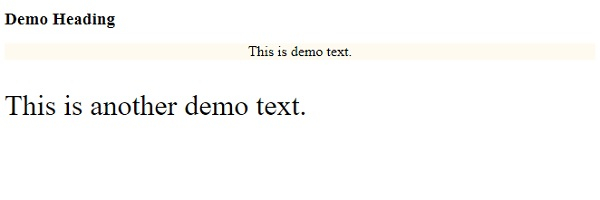
以下示例說明了如何使用關鍵字設定 CSS font-size 屬性。
示例
<!DOCTYPE html>
<html>
<head>
<style>
h1{
   font-size: larger;
}
#demo {
   font-size: medium;
   text-align: center;
   background-color: floralwhite;
}
p {
   font-size: xx-large;
}
</style>
</head>
<body>
<h1>Demo Heading</h1>
<p id="demo">This is demo text.</p>
<p>This is another demo text.</p>
</body>
</html>
輸出
這將產生以下輸出:
示例
<!DOCTYPE html>
<html>
<head>
<style>
div {
   margin: auto;
   padding: 5px;
   width: 30%;
   border: 1px solid;
   border-radius: 29%;
   text-align: center;
   font-size: xx-small;
}
p {
   font-size: xx-large;
}
</style>
</head>
<body>
<div>
<div>One</div>
<p>Two</p>
</div>
</body>
</html>
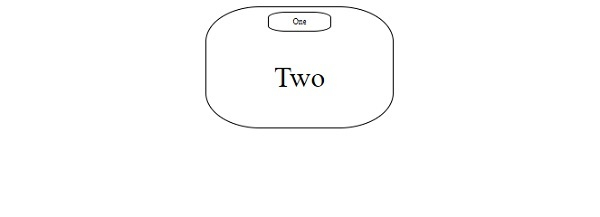
輸出
這將產生以下輸出:

更新於: 2020年1月9日
211 次檢視

廣告