
 資料結構
資料結構 網路
網路 關係型資料庫管理系統
 作業系統
作業系統 Java
Java MS Excel
 iOS
iOS HTML
HTML CSS
CSS Android
 Python
 C 程式設計
 C++
C++ C#
C# MongoDB
 MySQL
MySQL Javascript
 PHP
PHP 物理學
物理學 化學
化學 生物學
生物學 數學
數學 英語
英語 經濟學
經濟學 心理學
心理學 社會學
社會學 時尚研究
時尚研究 法律研究
法律研究Selenium CSS 選擇器示例
我們可以使用定位器 CSS 選擇器在 Selenium webdriver 中定位元素。建立 CSS 表示式的通用表示式為 tagname[attribute='value']。我們可以利用 id 和 class 屬性來建立 CSS。
使用 id,CSS 表示式的語法為 tagname#id。例如,對於 CSS 表示式 - input#txt-loc,input 是標籤名,txt-loc 是 id 屬性的值。
使用類名,CSS 表示式的語法為 tagname.class。例如,對於 CSS 表示式 - input.txt-cls,input 是標籤名,txt-cls 是 class 屬性的值。
如果一個 webelement 元素(父元素)有 n 個子元素(子元素),並且我們想定位第 n 個子元素,CSS 表示式的語法為 nth-of –type(n)。
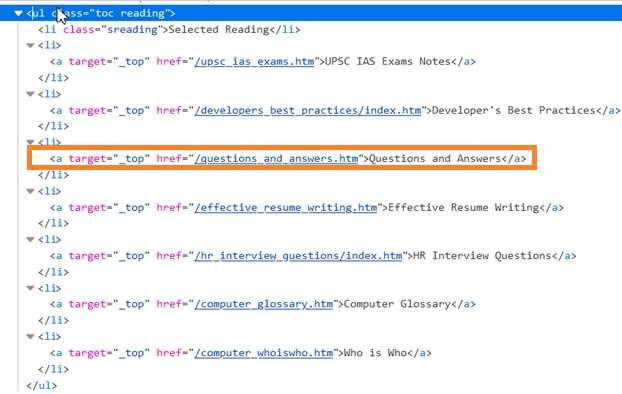
在上面的 html 中,如果我們想定位父元素 ul 的第四個 li,即具有文字“問答”的錨元素,則 CSS 應為 ul.reading li:nth-of-type(4)。類似地,要識別最後一個子元素,CSS 應為 ul.reading li:last-child。
對於具有動態值的屬性,我們可以使用符號 ^= 來識別屬性值以特定文字開頭的元素。例如,input[name^='qa1'] [此處 input 是標籤名,name 屬性的值以 qa1 開頭]。
對於具有動態值的屬性,我們可以使用符號 $= 來識別屬性值以特定文字結尾的元素。例如,input[class$='loc'] [此處 input 是標籤名,class 屬性的值以 loc 結尾]。
對於具有動態值的屬性,我們可以使用符號 *= 來識別屬性值包含特定子字串的元素。例如,input[name*='sub'] [此處 input 是標籤名,name 屬性的值包含子字串 sub]。
程式碼實現
import org.openqa.selenium.By;
import org.openqa.selenium.WebDriver;
import org.openqa.selenium.WebElement;
import org.openqa.selenium.firefox.FirefoxDriver;
import java.util.concurrent.TimeUnit;
public class CSSLocator{
   public static void main(String[] args) {
      System.setProperty("webdriver.gecko.driver",
      "C:\Users\ghs6kor\Desktop\Java\geckodriver.exe");
      WebDriver driver = new FirefoxDriver();
      //implicit wait
      driver.manage().timeouts().implicitlyWait(10, TimeUnit.SECONDS);
      //URL launch
      driver.get("https://www.linkedin.com/");
      //identify element
      WebElement m = driver.
      findElement(By.cssSelector("input[id='session_key']"));
      //enter text
      m.sendKeys("Java");
      String s = m.getAttribute("value");
      System.out.println("Attribute value: " + s);
      //close browser
      driver.close();
   }
}
輸出


720 次瀏覽
