
 資料結構
資料結構 網路
網路 RDBMS
RDBMS 作業系統
作業系統 Java
Java MS Excel
 iOS
iOS HTML
HTML CSS
CSS Android
 Python
 C 程式設計
 C++
C++ C#
C# MongoDB
 MySQL
MySQL Javascript
 PHP
PHP 物理學
物理學 化學
化學 生物學
生物學 數學
數學 英語
英語 經濟學
經濟學 心理學
心理學 社會學
社會學 時裝研究
時裝研究 法律研究
法律研究使用 jQuery 選中具有“data-”屬性的所有元素並在控制檯上顯示?
要選擇帶有“data-”屬性的所有元素,請使用 document.querySelectorAll(“”)。以下是程式碼 −
示例
<!DOCTYPE html>
<html lang="en">
<head>
<meta charset="UTF-8">
<meta name="viewport" content="width=device-width, initialscale=1.0">
<title>Document</title>
<link rel="stylesheet" href="//code.jquery.com/ui/1.12.1/themes/base/jquery-ui.css">
<script src="https://code.jquery.com/jquery-1.12.4.js"></script>
<script src="https://code.jquery.com/ui/1.12.1/jquery-ui.js"></script>
</head>
<body>
<p data-sentence="This is the program"></p>
<br/>
<h6 data-sentence="This is the test"></h6>
<script>
   var result=document.querySelectorAll('[data-sentence]');
   for (var index in result){
      if (result.hasOwnProperty(index)){
         console.log(result[index].getAttribute('data-sentence'));
      }
   }
</script>
</body>
</html>
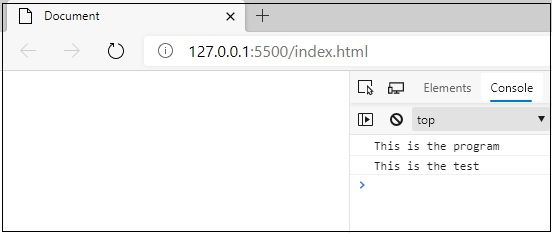
要執行以上程式,請儲存檔名為“anyName.html(index.html)”,然後右鍵單擊該檔案。在 VS Code 編輯器中選擇“使用 Live Server 開啟”。
輸出
這將產生以下輸出 −

更新於:07-Sep-2020
2K+ 瀏覽量

廣告