
 資料結構
資料結構 組網
組網 RDBMS
RDBMS 作業系統
作業系統 Java
Java MS Excel
 iOS
iOS HTML
HTML CSS
CSS Android
 Python
 C 程式設計
 C++
C++ C#
C# MongoDB
 MySQL
MySQL Javascript
 PHP
PHP 物理
物理 化學
化學 生物
生物 數學
數學 英語
英語 經濟學
經濟學 心理學
心理學 社會研究
社會研究 服裝研究
服裝研究 法學研究
法學研究ReactJS – shouldComponentUpdate() 方法
在本文中,我們來看看如何提高 React 應用的效能,使其僅在傳遞給它的道具發生變化或滿足某些條件時重新呈現元件。
此方法主要用於退出複雜的 React 生命週期,但大範圍使用它可能會導致應用程式中的錯誤。
語法
shouldComponentUpdate(nextProps, nextState)
預設情況下,此方法的返回值為 true;但如果它返回 false,則不會呼叫 render()、componentWillUpdate() 和 componentDidUpdate() 方法。
示例 1
在此示例中,我們將構建一個 React 應用,僅當傳遞給它們的道具發生變化時,才會重新呈現元件。
在以下示例中的第一個元件是 App。此元件是 MyComp 元件的父級。我們單獨建立 MyComp ,然後將其新增到 App 元件中的 JSX 樹中。只需匯出 App 元件。
App.jsx
import React from 'react';

class App extends React.Component {
   constructor() {
      super();
      this.state = { color: '#000' };
   }
   render() {
      return (
         <div>
            <h1 style={{ color: this.state.color }}>Tutorialspoint</h1>
            <button onClick={() => this.setState({ color: '#ff0000' })}>
               Change Color
            </button>
            <MyComp />
         </div>
      );
   }
}
class MyComp extends React.Component {
   shouldComponentUpdate(nextProps) {
      // Rendering the component only if
      // passed props value is changed
      if (nextProps.value !== this.props.value) {
         return true;
      } else {
         return false;
      }
   }
   render() {
      console.log('MyComp component is called');
      return (
         <div>
            <h1>Simply Easy Learning</h1>
         </div>
      );
   }
}
export default App;
輸出
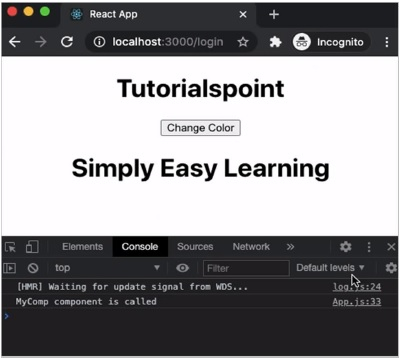
在上面示例中,MyComp 元件僅在接收的道具與之前的道具不同時才重新呈現。上面的程式碼將產生以下結果 -
示例 2
在下一個示例中,我們將不使用 shouldComponentUpdate() 方法執行相同的程式碼以檢視差異。
App.jsx
import React from 'react';

class App extends React.Component {
   constructor() {
      super();
      this.state = { color: '#000' };
   }
   render() {
      return (
         <div>
            <h1 style={{ color: this.state.color }}>Tutorialspoint</h1>
            <button onClick={() => this.setState({ color: '#ff0000' })}>
               Change Color
            </button>
            <MyComp />
         </div>
      );
   }
}
class MyComp extends React.Component {
   render() {
      console.log('MyComp component is called');
      return (
         <div>
            <h1>Simply Easy Learning</h1>
         </div>
      );
   }
}
export default App;
輸出
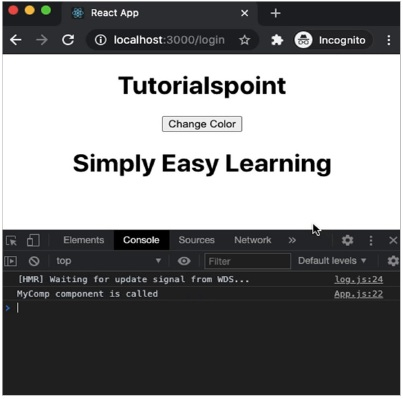
在這裡,MyComp 元件在每次父元件(即App 元件)重新呈現時都會重新呈現。上面的程式碼將產生以下結果 -

更新於:18-Mar-2021
2K+ 瀏覽

廣告