
 資料結構
資料結構 網路
網路 RDBMS
RDBMS 作業系統
作業系統 Java
Java MS Excel
 iOS
iOS HTML
HTML CSS
CSS Android
 Python
 C 程式設計
 C++
C++ C#
C# MongoDB
 MySQL
MySQL Javascript
 PHP
PHP 物理學
物理學 化學
化學 生物學
生物學 數學
數學 英語
英語 經濟學
經濟學 心理學
心理學 社會學
社會學 時尚研究
時尚研究 法律研究
法律研究在 iOS 中隱藏 UITextField 密碼
在 iOS 中隱藏 UITextField 密碼,可以使用 `secureTextEntry` 屬性。此屬性允許您透過顯示點或星號而不是實際字元來隱藏輸入到文字欄位中的文字。在大多數 iOS 應用程式中,我們都需要隱藏 UITextField 來實現密碼功能。此屬性易於使用。
`isSecureTextEntry` 屬性
`isSecureTextEntry` 是 iOS 中 UITextField 類的一個屬性,它決定是否應隱藏輸入到文字欄位中的文字,例如輸入密碼時。當 `isSecureTextEntry` 設定為 `true` 時,輸入到欄位中的文字將隱藏,通常透過顯示點或星號而不是實際字元來實現。
`isSecureTextEntry` 屬性是一個布林值,預設值為 `false`。要為 UITextField 啟用密碼隱藏,您可以將 `isSecureTextEntry` 設定為 `true`,可以透過程式設計方式或在 Interface Builder 中設定。
示例
以下是如何隱藏 UITextField 密碼的示例:
import UIKit
class TestController: UIViewController {

   override func viewDidLoad() {
      super.viewDidLoad()
      initialSetup()
   }

   private func initialSetup() {

      view.backgroundColor = .white

      let emailTextfield = UITextField()
      emailTextfield.keyboardType = .emailAddress
      emailTextfield.autocapitalizationType = .none
      emailTextfield.autocorrectionType = .no
      emailTextfield.layer.cornerRadius = 8
      emailTextfield.layer.borderColor = UIColor.lightGray.cgColor
      emailTextfield.layer.borderWidth = 1.0
      emailTextfield.placeholder = "Email Address"
      emailTextfield.textAlignment = .center

      let passwordTextfield = UITextField()
      passwordTextfield.keyboardType = .default
      passwordTextfield.autocapitalizationType = .none
      passwordTextfield.autocorrectionType = .no
      passwordTextfield.layer.cornerRadius = 8
      passwordTextfield.layer.borderColor = UIColor.lightGray.cgColor
      passwordTextfield.layer.borderWidth = 1.0
      passwordTextfield.placeholder = "Enter Password"
      passwordTextfield.textAlignment = .center
      passwordTextfield.isSecureTextEntry = true

      let stackView = UIStackView(arrangedSubviews: [emailTextfield, passwordTextfield])
      stackView.axis = .vertical
      stackView.alignment = .fill
      stackView.distribution = .fillEqually
      stackView.spacing = 10
      stackView.translatesAutoresizingMaskIntoConstraints = false
      view.addSubview(stackView)

      stackView.centerYAnchor.constraint(equalTo: view.centerYAnchor).isActive = true
      stackView.centerXAnchor.constraint(equalTo: view.centerXAnchor).isActive = true
      stackView.widthAnchor.constraint(equalToConstant: 300).isActive = true
      stackView.heightAnchor.constraint(equalToConstant: 100).isActive = true
   }
}
輸出
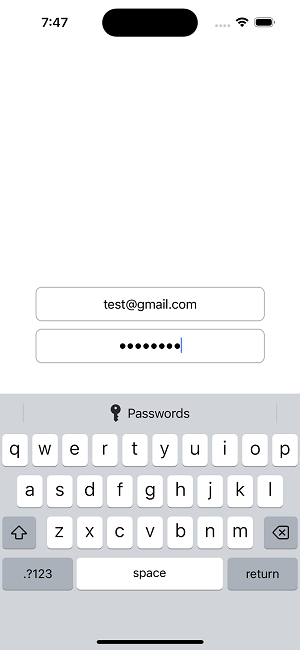
在此示例中,我們建立一個名為 `passwordTextfield` 的新 UITextField 物件。然後,我們將 `isSecureTextEntry` 屬性設定為 `true`,這將隱藏輸入到欄位中的文字。當用戶輸入字元時,文字欄位中將顯示點或星號而不是實際字元。
您也可以在 Interface Builder 中設定 `secureTextEntry` 屬性,方法是選擇文字欄位並在“屬性檢查器”中選中“安全文字輸入”複選框。
結論
iOS 中 UITextField 類的 `isSecureTextEntry` 屬性是一個布林值,它指定是否應隱藏輸入到文字欄位中的文字。這通常透過顯示點或星號而不是實際字元來實現。在輸入密碼或其他敏感資訊時,這可以幫助提高安全性。
必須記住,密碼隱藏並不能提供完全的保護。這是因為有決心的攻擊者如果訪問了裝置,仍然可能會檢視隱藏的資訊。因此,在管理敏感資訊時,採用其他安全預防措施(例如加密和安全儲存)至關重要。

671 次瀏覽
