
 資料結構
資料結構 網路
網路 關係資料庫管理系統 (RDBMS)
 作業系統
作業系統 Java
Java MS Excel
 iOS
iOS HTML
HTML CSS
CSS Android
 Python
 C語言程式設計
 C++
C++ C#
C# MongoDB
 MySQL
MySQL Javascript
 PHP
PHP 物理學
物理學 化學
化學 生物學
生物學 數學
數學 英語
英語 經濟學
經濟學 心理學
心理學 社會學
社會學 服裝學
服裝學 法學
法學JavaScript:如何允許使用者更改網頁的字型大小?
在本文中,我們將探討建立一個函式,該函式允許使用者更改整個網頁的字型大小。我們通常可以在一些政府網站的右上角看到此類功能。這主要是為了方便網站使用者根據需要放大網頁內容。
在本文中,我們將使用JavaScript和JQuery應用相同的函式。
示例 #1
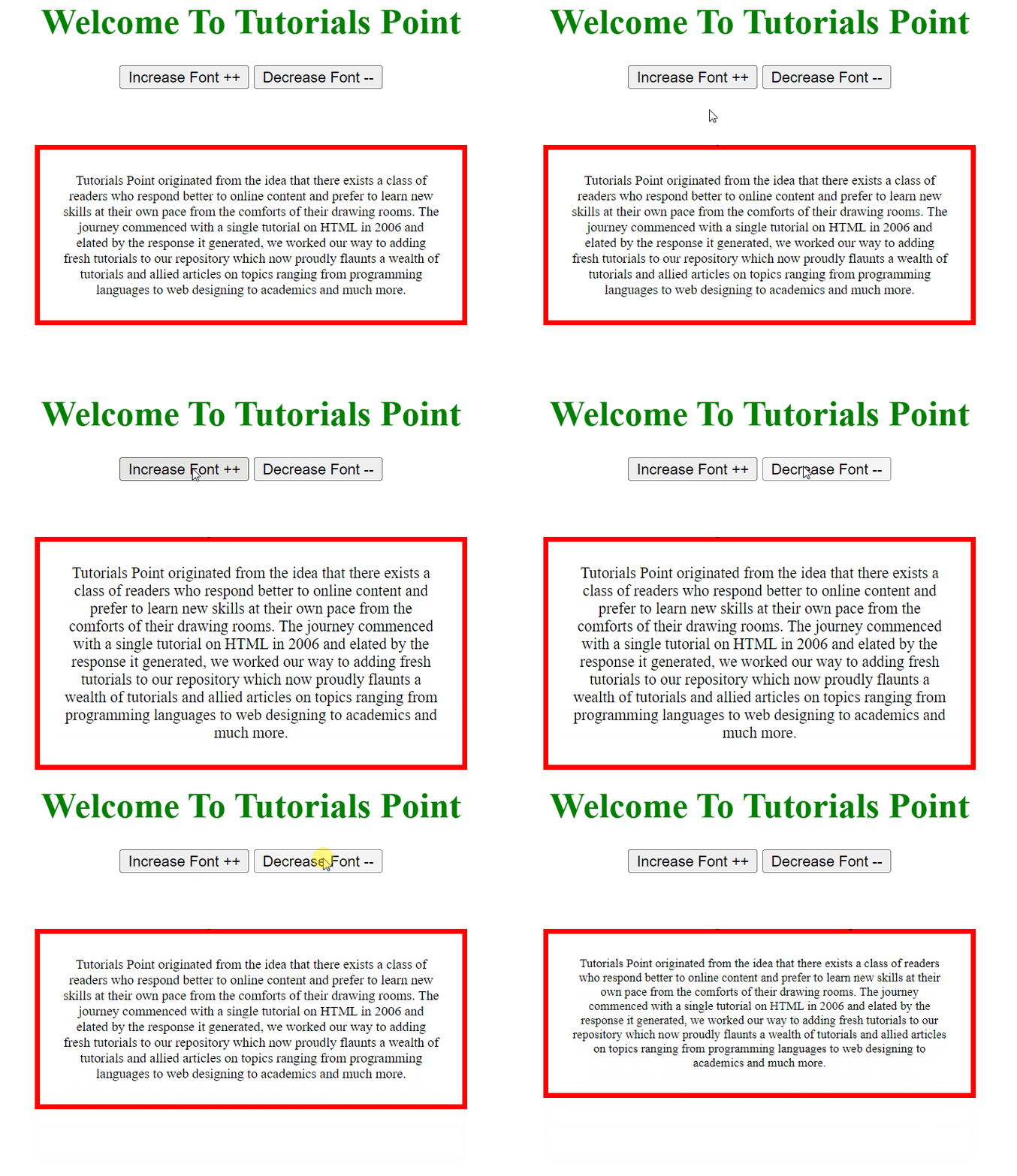
在下面的示例中,我們建立了一個簡單的div程式並建立了兩個按鈕,即“增大”和“減小”。我們使用這兩個函式來增大div的字型,並使用“減小”按鈕來減小div的字型。
#檔名:index.html
<!DOCTYPE html>
<html lang="en">
<head>
   <title>Change Font Size</title>
   <script src="https://ajax.googleapis.com/ajax/libs/jquery/1.4.2/jquery.min.js"></script>
</head>
<body>
   <center>
      <h1 style="color: green">
         Welcome To Tutorials Point
      </h1>
      <button type="button" value="increase" class="increaseFont">
         Increase Font ++
      </button>
      <button type="button" value="decrease" class="decreaseFont">
         Decrease Font --
      </button>
      <div style="padding: 20px; margin: 50px;
         font-size: 20px; border: 5px solid red;"
         id="container" class="data">
         Tutorials Point originated from the idea that there exists a class of readers who   respond better to online content and prefer to   learn new skills at their own pace from the   comforts of their drawing   rooms.
         The journey commenced with a single tutorial on HTML in 2006 and elated by the response it generated, we worked our way to adding fresh tutorials to our repository which now proudly flaunts a wealth of tutorials and allied articles on topics ranging from programming languages to web designing to academics and much more.
      </div>
   </center>
   <script type="text/javascript">
      $(document).ready(function(){
         $(".increaseFont,.decreaseFont").click(function(){
            var type= $(this).val();
            var curFontSize = $('.data').css('font-size');
            if(type=='increase'){
               $('.data').css('font-size', parseInt(curFontSize)+1);
            } else{
               $('.data').css('font-size', parseInt(curFontSize)-1);
            }
            // alert($('.data').css('font-size'));
         });
      });
   </script>
</body>
</html>
輸出
要增大字型大小,請單擊“增大字型 ++”按鈕;要減小字型大小,請單擊“減小字型 --”按鈕。

更新於:2022年4月25日
3K+ 次瀏覽

廣告