
 資料結構
資料結構 網路
網路 關係資料庫管理系統
 作業系統
作業系統 Java
Java MS Excel
 iOS
iOS HTML
HTML CSS
CSS Android
 Python
 C 程式設計
 C++
C++ C#
C# MongoDB
 MySQL
MySQL Javascript
 PHP
PHP 物理學
物理學 化學
化學 生物學
生物學 數學
數學 英語
英語 經濟學
經濟學 心理學
心理學 社會學
社會學 時尚研究
時尚研究 法律研究
法律研究我需要一個 HTML5 中的客戶端瀏覽器資料庫。我有哪些選擇?
我們在本文中要執行的任務是關於我需要一個 HTML5 中的客戶端瀏覽器資料庫,我有哪些選擇。在深入瞭解本文之前,讓我們先了解一下。
HTML5 引入了兩種類似於 HTTP 會話 cookie 的機制,用於在客戶端儲存結構化資料。這兩種儲存方式分別是會話儲存和本地儲存,它們將用於處理不同的情況。
您可以為此目的在 HTML5 中使用本地儲存。本地儲存旨在用於跨多個視窗的儲存,並且持續時間超過當前會話。
本地儲存
Web 儲存應用程式程式設計介面包括 HTML5 本地儲存的一部分。這是一種 Web 頁面用來在使用者的 Web 瀏覽器中本地儲存命名鍵/值對的技術。通常使用本地儲存在來自同一域的 HTML 頁面中儲存和檢索資料。
本地儲存使用 localStorage 物件永久儲存您整個網站的資料。
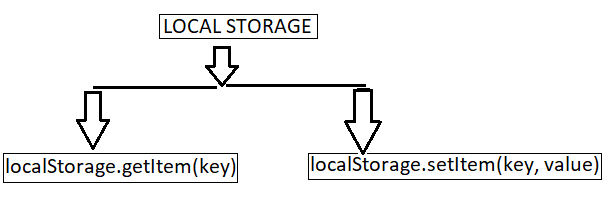
localStorage.setItem(key, value) 儲存與鍵關聯的資料。
localStorage.getItem(key) 檢索與鍵關聯的資料。
為了更好地理解本地儲存如何提供幫助,讓我們考慮以下示例。
示例 1:使用 HTML 本地儲存
在以下示例中,我們使用本地儲存在 Web 中儲存我們的資料,並且沒有過期時間。
<!DOCTYPE html>
<html>
<body>
   <input id="name" type="name" placeholder="enter your name" />
   <button type="submit" onClick="handleClick()">Click</button>
   <br />
   <div id="Varma"></div>
   <script>
      function handleClick() {
         if (typeof Storage !== "undefined") {
            let name = document.getElementById("name").value;
            localStorage.setItem("name", name);
            document.getElementById("Varma").innerHTML =
            "Welcome To Tutorialspoint" + " " + localStorage.name;
         }
         else {
            alert("Sorry! your browser doesn't support Web Storage");
         }
      }
   </script>
</body>
</html>
執行上述指令碼後,它將生成顯示輸入欄位和點選按鈕的輸出。當用戶在輸入欄位中輸入內容後點擊按鈕時,資料將儲存在本地儲存中,並且沒有驗證。
示例 2
考慮到以下示例,我們使用本地儲存在 Web 中儲存我們的資料,並且沒有過期時間。
<!DOCTYPE HTML>
<!DOCTYPE HTML>
<html>
<body>
   <script>
      if( localStorage.hits ){
         localStorage.hits = Number(localStorage.hits) +1;
      }
      else{
         localStorage.hits = 1;
      }
      document.write("Total Hits :" + localStorage.hits );
   </script>
   <p>Refresh the page to increase number of hits.</p>
   <p>Close the window and open it again and check the result.</p>
</body>
</html>
當指令碼執行時,它將生成一個包含總點選次數和提示的輸出。當用戶重新整理網頁時,點選次數會增加並存儲該值。

更新於: 2022-12-15
317 次瀏覽

廣告