
 資料結構
資料結構 網路
網路 RDBMS
RDBMS 作業系統
作業系統 Java
Java MS Excel
 iOS
iOS HTML
HTML CSS
CSS Android
 Python
 C 程式設計
 C++
C++ C#
C# MongoDB
 MySQL
MySQL Javascript
 PHP
PHP 物理
物理 化學
化學 生物
生物 數學
數學 英語
英語 經濟
經濟 心理學
心理學 社會科學
社會科學 時尚研究
時尚研究 法律研究
法律研究HTML5 語義
HTML5 語義指的是為 HTML 頁面提供意義的語義標籤。在 HTML5 中,標籤分為兩個類別——語義和非語義。HTML5 為 HTML 帶來了幾個新的語義標籤。
一些 HTML5 語義標籤如下 −
| 標籤 | 說明 |
|---|---|
| figure | 指定不同格式的影像。 |
| article | 指定一個獨立的自包含文章。 |
| nav | 指定一個用於導航連結的容器。 |
| aside | 為除主要內容(如側邊欄)之外的內容指定一個標籤。 |
| section | 表示文件中的一個章節。 |
| details | 為其他詳細資訊指定一個標籤。 |
| header | 指定一個用於章節或文件的標題。 |
| footer | 指定一個用於章節或文件的頁尾 |
| figcaption | 指定一個 HTML 文件中影像的小描述。 |
| main | 指定頁面的主要內容,且該內容應該是唯一的。 |
| summary | 指定 <details> 元素的標題。 |
| mark | 指定高亮文字。 |
讓我們看一個 HTML5 語義的例子 −
示例
<!DOCTYPE html>
<html>
<style>
   * {
      box-sizing: border-box;
   }
   body {
      color: #000;
      background-color: #8BC6EC;
      background-image: linear-gradient(135deg, #8BC6EC 0%, #9599E2 100%);
      text-align: center;
   }
   header {
      background-color: #000;
      padding: 20px;
      text-align: center;
      color: white;
   }
   nav {
      float: left;
      width: 20%;
      height: 200px;
      background: #282828;
      padding: 60px 10px;
   }
   nav ul {
      list-style-type: none;
      padding: 0;
   }
   nav ul li a {
      text-decoration: none;
      color: #fff;
   }
   article {
      float: left;
      padding: 80px 10px;
      width: 80%;
      background-color: #fff;
      height: 200px;
      text-align: center;
   }
   section:after {
      content: "";
      display: table;
      clear: both;
   }
   footer {
      background-color: #000;
      padding: 20px;
      text-align: center;
      color: white;
   }
</style>
<body>
<h1>HTML Semantics Demo</h1>
<header>This is Header</header>
<section>
<nav>
<ul>
<li><a href="#">Home</a></li>
<li><a href="#">About</a></li>
<li><a href="#">Contact</a></li>
</ul>
</nav>
<article>This is an article element.</article>
</section>
<footer>This is Footer</footer>
</body>
</html>
輸出
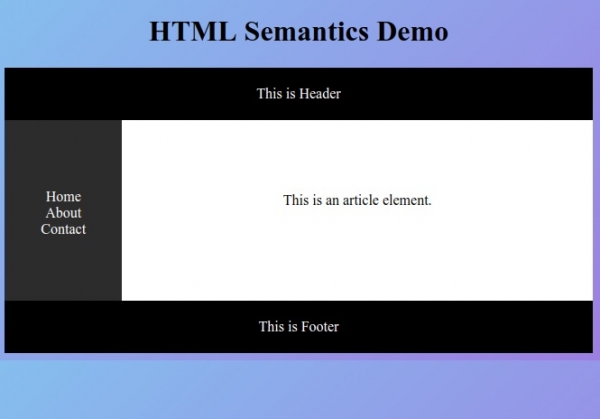

更新時間:01-Oct-2019
663 瀏覽量

廣告