
 資料結構
資料結構 網路
網路 關係資料庫管理系統 (RDBMS)
 作業系統
作業系統 Java
Java MS Excel
 iOS
iOS HTML
HTML CSS
CSS Android
 Python
 C語言程式設計
 C++
C++ C#
C# MongoDB
 MySQL
MySQL Javascript
 PHP
PHP 物理
物理 化學
化學 生物
生物 數學
數學 英語
英語 經濟學
經濟學 心理學
心理學 社會學
社會學 服裝設計
服裝設計 法學
法學你可能沒有用到的 HTML5 輸入型別
HTML5 輸入型別增強了使用者體驗,並最大限度地減少了對 JavaScript 驗證的需求。下面列出了一些很少使用但可以顯著改進網站表單的 HTML5 輸入型別。
HTML5 輸入型別值
| 輸入型別 | 用途 |
| <input type="tel"> | 在移動瀏覽器上顯示數字鍵盤,從而增強裝置上的使用者體驗。 |
| <input type="date"> | 可以從日曆中選擇任何特定日期,確保格式正確。 |
| <input type="month"> | 它最大限度地減少了輸入與月份/年份相關資料的複雜性。例如,設定信用卡的到期日期。 |
| <input type="file"> | 它可以直接將檔案的選取整合到表單中,並且可以指定可接受的檔案型別。 |
| <input type="hidden"> | 它可以用來傳遞機密資料、元資料等。 |
| <input type="datetime-local"> | 它允許更精確的輸入,包括日期和時間。 |
| <input type="week"> | 它可以用來安排和安排會議,以及跟蹤每週資料。 |
| <input type="email"> | 它在現代瀏覽器上提供基本的驗證,例如檢查“@”符號。 |
| <input type="range"> | 它提供了一種簡單直觀的方式來在一個指定範圍內輸入數字。 |
| <input type="url"> | 包含驗證以確保正確的 URL 結構,對連結很有用。 |
| <input type="password"> | 適用於密碼輸入,並確保輸入得到安全處理。 |
| <input type="time"> | 它提供時間選擇和驗證,並防止無效的時間格式。 |
| <input type="color"> | 它以視覺化的方式簡化了顏色值的輸入。 |
| <input type="search"> | 它包含針對搜尋進行了升級的特定樣式和行為(例如“清除按鈕”)。 |
| <input type="number"> | 它會自動驗證輸入是否為數字,並帶有最小值和最大值屬性。 |
輸入型別值的示例
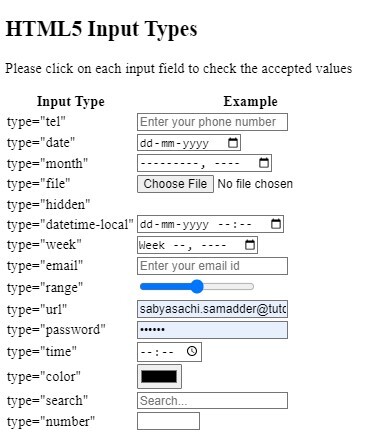
在這個例子中,我們將向您展示每種型別值的用法,您可以點選任何輸入欄位自行檢視輸出結果。
示例
<!DOCTYPE html>
<html>

<head>
    <title>HTML5 Input Types</title>
</head>

<body>
    <h2>HTML5 Input Types</h2>
    <p>Please click on each input field to check the accepted values</p>
    <table>
        <tr>
            <th>Input Type</th>
            <th>Example</th>
        </tr>
        <tr>
            <td>type="tel"</td>
            <td><input type="tel"
                       name="phone"
                       placeholder="Enter your phone number"></td>
        </tr>
        <tr>
            <td>type="date"</td>
            <td><input type="date"
                       name="birthday"></td>
        </tr>
        <tr>
            <td>type="month"</td>
            <td><input type="month"
                       name="expiration_date"></td>
        </tr>
        <tr>
            <td>type="file"</td>
            <td><input type="file"
                       name="curriculum vitae" accept=".pdf, .doc"></td>
        </tr>
        <tr>
            <td>type="hidden"</td>
            <td><input type="hidden"
                       name="customer_id" value="1234"></td>
        </tr>
        <tr>
            <td>type="datetime-local"</td>
            <td><input type="datetime-local" id="interview"
                       name="interview"></td>
        </tr>
        <tr>
            <td>type="week"</td>
            <td><input type="week"
                       name="schedule_week"></td>
        </tr>
        <tr>
            <td>type="email"</td>
            <td><input type="email"
                       name="email"
                       placeholder="Enter your email id"></td>
        </tr>
        <tr>
            <td>type="range"</td>
            <td><input type="range"
                       name="volume" min="1" max="100"></td>
        </tr>
        <tr>
            <td>type="url"</td>
            <td><input type="url"
                       name="website"
                       placeholder="Enter your website url"></td>
        </tr>
        <tr>
            <td>type="password"</td>
            <td><input type="password"
                       name="password"
                       placeholder="Enter your password"></td>
        </tr>
        <tr>
            <td>type="time"</td>
            <td><input type="time"
                       name="interview_time"></td>
        </tr>
        <tr>
            <td>type="color"</td>
            <td><input type="color"
                       name="favcolor"></td>
        </tr>
        <tr>
            <td>type="search"</td>
            <td><input type="search"
                       name="search"
                       placeholder="Search..."></td>
        </tr>
        <tr>
            <td>type="number"</td>
            <td><input type="number"
                       name="quantity" min="1" max="100"></td>
        </tr>
</body>

</html>
輸出

更新於:2024年9月26日
74 次瀏覽

廣告