
 資料結構
資料結構 網路
網路 RDBMS
RDBMS 作業系統
作業系統 Java
Java MS Excel
 iOS
iOS HTML
HTML CSS
CSS Android
 Python
 C 程式設計
 C++
C++ C#
C# MongoDB
 MySQL
MySQL Javascript
 PHP
PHP 物理
物理 化學
化學 生物
生物 數學
數學 英語
英語 經濟
經濟 心理學
心理學 社會學
社會學 時尚研究
時尚研究 法律研究
法律研究HTML DOM TableData headers 屬性
HTML DOM TableData headers 屬性可返回和修改 HTML 文件中表格的 headers 屬性值。
語法
以下為語法 −
1. 返回 headers
object.headers
2. 新增 colspan
object.headers = “headers_ids”
我們來看看 headers 屬性的示例 −
示例
<!DOCTYPE html>
<html>
<style>
   body {
      color: #000;
      background: lightblue;
      height: 100vh;
      text-align: center;
   }
   table {
      margin: 2rem auto;
      width: 400px;
   }
   .btn {
      background: #db133a;
      border: none;
      height: 2rem;
      border-radius: 2px;
      width: 40%;
      display: block;
      color: #fff;
      outline: none;
      cursor: pointer;
      margin: 1rem auto;
   }
   .show {
      font-size: 1.2rem;
   }
</style>
<body>
<h1>DOM TableData headers Property Demo</h1>
<table border="2">
<thead>
<tr>
<th>Name</th>
<th>Roll No.</th>
</tr>
<thead>
<tbody>
<tr>
<td headers="Name">John</td>
<td headers="Rollno">071717</td>
</tr>
<tr>
<td headers="Name: Jane" id="jane-data">Jane</td>
<td headers="Rollno">031717</td>
</tr>
</tbody>
</table>
<button onclick="get()" class="btn">Show Headers Value</button>
<div class="show"></div>
<script>
   function get() {
      document.querySelector(".show").innerHTML = document.querySelector('#jane-data').headers;
   }
</script>
</body>
</html>
輸出
將產生以下輸出
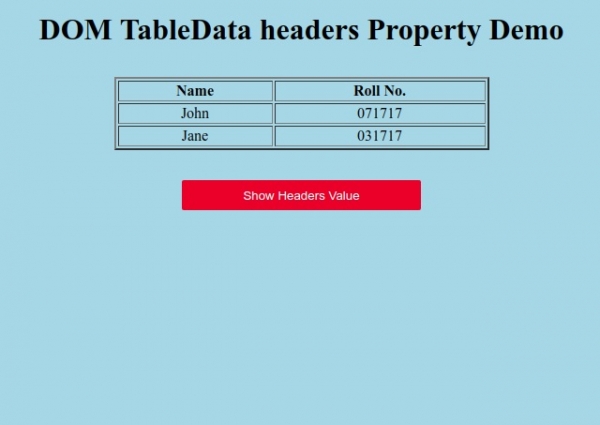
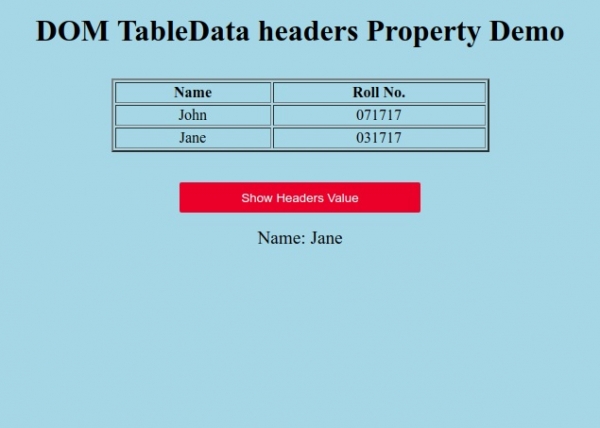
點選“顯示 headers 值”按鈕,可顯示 Jane 行的 headers 屬性值。

更新於: 20-6 月-2020
56 人瀏覽

廣告