
 資料結構
資料結構 網路
網路 RDBMS
RDBMS 作業系統
作業系統 Java
Java MS Excel
 iOS
iOS HTML
HTML CSS
CSS Android
 Python
 C 程式設計
 C++
C++ C#
C# MongoDB
 MySQL
MySQL Javascript
 PHP
PHP 物理學
物理學 化學
化學 生物學
生物學 數學
數學 英語
英語 經濟學
經濟學 心理學
心理學 社會學
社會學 時尚研究
時尚研究 法學研究
法學研究HTML DOM 輸入文字停用屬性
HTML DOM 輸入文字的 disabled 屬性用於設定或返回文字框是否應停用。它使用布林值,其中 true 表示元素應停用,否則為 false。disabled 屬性預設設定為 false。停用的元素被灰掉並且為不可點選狀態。
語法
以下為語法 −
設定 disabled 屬性 −
textObject.disabled = true|false;
這裡,true=文字框已停用,false=文字框未停用。它預設值為 false。
示例
讓我們看一個輸入文字 disabled 屬性的示例 −
<!DOCTYPE html>
<html>
<body>
<h1>Input Text disabled Property</h1>
USERNAME: <input type="text" id="TEXT1" autofocus>
<p>Disable the above text field by clicking on the DISABLE button</p>
<button type="button" onclick="disableText()">DISABLE</button>
<p id="Sample"></p>
<script>
   function disableText() {
      document.getElementById("TEXT1").disabled=true;
      document.getElementById("Sample").innerHTML = "The text field is now disabled" ;
   }
</script>
</body>
</html>
輸出
這將產生以下輸出 −
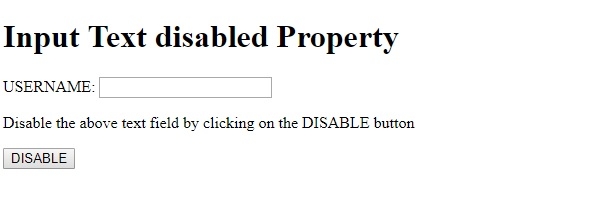
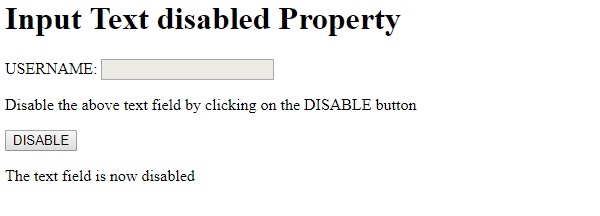
點選停用按鈕,文字框將被停用 −

更新於: 19-Feb-2021
204 次瀏覽

廣告