
 資料結構
資料結構 網路
網路 RDBMS
RDBMS 作業系統
作業系統 Java
Java MS Excel
 iOS
iOS HTML
HTML CSS
CSS Android
 Python
 C 程式設計
 C++
C++ C#
C# MongoDB
 MySQL
MySQL Javascript
 PHP
PHP 物理學
物理學 化學
化學 生物學
生物學 數學
數學 英語
英語 經濟學
經濟學 心理學
心理學 社會科學
社會科學 時裝研究
時裝研究 法律研究
法律研究HTML DOM 輸入表單 formEnctype 屬性
HTML DOM 提交 formEnctype 屬性用於設定或返回提交按鈕的 formEnctype 屬性值。它是 HTML5 中引入的 type 提交輸入元素,用於指定表單資料在提交到伺服器時應如何編碼。
此屬性僅在存在 method=”post”屬性時才有效。formEnctype 屬性值會覆蓋與 <form> 元素關聯的 enctype 屬性值
語法
以下是語法 -
設定提交表單 formEnctype 屬性 -
submitObject.enctype = encoding
在這裡,編碼可以是 “application/x-www-form-urlencoded”,這意味著所有字元在傳送之前都經過編碼,這是預設編碼。另一個編碼是 “multipart/form-data”,該編碼指定不應編碼任何字元,並用於將檔案上傳到伺服器。第三種編碼是 “text/plain”,它只將空格轉換為 “+” 符號,不進行其他編碼。text./plain 編碼不得使用,因為它不安全。
示例
讓我們看一個提交表單 formEnctype 屬性的示例 -
<!DOCTYPE html>
<html>
<head>
<script>
   function changeEnc() {
      document.getElementById("SUBMIT1").formEnctype = "application/x-www-formurlencoded";
      document.getElementById("Sample").innerHTML = "The formenctype attribute value is now 'application/x-www-form-urlencoded' ";
   }
</script>
</head>
<body>
<h1>Submit formEnctype property example</h1>
<form id="FORM_1" action="/Sample.php" style="border:solid 2px green;padding:2px">
UserName: <input type="text" id="USR"> <br>
Location: <input type="text" id=“Loc”> <br><br>
<input type="submit" id="SUBMIT1" formenctype="multipart/form-data">
</form>
<br>
<button onclick="changeEnc()">CHANGE</button>
<p id="Sample"></p>
</body>
</html>
輸出
這將產生以下輸出 -
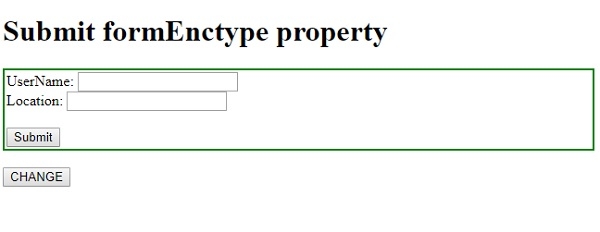
單擊更改按鈕 -
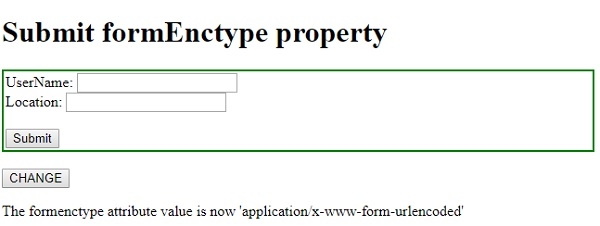

更新於: 19-Feb-2021
73 次瀏覽

廣告