
 資料結構
資料結構 網路
網路 RDBMS
RDBMS 作業系統
作業系統 Java
Java MS Excel
 iOS
iOS HTML
HTML CSS
CSS Android
 Python
 C 程式設計
 C++
C++ C#
C# MongoDB
 MySQL
MySQL Javascript
 PHP
PHP 物理學
物理學 化學
化學 生物學
生物學 數學
數學 英語
英語 經濟學
經濟學 心理學
心理學 社會學
社會學 時尚研究
時尚研究 法律研究
法律研究HTML DOM Input DatetimeLocal type 屬性
HTML DOM Input DatetimeLocal type 屬性返回/設定 Input DatetimeLocal 的型別。
語法
以下是語法 −
- 返回字串值
inputDatetimeLocalObject.type
- 將 type 設定為字串值
inputDatetimeLocalObject.type = stringValue
字串值
這裡,“stringValue”可以取以下值 −
| stringValue | 詳細資訊 |
|---|---|
| date | 定義輸入型別為日期 |
| datetime-local | 定義輸入型別為日期時間區域性 |
| checkbox | 定義輸入型別為複選框 |
| text | 定義輸入型別為文字 |
示例
下面讓我們看一個 Input DatetimeLocal type 屬性的示例 −
<!DOCTYPE html>
<html>
<head>
<title>Input DatetimeLocal type</title>
<style>
   form {
      width:70%;
      margin: 0 auto;
      text-align: center;
   }
   * {
      padding: 2px;
      margin:5px;
   }
   input[type="button"] {
      border-radius: 10px;
   }
</style>
</head>
<body>
<form>
<fieldset>
<legend>Datetime-Local-type</legend>
<label for="datetimeLocalSelect">Inauguration Date-Time :
<input type="datetime-local" id="datetimeLocalSelect" value="2020-01-01T10:00">
</label>
<input type="button" onclick="getEvent()" value="Where is the event? ">
<div id="divDisplay"></div>
</fieldset>
</form>
<script>
   var divDisplay = document.getElementById("divDisplay");
   var inputDatetimeLocal = document.getElementById("datetimeLocalSelect");
   function getEvent() {
      if(inputDatetimeLocal.type === 'datetime-local')
         divDisplay.textContent = 'Event Inauguration near you';
      else
         divDisplay.textContent = 'Event Inauguration in India';
   }
</script>
</body>
</html>
輸出
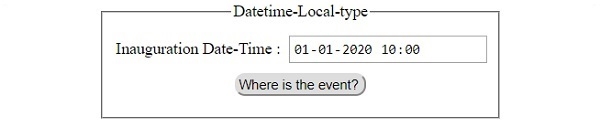
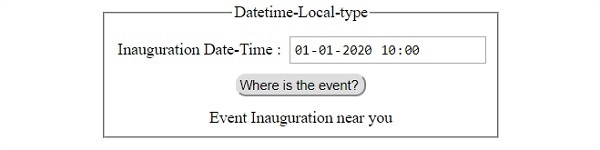
這會產生以下輸出 −
在點選 ‘Where is the event?’ 按鈕之前 −
在點選 ‘Where is the event?’ 按鈕之後 −

更新於: 2019 年 7 月 30 日
76 次檢視

廣告