
 資料結構
資料結構 網路
網路 RDBMS
RDBMS 作業系統
作業系統 Java
Java MS Excel
 iOS
iOS HTML
HTML CSS
CSS Android
 Python
 C 程式設計
 C++
C++ C#
C# MongoDB
 MySQL
MySQL Javascript
 PHP
PHP 物理
物理 化學
化學 生物
生物 數學
數學 英語
英語 經濟
經濟 心理學
心理學 社會學
社會學 服裝研究
服裝研究 法律研究
法律研究HTML DOM 表物件
HTML DOM 表物件與 HTML <caption> 元素相關聯。<caption> 元素用於設定表格標題(標題),應作為表格的第一個子級。可以透過表物件訪問標題元素。
屬性
注意:以下屬性在 HTML5 中不受支援。
以下列出 HTML DOM 表物件的屬性 −
| 屬性 | 說明 |
|---|---|
| Align | 設定或返回標題對齊方式。 |
語法
以下是語法 −
建立表物件 −
var x = document.createElement("CAPTION");示例
讓我們看一個 HTML DOM 表物件的示例 −
<!DOCTYPE html>
<html>
<head>
<style>
   table, th, td {
      border: 1px double black;
      margin-top: 14px;
   }
</style>
</head>
<body>
<p>Click the button below to create the caption for the table.</p>
<button onclick="createCaption()">CREATE</button>
<table id="SampleTable">
<tr>
<td colspan="2" rowpan="2">TABLE</td>
</tr>
<tr>
<td>Value 1</td>
<td>Value 2</td>
</tr>
</table>
<script>
   function createCaption() {
      var x = document.createElement("CAPTION");
      var t = document.createTextNode("TABLE CAPTION");
      x.appendChild(t);
      var table = document.getElementById("SampleTable")
      table.insertBefore(x, table.childNodes[0]);
   }
</script>
</body>
</html>
輸出
這將產生以下輸出 −
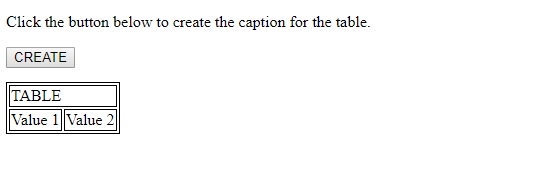
單擊 CREATE 按鈕時 −
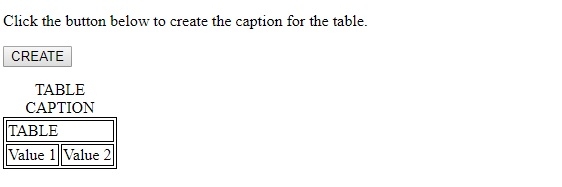
在以上示例中 −
我們首先建立了一個按鈕 CREATE,然後執行單擊時的 createCaption() 方法 −
<button onclick="createCaption()">CREATE</button>
createCaption() 方法使用文件物件的 createElement() 方法建立了標題元素,並將其分配給變數 x。然後它建立了一個帶有“TABLE CAPTION”文字的文字節點。然後我們將該文字節點附加到該元素。
最後,我們使用 ID “SampleTable”獲取 <table> 元素並使用 insertBefore() 方法插入標題行和文字節點,作為該表的第一個子元素。<caption> 只可以作為表中的第一個子元素 −
function createCaption() {
   var x = document.createElement("CAPTION");
   var t = document.createTextNode("TABLE CAPTION");
   x.appendChild(t);
   var table = document.getElementById("SampleTable")
   table.insertBefore(x, table.childNodes[0]);
}

更新於: 2019-08-07
107 次瀏覽

廣告