
 Data Structure
 Networking
 RDBMS
RDBMS Operating System
 Java
Java MS Excel
 iOS
iOS HTML
HTML CSS
CSS Android
 Python
 C Programming
 C++
C++ C#
C# MongoDB
 MySQL
MySQL Javascript
 PHP
PHP Physics
 Chemistry
 Biology
 Mathematics
 English
 Economics
 Psychology
 Social Studies
 Fashion Studies
 Legal Studies
HTML DOM Button disabled 屬性
HTML DOM Button disabled 屬性與 <button> 元素的 disabled 屬性相關聯。button disabled 屬性用於設定或返回給定的按鈕是否停用。它用於停用按鈕,以便使用者不能再與指定元素互動。預設情況下,在 Web 瀏覽器中設定 disabled 屬性將使按鈕變為灰色。
語法
以下為語法 −
設定 disabled 屬性 −
buttonObject.disabled = true|false
此處,true|false 指定是否應停用給定的輸入按鈕。
- True − 停用按鈕。
- False − 不會停用按鈕。
我們來看看 button disable 屬性示例 −
示例
<!DOCTYPE html>
<html>
<body>
<button id="Button1">BUTTON</button>
<p>Click the below button to disable the above button.</p>
<button onclick="buttonDis()">CLICK IT</button>
<p id="Sample">
<script>
   function buttonDis() {
      document.getElementById("Button1").disabled = true;
      var x=document.getElementById("Button1").disabled;
      document.getElementById("Sample").innerHTML = "Button disabled is "+x;
   }
</script>
</body>
</html>
輸出
這將產生以下輸出 −
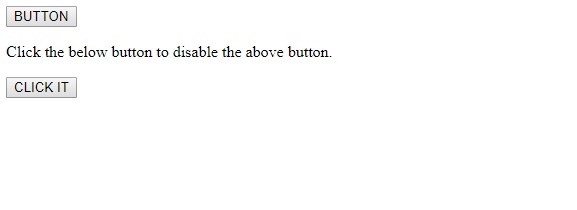
單擊 CLICK IT 按鈕 −
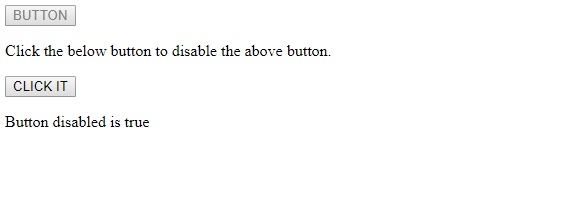
在上面的示例中 −
我們建立了一個 id 為 “Button1” 的按鈕,該按鈕預設啟用。
<button id="Button1">BUTTON</button>
然後我們建立了 CLICK IT 按鈕,用於單擊時執行 buttonDis() 方法。
<button onclick="buttonDis()">CLICK IT</button>
buttonDis() 方法透過其 id “button1” 獲取按鈕元素,並將其上的 disabled 屬性設定為 true。停用按鈕後,其 disabled 值(true 或 false)將被賦值給變數 x,並顯示在 id 為 “Sample” 的段落中
function buttonDis() {
   document.getElementById("Button1").disabled = true;
   var x=document.getElementById("Button1").disabled;
   document.getElementById("Sample").innerHTML = "Button disabled is "+x;
}

更新於:07-Aug-2019
984 次瀏覽

廣告