
 資料結構
資料結構 網路
網路 RDBMS
RDBMS 作業系統
作業系統 Java
Java MS Excel
 iOS
iOS HTML
HTML CSS
CSS Android
 Python
 C 程式設計
 C++
C++ C#
C# MongoDB
 MySQL
MySQL Javascript
 PHP
PHP 物理學
物理學 化學
化學 生物學
生物學 數學
數學 英語
英語 經濟學
經濟學 心理學
心理學 社會學
社會學 服裝設計
服裝設計 法律研究
法律研究HTML DOM Area 物件
HTML DOM Area 物件與 HTML 中的影像對映相關聯。Area 基本上表示影像對映內的可點選區域。
image 物件幫助我們建立和訪問物件內的 <area> 元素。我們可以更改對映內的可點選區域或根據使用者輸入更改影像對映的形狀等。它還可以用於操作 area 元素內的連結。
屬性
以下是 Area 物件的屬性:
| 值 | 描述 |
|---|---|
| alt | 設定或返回 alt 屬性值。 |
| coords | 設定或返回區域的 coords 屬性。 |
| hash | 設定或返回 href 屬性值的錨部分。 |
| host | 設定或返回 href 屬性的主機名和埠部分。 |
| hostname | 設定或返回 href 屬性的主機名部分。 |
| href | 設定或返回區域的 href 屬性的值。 |
| noHref | 設定或返回區域的 nohref 屬性的值。在 HTML5 中已棄用。 |
| origin | 返回 href 屬性的協議、主機名和埠部分。 |
| password | 設定或返回 href 屬性的密碼部分。 |
| pathname | 設定或返回 href 屬性的檔案路徑部分。 |
| port | 設定或返回 href 屬性的埠部分。 |
示例
讓我們來看一個 area 物件的示例:
<!DOCTYPE html>
<html>
<body>
<img
src="https://upload.wikimedia.org/wikipedia/commons/thumb/f/fb/New7Wonders.jpg/276pxNew7Wonders.jpg" width="400" height="400" usemap="#7Wonders">
<map id="WonderWorld" name="7Wonders">
</map>
<p>Click the button to create an AREA element with a link to "Maya City", which is one of the New Seven Wonders of the World.</p>
<button onclick="myWonder()">CLICK IT</button>
<p id="SAMPLE"></p>
<script>
   function myWonder() {
      var x = document.createElement("AREA");
      x.setAttribute("href", "https://en.wikipedia.org/wiki/Maya_city");
      x.setAttribute("shape", "circle");
      x.setAttribute("coords", "124,58,16");
      document.getElementById("WonderWorld").appendChild(x);
      document.getElementById("SAMPLE").innerHTML = "The AREA element was created, and
      you can now click on Maya City.";
   }
</script>
</body>
</html>
輸出
這將產生以下輸出:
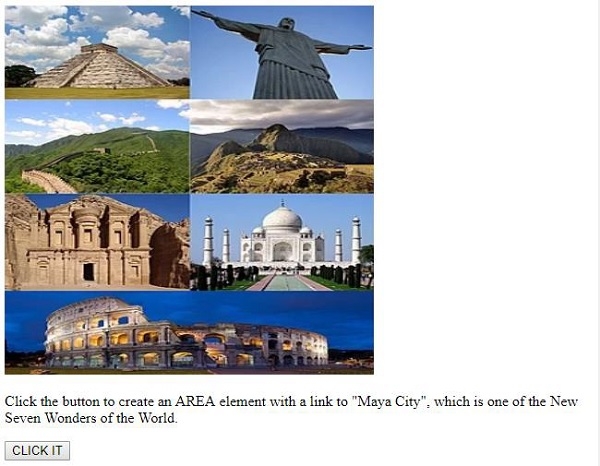
點選“CLICK IT”按鈕後:
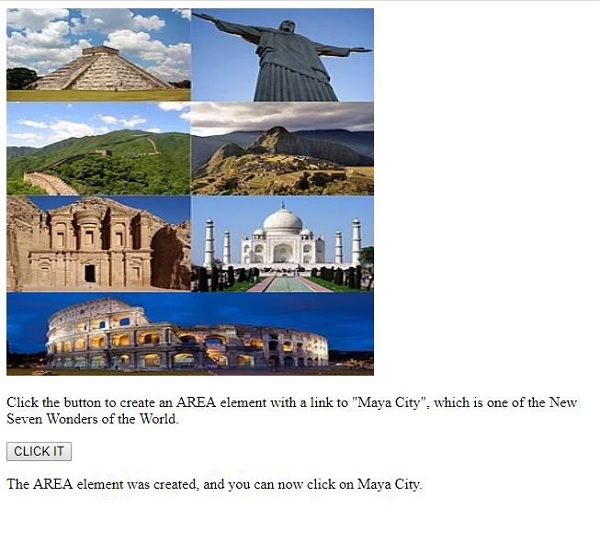
現在,當您點選“瑪雅城”時,它將帶您到其維基百科頁面。
在上面的示例中:
我們使用 標籤包含了一個影像,並指定了其寬度、高度和 id。
<img data-fr-src="https://upload.wikimedia.org/wikipedia/commons/thumb/f/fb/New7Wonders.jpg/276pxNew7Wonders.jpg" width="400" height="300" usemap="#7Wonders">
然後我們建立了一個空對映,稍後我們將在此處新增影像、區域和其他內容:
<map id="WonderWorld" name="7Wonders"></map>
然後我們建立了一個名為“CLICK IT”的按鈕,它將執行 myWonder() 函式。
<button onclick="myWonder()">CLICK IT</button>
myWonder() 函式首先建立一個 元素並將其分配給變數 x。為其設定各種屬性,如 href、shape 和 cords。最後,我們將與變數 x 關聯的 元素作為子節點附加到影像對映,並顯示建立的區域元素,現在您可以使用 innerHTML 點選 id 為“Sample”的段落內的“瑪雅城”:
function myWonder() {
   var x = document.createElement("AREA");
   x.setAttribute("href", "https://en.wikipedia.org/wiki/Maya_city ");
   x.setAttribute("shape", "circle");
   x.setAttribute("coords", "124,58,16");
   document.getElementById("WonderWorld").appendChild(x);
   document.getElementById("SAMPLE").innerHTML = "The AREA element was created, and
   you can now click on Maya City.";
}

更新於: 2019年8月6日
86 次瀏覽

廣告