
 資料結構
資料結構 網路
網路 關係型資料庫管理系統
 作業系統
作業系統 Java
Java MS Excel
 iOS
iOS HTML
HTML CSS
CSS Android
 Python
 C 程式設計
 C++
C++ C#
C# MongoDB
 MySQL
MySQL Javascript
 PHP
PHP 物理學
物理學 化學
化學 生物學
生物學 數學
數學 英語
英語 經濟學
經濟學 心理學
心理學 社會學
社會學 時尚學
時尚學 法學
法學HTML DOM AnimationEvent
HTML DOM AnimationEvent 是一個 JavaScript 物件,用於處理 CSS 動畫執行時發生的事件。它主要為我們提供了與動畫相關的事件資訊。它透過描述觸發動畫的事件,為我們提供了對 CSS 動畫的更大控制。它表示事件與動畫之間的關係。
屬性
以下為 Animation Event 的屬性 −
| 屬性 | 說明 |
|---|---|
| animationName | 將返回正在執行的動畫的名稱。 |
| elapsedTime | 返回自動畫執行以來經過的時間(秒)。 |
| pseudoElement | 返回動畫的偽元素名稱。例如:::before、::after、::first-line 等。 |
語法
以下為 animationEvent 的語法 −
animationEvent.property
示例
讓我們看一個 animationEvent 示例 −
<!DOCTYPE html>
<html>
<head>
<style>
   #ANIM-DIV {
      margin: 10px;
      width: 400px;
      height: 100px;
      background: lightgreen;
      position: relative;
      font-size: 30px;
      animation-name: animMove;
      animation-duration: 5s;
   }
   @-webkit-keyframes animMove {
      from {top: 0px;}
      to {top: 200px;}
   }
</style>
</head>
<body>
<div id="ANIM-DIV"></div>
<script>
   var x = document.getElementById("ANIM-DIV");
   x.addEventListener("animationstart", myAnimFunction);
   function myAnimFunction(event) {
      this.innerHTML = "The animation-name is: " + event.animationName;
   }
</script>
</body>
</html>
注意 − 已在 chrome 74.0.3729.169 上對此進行了測試。請檢查你的瀏覽器與 animationEvent 的相容性。
輸出
它將產生以下輸出 −
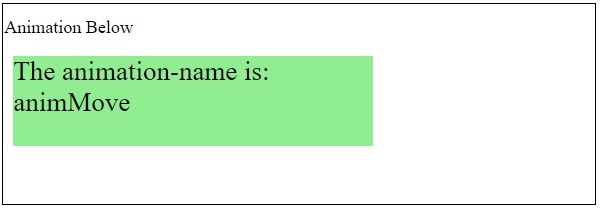
5 秒後,元素將向下移動 −
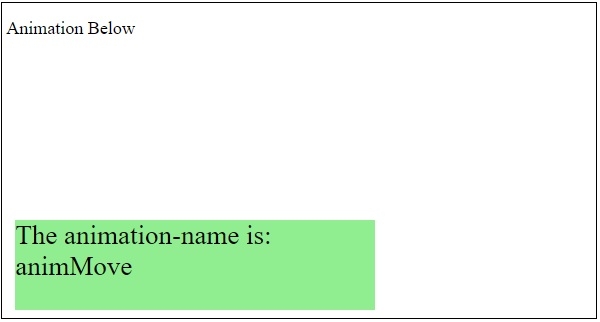
在上面的示例中 −
已使用 div 建立了一個 400px X 100px 的矩形框。
#ANIM-DIV {
   margin: 10px;
   width: 400px;
   height: 100px;
   background: lightgreen;
   position: relative;
   font-size: 30px;
   animation-name: animMove;
   animation-duration: 5s;
}
接下來,我們在 div 將移動到併產生動畫效果的位置之間指定了開始和結束位置 −
@-webkit-keyframes animMove {
   from {top: 0px;}
   to {top: 200px;}
}

更新時間: 2021 年 2 月 20 日
213 人次瀏覽

廣告