
 資料結構
資料結構 網路
網路 關係資料庫管理系統 (RDBMS)
 作業系統
作業系統 Java
Java MS Excel
 iOS
iOS HTML
HTML CSS
CSS Android
 Python
 C語言程式設計
 C++
C++ C#
C# MongoDB
 MySQL
MySQL Javascript
 PHP
PHP 物理學
物理學 化學
化學 生物學
生物學 數學
數學 英語
英語 經濟學
經濟學 心理學
心理學 社會學
社會學 服裝設計
服裝設計 法學
法學如何使用Protractor等待元素的屬性更改為特定值?
我們將學習如何使用Protractor等待元素的屬性更改為特定值。Protractor是一個用於Angular和AngularJS應用程式的端到端測試框架。Protractor內建支援等待Angular特定元素載入並準備好後再執行測試操作。
我們需要學習這個主題,以確保測試只有在特定元素準備好時才繼續進行,避免錯誤並提高測試結果的準確性。等待屬性更改為特定值也有助於識別和除錯與網頁上的資料操作和其他動態事件相關的問題。
我們將透過兩個不同的示例來演示如何使用Protractor等待元素的屬性更改為特定值。
點選按鈕後的更改
給定時間後的更改
點選按鈕後的更改
單擊按鈕後,我們將等待元素的屬性更改為特定值。
語法
使用者可以遵循以下語法,使用Protractor等待值更改為預期值。
browser.wait(function() {
   return element(by.css('your-css-selector'))
   .getAttribute( 'attribute-name' )
   .then(function (value) {
      return value === 'expected-value';
   } ) ;
}, timeout-in-milliseconds) ;
它將等待具有指定CSS選擇器的元素具有指定的屬性值,並設定指定的超時時間。
示例
在下面的示例中,我們建立了3個檔案——conf.js、test.html和test.js。
我們在conf資料夾中有一個conf.js檔案,tests資料夾包含test.html和test.js。
conf.js
此檔案是Protractor的配置檔案。它將瀏覽器功能設定為Chrome,“chromeOptions”和“args”將Chrome瀏覽器(由Protractor啟動)的日誌級別設定為“3”(最不詳細的級別),指定Jasmine框架,並指定測試指令碼檔案的位置。它還設定預設超時間隔和測試的基本URL。onPrepare函式用於設定瀏覽器的重置URL。
exports.config = {
   directConnect: true,

   // Capabilities to be passed to the webdriver instance.
   capabilities: {
      'browserName' : 'chrome',
      'chromeOptions' : {
         args: ['--log-level=3']
      }
   } ,

   // Framework to use. Jasmine is recommended.
   framework: 'jasmine',

   /* Spec patterns are relative to the current working directory when protractor is called */
   specs : ['../tests/test.js'],

   // Options to be passed to Jasmine.
   jasmineNodeOpts: {
      defaultTimeoutInterval: 30000
   },
   // Define the baseUrl for the file
   baseUrl: "file://" + __dirname + "/",

   onPrepare: function () {
      browser.resetUrl = "file://" ;
   }
};
test.html
此檔案包含一個div元素和一個按鈕,該按鈕更改div的屬性值和文字內容。
<html>
<head>
</head>
<body>
   <h2>Wait for attribute to change to particular value</h2>
   <div id = "myElement" data-state = "initial" > Initial State </div>
   <button id = "change-state" onclick = "changeState()" > Change State </button>
   <script>
      function changeState() {
         let myElement = document.getElementById('myElement');
         myElement.setAttribute('data-state', 'changed');
         myElement.textContent = 'Changed State';
      }
   </script>
</body>
</html>
test.js
test.js檔案是使用Protractor等待元素的屬性更改為特定值的示例。它停用對Angular渲染更新的等待,載入一個頁面,該頁面的元素屬性在單擊按鈕時會更改,並使用browser.wait()函式等待屬性更改為預期值,然後驗證元素的文字內容是否已更改。
describe('Protractor Attribute Wait Example 1' , function() {
   it('should wait for an element attribute to change' , function() {
      // Disable waiting for Angular render update
      browser.waitForAngularEnabled(false);

      browser.get('../tests/test.html');

      let myElement = element(by.id('myElement'));

      /* Wait for the data-state attribute to change to 'changed' */
      browser.wait(function() {
         return myElement.getAttribute('data-state')
         .then(function(state) {
            return state === 'changed';
         });
      }, 5000);

      // Verify that the element's text content has changed
      expect(myElement.getText()).toEqual( 'Changed State' );
   });
});
執行配置檔案的命令
protractor conf.js(file path)
輸出
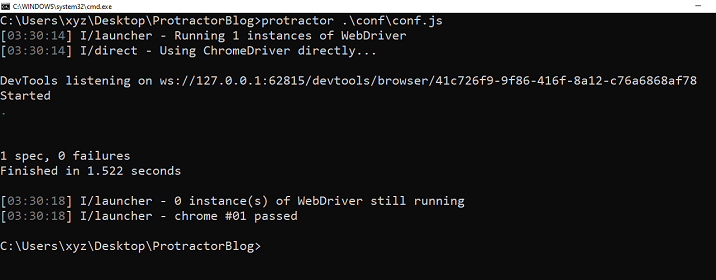
我們可以看到所有測試都通過了,沒有錯誤。
給定時間後的更改
在給定的時間間隔後,HTML中的值將更改。我們將使用Protractor等待該值更改。
示例
這是一個使用Protractor在給定時間內等待元素屬性更改為特定值的示例。它包括一個HTML檔案,該檔案使用jQuery更改div元素屬性的值,以及一個測試檔案,該檔案使用browser.wait()函式和expect()斷言驗證更改。**conf.js**檔案將保持不變。
test.html
此HTML檔案使用jQuery庫在頁面載入3秒後更改div元素的data-status屬性和文字內容的值。
<html>
<head>
   <script src = "https://code.jquery.com/jquery-3.6.0.min.js" > </script>
</head>
<body>
   <h2>Wait for attribute to change to particular value in given time</h2>
   <div id = "my-div" data-status = "initial" > Initial Status </div>
   <script>
      $(document).ready(function() {
         setTimeout(function() {
            $('#my-div').attr('data-status', 'updated').text('Updated Status');
         }, 3000);
      });
   </script>
</body>
</html>
test.js
這是我們的test.js檔案,它驗證元素的屬性在等待後是否更改為特定值。browser.wait()函式用於等待div的data-status屬性在5000毫秒超時內等於“updated”。最後,測試使用expect()斷言屬性已更新為預期值。
describe('Protractor Attribute Wait Example 2', function() {
   beforeEach(function() {
      browser.waitForAngularEnabled(false);

      browser.get('../tests/test.html');
   });

   it('should wait for the element attribute to change to a particular value', function() {
      // Get the div element
      let divElement = $('#my-div');

      /* Wait for the div's data-status attribute to equal 'updated' */
      browser.wait(function() {
         return divElement.getAttribute('data-status').then(function(status) {
            return status === 'updated';
         } ) ;
      }, 5000);

      // Verify that the attribute has been updated
      expect(divElement.getAttribute('data-status')).toBe('updated');
   } ) ;
} ) ;
輸出
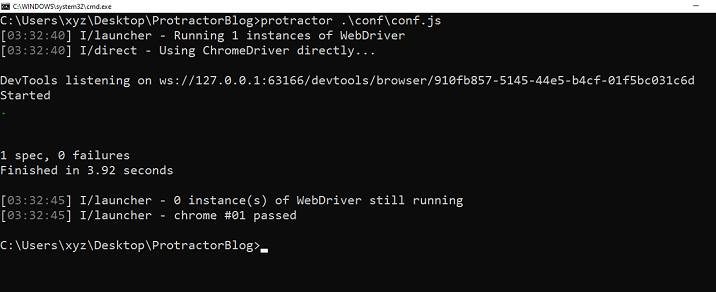
我們演示了兩個使用Protractor等待元素屬性更改為特定值的示例,包括等待屬性在單擊按鈕後更改以及等待屬性在給定的時間間隔後更改。這是確保端到端測試的準確性和可靠性的重要技能。

449 次瀏覽
