
 資料結構
資料結構 網路
網路 關係資料庫管理系統 (RDBMS)
 作業系統
作業系統 Java
Java MS Excel
 iOS
iOS HTML
HTML CSS
CSS Android
 Python
 C 語言程式設計
 C++
C++ C#
C# MongoDB
 MySQL
MySQL Javascript
 PHP
PHP 物理學
物理學 化學
化學 生物學
生物學 數學
數學 英語
英語 經濟學
經濟學 心理學
心理學 社會學
社會學 服裝學
服裝學 法學
法學如何在 ReactJS 中使用 setState 更新物件?
ReactJS 允許我們為每個元件定義一個狀態物件。在狀態物件中,我們可以新增不同的變數作為狀態物件的屬性。之後,我們可以在元件內部使用狀態變數來渲染或執行元件中的其他操作。
本教程將教我們如何為元件建立狀態物件並使用各種值更新它。
使用 setState 更新 ReactJS 中的物件
狀態物件與 ReactJS 中的類元件一起使用。使用 setState() 方法,我們可以更新狀態物件。
語法
使用者可以按照以下語法使用 setState() 方法更新 ReactJS 中的物件。
this.setState({
      student: {
        ...this.state.student,
        fees: new_value,
      },
    });
在上面的語法中,我們將更新後的 student 物件作為 setState() 方法的引數傳遞。此外,我們還將擴充套件運算子與 student 物件一起使用。
示例
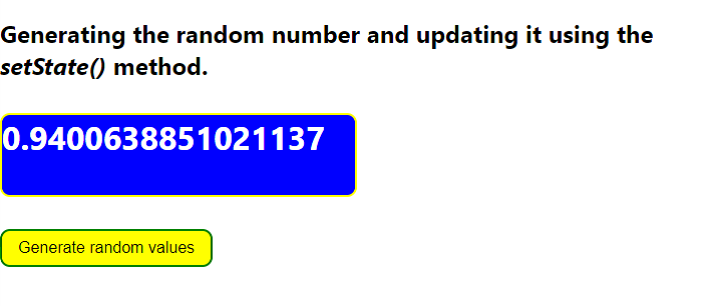
在下面的示例中,我們在類元件內部建立了狀態物件。狀態物件包含 number 屬性,並使用 Math.random() 方法用隨機數進行初始化。
每當使用者單擊按鈕時,我們都會呼叫 changeNumber 函式。在 changeNumber() 函式中,使用 setState() 方法更新狀態物件。我們將包含新隨機數的物件作為 setState() 方法的引數傳遞。
import React, { Component } from "react";
// creating the class component
class App extends Component {
  state = {
    number: Math.random(),
  };

  // Method to update the object
  changeNumber = () => {
    this.setState({ number: Math.random() });
  };

  render() {
    return (
      <div>
        <h2>
          {" "}
          Generating the random number and updating it using the{" "}
          <i> setState() </i> method.{" "}
        </h2>
        <h3
          style={{
            border: "2px solid yellow",
            borderRadius: "10px",
            width: "22rem",
            height: "5rem",
            backgroundColor: "blue",
            color: "white",
            fontSize: "2rem",
          }}
        >
          <span>{this.state.number}</span>
        </h3>
        <button
          onClick= {this.changeNumber}
          style = {{
            border: "2px solid green",
            borderRadius: "10px",
            padding: "0.5rem 1rem",
            backgroundColor: "yellow",
            color: "black",
            fontSize: "1rem",
          }}
        >
          {" "}
          Generate random values{" "}
        </button>
      </div>
    );
  }
}

export default App;
輸出
示例
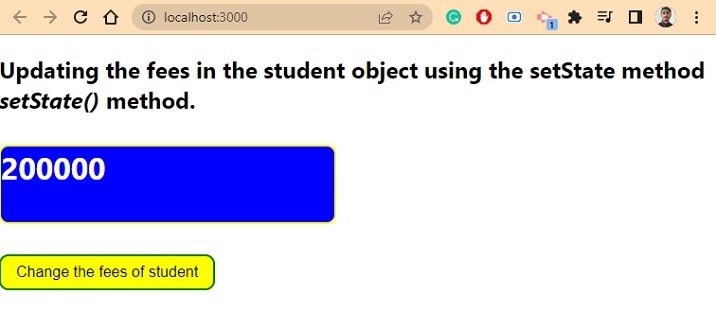
在下面的示例中,table 物件包含巢狀物件作為 student 屬性的值。student 物件包含 id、name、age 和 fee 屬性。
之後,每當使用者按下按鈕時,它都會呼叫 changesFees() 函式,該函式只更改 student 物件中 fee 屬性的值。使用者可以看到我們如何在 setState() 方法內部使用擴充套件運算子來保持 student 物件中的其他值不變。
import React, { Component } from "react";
// creating the class component
class App extends Component {
  state = {
    student: {
      id: "123qwe",
      name: "Shubham",
      age: 22,
      fees: 200000,
    },
  };

  // Method to update the object
  changeFees = () => {

    this.setState({
      student: {
        ...this.state.student,
        fees: this.state.student.fees + this.state.student.fees * 0.2,
      },
    });
  };

  render() {
    return (
      <div>
        <h2>
          {" "}
          Updating the fees in the student object using the setState method
          <i> setState() </i> method.{" "}
        </h2>
        <h3
          style = {{
            border: "2px solid yellow",
            borderRadius: "10px",
            width: "22rem",
            height: "5rem",
            backgroundColor: "blue",
            color: "white",
            fontSize: "2rem",
          }}
        >
          <span> {this.state.student.fees} </span>
        </h3>
        <button
          onClick = {this.changeFees}
          style = {{
            border: "2px solid green",
            borderRadius: "10px",
            padding: "0.5rem 1rem",
            backgroundColor: "yellow",
            color: "black",
            fontSize: "1rem",
          }}
        >
          {" "}
          Change the fees of student{" "}
        </button>
      </div>
    );
  }
}

export default App;
輸出
使用 ReactJS 中的 Hook 更新物件的狀態
setState() 方法是更新 ReactJS 中狀態物件的舊方法。近年來,ReactJS 中引入了 Hook,我們可以使用它來更新 React 中的物件或變數值。
語法
使用者可以按照以下語法使用 Hook 更新狀態物件。
  const [state, setState] = useState({
    prop1: "Value1",
    prop2: "value2",
    prop3: "value3",
  });

setState((state) => ({ ...state, prop3: value }));
在上面的語法中定義了 setState() 方法來更新狀態物件。在 setState() 方法中,我們將回調函式作為引數傳遞。
示例
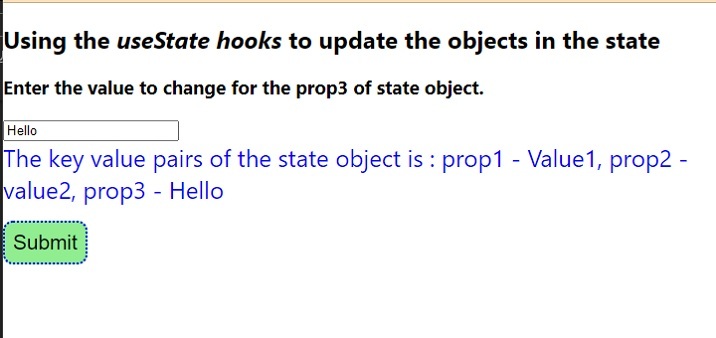
在下面的示例中,我們在 ReactJS 中使用了函式元件。我們使用 state 儲存物件,使用 setState 更新狀態物件。但是,使用者可以為 state 和 setState 指定其他名稱。
我們獲取 state 物件的 prop3 屬性值的使用者的輸入。之後,我們在 handleSubmit() 函式中更改 state 物件的 prop3 屬性的值。在 setState() 中,我們獲得之前的狀態作為回撥引數,並在回撥函式中將其與擴充套件運算子一起使用。
import React, { useState } from "react";
const App = () => {
  const [state, setState] = useState({
    prop1: "Value1",
    prop2: "value2",
    prop3: "value3",
  });
  const [value, setValue] = useState("");

  function handleValue(e) {
    // handle the value
    let new_value = e.target.value;
    setValue(new_value);
  }

  function handleSubmit() {
    // updating the state object
    setState((state) => ({ ...state, prop3: value }));
  }
  return (
    <div>
      <h2>
        {" "}
        Using the <i> useState hooks </i> to update the objects in the state
      </h2>
      <h3>Enter the value to change for the prop3 of state object. </h3>
      <input type = "text" value = {value} onChange = {handleValue} />
      <div style = {{ color: "blue", fontSize: "1.5rem" }}>
        The key value pairs of the state object are : prop1 - {state.prop1},
        prop2 - {state.prop2}, prop3 - {state.prop3}
      </div>
      <button
        onClick = {handleSubmit}
        style = {{
          margin: "1rem 0",
          padding: "0.5rem 1rem",
          backgroundColor: "lightgreen",
          border: "2px dotted blue",
          borderRadius: "10px",
          color: "black",
          fontSize: "1.3rem",
          padding: "0.5rem",
        }}
      >
        Submit
      </button>
    </div>
  );
};

export default App;
輸出
我們學習瞭如何使用 setState() 方法以及函式元件和類元件來更新狀態物件。如今,使用者可以使用函式元件,因為 Hook 提供了更好的功能來更新狀態物件。

2K+ 次瀏覽
