
 資料結構
資料結構 網路
網路 關係資料庫管理系統
 作業系統
作業系統 Java
Java MS Excel
 iOS
iOS HTML
HTML CSS
CSS Android
 Python
 C 語言程式設計
 C++
C++ C#
C# MongoDB
 MySQL
MySQL Javascript
 PHP
PHP 物理學
物理學 化學
化學 生物學
生物學 數學
數學 英語
英語 經濟學
經濟學 心理學
心理學 社會學
社會學 時尚研究
時尚研究 法律研究
法律研究如何使用 Tkinter 獲取複製的檔名?
Tkinter 是 Python 的標準 GUI 工具包,它提供了一套功能強大的工具來建立圖形使用者介面。在本文中,我們將探討如何使用 Tkinter 獲取已複製到剪貼簿的檔名。我們將提供清晰的分步說明和完整的實現示例,向您展示如何執行此操作。
但在開始我們的實現之旅之前,瞭解 Tkinter 如何與剪貼簿互動非常重要。
Tkinter 如何與剪貼簿互動?
Tkinter 提供了一種方便的方式來與剪貼簿互動,允許開發人員檢索和操作使用者複製或剪下的資料。tkinter.Tk 是 Tkinter 中負責剪貼簿互動的主要類。
讓我們看看 tkinter.Tk 類如何與剪貼簿互動:
tkinter.Tk 類
tkinter.Tk 類是 Tkinter 中的主要視窗管理器,它提供了與剪貼簿互動的方法。用於剪貼簿檢索的關鍵方法是 clipboard_get()。
o clipboard_get() 方法
clipboard_get() 方法用於檢索剪貼簿的當前內容。它可以在 Tk 類的例項上呼叫,並返回儲存在剪貼簿中的資料。
示例
以下簡單示例展示了 clipboard_get() 方法的工作原理:
import tkinter as tk
# Create the main window
root = tk.Tk()
# Retrieve data from the clipboard
clipboard_data = root.clipboard_get()
# Do something with the clipboard data
print("Clipboard Data:", clipboard_data)
# Close the main window (optional)
root.destroy()
執行上述程式後,您將獲得您複製的資料作為輸出。
輸出
Clipboard Data: Simple Easy Learning At Your Fingertips
我希望您理解了 Tkinter 與剪貼簿的互動方式。現在讓我們開始我們的實現之旅,以在 Tkinter 視窗中檢索複製到剪貼簿的檔案。
基本的 Tkinter 設定
首先,我們需要設定一個基本的 Tkinter 視窗,以下程式碼初始化了它:
import tkinter as tk

# Create the main window
root = tk.Tk()
root.title("Retrieving Copied File Name")

# Set window dimensions
root.geometry("720x250")

# Run the Tkinter event loop
root.mainloop()
完成基本的 Tkinter 設定後,我們需要向視窗新增一個按鈕,該按鈕將觸發檢索過程。我們還需要建立一個函式來檢索和顯示覆制的資料。
向視窗新增按鈕
以下程式碼將向視窗新增一個按鈕
# Add a button to trigger file name retrieval
button = tk.Button(root, text="Retrieve File Name", command= retrieve_clipboard_file)
button.pack(pady=20)
建立函式
要檢索複製的檔名,我們需要與剪貼簿互動。Tkinter 為此提供了 clipboard_get() 方法。以下程式碼將建立一個名為“retrieve_clipboard_file”的函式來檢索和顯示覆制的檔名:
def retrieve_clipboard_file():
   try:
      # Attempt to get the file name from the clipboard
      file_name = root.clipboard_get()

      # Display the retrieved file name
      result_label.config(text=f"File Name: {file_name}")
   except tk.TclError:
      # Handle the case where the clipboard is empty or contains non-text data
      result_label.config(text="Clipboard is empty or contains non-text data")
在此程式碼中,我們使用 try-except 塊來處理剪貼簿為空或包含非文字資料的情況。如果檢索成功,我們將使用檢索到的資料更新標籤 (result_label)。
示例
以下是使用 Tkinter 檢索已複製到剪貼簿的資料的完整 Python 實現:
import tkinter as tk

def retrieve_clipboard_file ():
   try:
      # Attempt to get the file name from the clipboard
      file_name = root.clipboard_get()

      # Display the retrieved file name
      result_label.config(text=f"File Name: {file_name}")
   except tk.TclError:
      # Handle the case where the clipboard is empty or contains non-text data
      result_label.config(text="Clipboard is empty or contains non-text data")

# Create the main window
root = tk.Tk()
root.title("Retrieving Copied File Name")

# Set window dimensions
root.geometry("720x250")

# Add a button to trigger file name retrieval
button = tk.Button(root, text="Retrieve File Name", command= retrieve_clipboard_file)
button.pack(pady=20)

# Label to display the result
result_label = tk.Label(root, text="")
result_label.pack()

# Run the Tkinter event loop
root.mainloop()
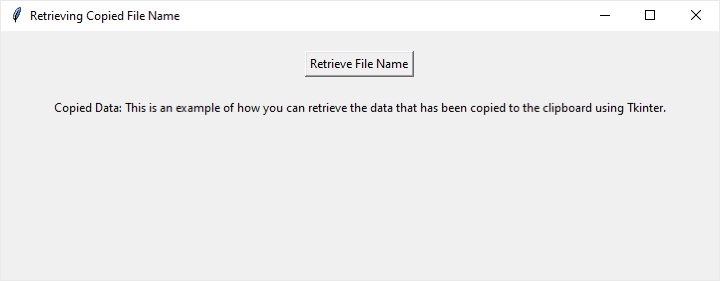
執行此程式碼後,將出現一個視窗,其中包含一個標有“檢索檔名”的按鈕。單擊此按鈕將嘗試檢索並顯示覆制的檔名。
輸出
結論
總之,本文展示瞭如何在 Python 中使用 Tkinter 獲取複製檔案的名稱。提供的示例程式碼說明了建立與剪貼簿平滑互動的互動式應用程式的實用方面。通過了解 Tkinter 如何與剪貼簿互動,開發人員可以整合類似的功能,使他們的程式更易於使用者使用。
本文不僅涵蓋了獲取檔名的基礎知識,而且也為更高階的剪貼簿功能提供了一個起點。遵循這些步驟可幫助開發人員建立使用者可以輕鬆使用複製資料的應用程式。Tkinter 和剪貼簿之間的協作為在 Python 程式設計世界中構建使用者友好的應用程式帶來了令人興奮的可能性。

90 次瀏覽
