
 資料結構
資料結構 網路技術
網路技術 關係型資料庫管理系統
 作業系統
作業系統 Java
Java MS Excel
 iOS
iOS HTML
HTML CSS
CSS Android
 Python
 C 程式設計
 C++
C++ C#
C# MongoDB
 MySQL
MySQL Javascript
 PHP
PHP 物理
物理 化學
化學 生物
生物 數學
數學 英語
英語 經濟
經濟 心理學
心理學 社會研究
社會研究 時裝研究
時裝研究 法律研究
法律研究如何從 Tkinter 視窗小部件移除焦點?
要在 Tkinter 程式執行期間啟用特定視窗小部件的焦點,我們可以使用focus_set()方法。新增焦點會在視窗小部件周圍建立一條灰色線,並向用戶展示該視窗小部件。
在某些情況下,我們需要從所需的視窗小部件中移除焦點。
這可以透過移除focus_set()屬性或將焦點從一個視窗小部件切換到另一個視窗小部件來實現。
示例
#Import the required Libraries
from tkinter import *
from tkinter import ttk
from tkinter import messagebox

#Create an instance of Tkinter frame
win = Tk()
#Set the geometry of Tkinter Frame
win.geometry("750x250")

#Define a function to show the message
def logged_in():
   messagebox.showinfo("Message", "Successfully Logged In!")
   win.destroy()

#Define a Label widget
Label(win, text= "Login to the System", font=('Aerial', 14, 'bold')).pack(pady=15)
#Create an entry widget
Label(win, text="Enter Username").pack()
username= Entry(win, width= 20)
username.pack()
Label(win, text= "Enter passowrd").pack()
password= Entry(win, show="*", width= 20)
password.pack()
password.focus_set()
#Add a Bottom widget
button=ttk.Button(win, text="Login", command= logged_in)
button.pack(pady=13)

#Create a Button widget
win.mainloop()
輸出
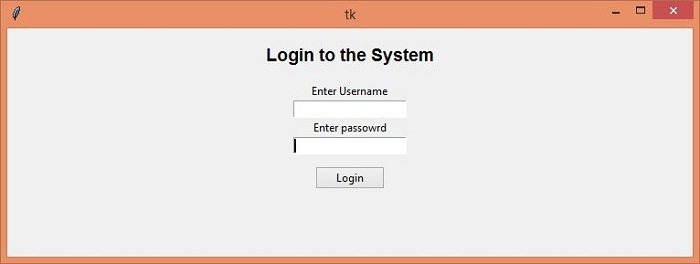
在上面的程式碼片段中,焦點當前設定為密碼輸入框,可以透過向另一個視窗小部件新增focus_set() 來取消設定或切換它。

更新時間: 03-05-2021
2K+ 瀏覽量

廣告