
 資料結構
資料結構 網路
網路 RDBMS
RDBMS 作業系統
作業系統 Java
Java MS Excel
 iOS
iOS HTML
HTML CSS
CSS Android
 Python
 C 程式語言
 C++
C++ C#
C# MongoDB
 MySQL
MySQL Javascript
 PHP
PHP 物理
物理 化學
化學 生物學
生物學 數學
數學 英語
英語 經濟學
經濟學 心理學
心理學 社會學
社會學 時尚學
時尚學 法學
法學如何使用 jQuery 列印 div 內容?
假設我們有以下按鈕 -
<input type='button' id='buttonId' value='Press Me To print the data'>
點選上面的按鈕後,使用 on() 呼叫 function() -
$('#buttonId').on('click', function () {
   displayTheData();
})
以上函式使用 html() 來顯示以下 div -
<div id='printThisDivIdOnButtonClick'>
   <p>I am inside the div tag...</p>
</div>
示例
以下是列印 div 內容的完整程式碼 -
<!DOCTYPE html>
<html lang="en">
<head>
   <meta charset="UTF-8">
   <meta name="viewport" content="width=device-width, initial-scale=1.0">
   <title>Document</title>
</head>
<link rel="stylesheet" href="//code.jquery.com/ui/1.12.1/themes/base/jquery-ui.css">
<script src="https://code.jquery.com/jquery-1.12.4.js"></script>
<script src="https://code.jquery.com/ui/1.12.1/jquery-ui.js"></script>
<link rel="stylesheet" href="https://cdnjs.cloudflare.com/ajax/libs/font-awesome/4.7.0/css/font-awesome.min.css">
<body>
   <div id='printThisDivIdOnButtonClick'>
      <p>I am inside the div tag...</p>
   </div>
   <p>I am not inside the div tag...</p>
   <input type='button' id='buttonId' value='Press Me To print the data'>
   <div id="printTheDivisionValue"></div>
</body>
<script>
   $('#buttonId').on('click', function () {
      displayTheData();
   })
   function displayTheData() {
      $(document).ready(function () {
         $("#printTheDivisionValue").html($("#printThisDivIdOnButtonClick").html());
      });
   }
</script>
</html>
要執行以上程式,請將檔案另存為 anyName.html(index.html)。右鍵單擊該檔案,並在 VS Code 編輯器中選擇“透過 Live Server 開啟”選項。
輸出
輸出如下所示 -

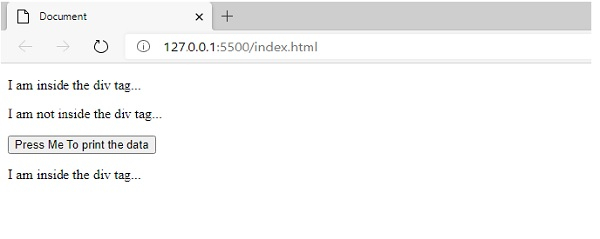
現在點選該按鈕,你會得到以下輸出。
輸出如下所示 -

更新於:2020 年 10 月 1 日
6K+ 瀏覽量

廣告