
 資料結構
資料結構 網路
網路 RDBMS
RDBMS 作業系統
作業系統 Java
Java MS Excel
 iOS
iOS HTML
HTML CSS
CSS Android
 Python
 C 程式設計
 C++
C++ C#
C# MongoDB
 MySQL
MySQL JavaScript
 PHP
PHP 物理
物理 化學
化學 生物
生物 數學
數學 英語
英語 經濟學
經濟學 心理學
心理學 社會學科
社會學科 時裝研究
時裝研究 法律研究
法律研究如何使用 Selenium ChromeDriver 執行右鍵單擊?
我們可以使用 Selenium ChromeDriver 來執行右鍵單擊。在 Web 元素上右鍵單擊時,上下文選單將顯示。例如,如果我們在文字區域上單擊滑鼠右鍵,就會彈出一個包含幾個選項的附加選單。
Selenium 中的 Actions 類負責模擬此滑鼠操作。Actions 類的提供的contextClick() 方法來執行此操作,從上下文選單中選擇任何選項。
要執行此整個操作,我們首先要使用**moveToElement() 方法將滑鼠移動到元素的中間,然後應用 contextClick() 方法。此外,我們必須執行 build() 方法來執行這兩個操作,然後執行 perform() 方法實際執行操作。
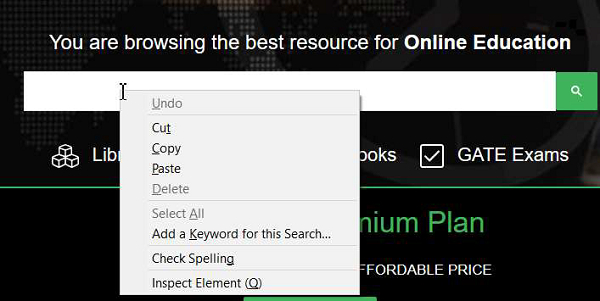
我們必須將匯入 org.openqa.selenium.interactions.Actions 包到我們的程式碼中,以使用 Actions 類下的方法。
示例
import org.openqa.selenium.By;
import org.openqa.selenium.WebDriver;
import org.openqa.selenium.WebElement;
import org.openqa.selenium.chrome.ChromeDriver;
import java.util.concurrent.TimeUnit;
import org.openqa.selenium.interactions.Action;
import org.openqa.selenium.interactions.Actions;

public class RightClickOperation{
   public static void main(String[] args) {
      System.setProperty("webdriver.chrome.driver", "C:\Users\ghs6kor\Desktop\Java\chromedriver.exe");
      WebDriver driver = new ChromeDriver();
      String url = "https://tutorialspoint.tw/index.htm";
      driver.get(url);
      driver.manage().timeouts().implicitlyWait(5, TimeUnit.SECONDS);
      // identify element
      WebElement l=driver.findElement(By.xpath("//*[text()='Library']"));
      // Actions class with moveToElement() and contextClick()
      Actions a = new Actions(driver);
      a.moveToElement(l).contextClick().build().perform();
      driver.quit();
   }
}
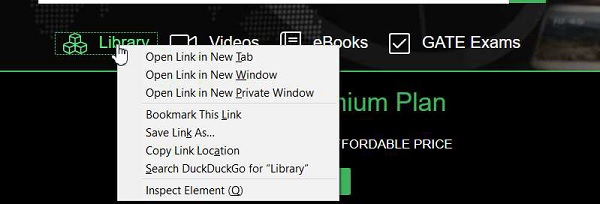
輸出

更新日期: 18-Sep-2020
620 次檢視

廣告