
 資料結構
資料結構 網路
網路 RDBMS
RDBMS 作業系統
作業系統 Java
Java MS Excel
 iOS
iOS HTML
HTML CSS
CSS Android
 Python
 C 程式設計
 C++
C++ C#
C# MongoDB
 MySQL
MySQL Javascript
 PHP
PHP 物理學
物理學 化學
化學 生物學
生物學 數學
數學 英語
英語 經濟學
經濟學 心理學
心理學 社會學
社會學 時尚學
時尚學 法學
法學如何使元素的寬度:100% 減去填充?
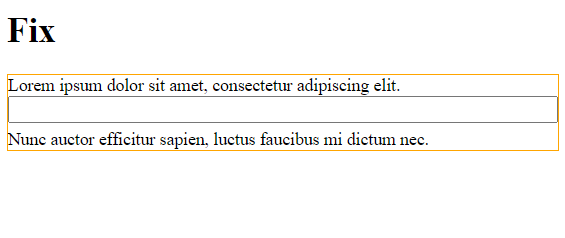
假設為輸入設定了 padding: 50px 10px;,並希望它是父 div 寬度 的100%。使用 width: 100%; 不起作用。為了修復此問題,我們可以將輸入放入一個帶有 position: relative 和固定高度的 div 中。這會將元素的寬度設定為100% 減去填充。
我們已將 position 設定為 relative,高度已固定 −
.container {
   position: relative;
   height: 30px;
}
輸入的 position 已設定為 absolute −
content {
   position: absolute;
   left: 0;
   right: 0;
   padding: 3px 10px;
}
示例
讓我們看看一個完整的示例 −
<!DOCTYPE html>
<html>
<head>
   <style>
      .demo {
         border: thin solid orange;
      }
      .container {
         position: relative;
         height: 30px;
      }
      .content {
         position: absolute;
         left: 0;
         right: 0;
         padding: 3px 10px;
      }
   </style>
</head>
<body>
   <h1>Fix</h1>
   <div class="demo">
      Lorem ipsum dolor sit amet, consectetur adipiscing elit.
      <div class="container">
         <input class="content" type="text" />
      </div>
      Nunc auctor efficitur sapien, luctus faucibus mi dictum nec.
   </div>
</body>
</html>
輸出

更新日期: 01-Nov-2022
2K+ 檢視數

廣告