
 資料結構
資料結構 網路
網路 關係資料庫管理系統
 作業系統
作業系統 Java
Java MS Excel
 iOS
iOS HTML
HTML CSS
CSS Android
 Python
 C 程式設計
 C++
C++ C#
C# MongoDB
 MySQL
MySQL Javascript
 PHP
PHP 物理
物理 化學
化學 生物
生物 數學
數學 英語
英語 經濟
經濟 心理學
心理學 社會科學研究
 時尚研究
時尚研究 法律研究
法律研究如何在 Ubuntu 上安裝 Etherpad Lite
你真的要尋找基於網路的記事本來與團隊協作嗎?. Etherpad 是一款基於網路的開原始檔編輯器,它使您能夠即時協作處理一個檔案。透過使用 Etherpad,眾多使用者可以編輯文字文件。本文介紹“如何在 Ubuntu 上安裝 Etherpad Lite”。
要在 Ubuntu 上安裝 Etherpad Lite,它需要 Node.js 和 NPM,要安裝 Node.js 和 NPM 請閱讀本文 –
在 Linux 上安裝 Node.js
要安裝 Etherpad 支援的 Python 庫,請使用以下命令 –
$ sudo apt-get install gzip curl python libssl-dev pkg-config build-essential git
示例輸出應如下所示 –
Reading package lists... Done
Building dependency tree
Reading state information... Done
build-essential is already the newest version (12.1ubuntu2).
git is already the newest version (1:2.7.4-0ubuntu1).
gzip is already the newest version (1.6-4ubuntu1).
pkg-config is already the newest version (0.29.1-0ubuntu1).
pkg-config set to manually installed.
python is already the newest version (2.7.11-1).
python set to manually installed.
curl is already the newest version (7.47.0-1ubuntu2.2).
The following packages were automatically installed and are no longer required:
   libterm-readkey-perl linux-headers-4.4.0-31 linux-headers-4.4.0-31-generic
   linux-image-4.4.0-31-generic linux-image-extra-4.4.0-31-generic
   linux-signed-image-4.4.0-31-generic
Use 'sudo apt autoremove' to remove them.
The following additional packages will be installed:
   libssl-doc zlib1g-dev
The following NEW packages will be installed:
   libssl-dev libssl-doc zlib1g-dev
0 upgraded, 3 newly installed, 0 to remove and 26 not upgraded.
Need to get 2,590 kB of archives.
After this operation, 10.5 MB of additional disk space will be used.
Do you want to continue? [Y/n] y
Get:1 http://in.archive.ubuntu.com/ubuntu xenial/main amd64 zlib1g-dev amd64 1:1.2.8.dfsg-2ubuntu4 [168 kB]
Get:2 http://in.archive.ubuntu.com/ubuntu xenial-updates/main amd64 libssl-dev amd64 1.0.2g-1ubuntu4.5 [1,344 kB]
Get:3 http://in.archive.ubuntu.com/ubuntu xenial-updates/main amd64 libssl-doc all 1.0.2g-1ubuntu4.5 [1,078 kB]
.......................................................................................
Etherpad Lite 託管在 Git 中。要訪問 Etherpad git 儲存庫,請使用以下命令 –
$ git clone http://github.com/ether/etherpad-lite.git
示例輸出應如下所示 –
Cloning into 'etherpad-lite'...
remote: Counting objects: 28782, done.
remote: Compressing objects: 100% (10/10), done.
remote: Total 28782 (delta 4), reused 0 (delta 0), pack-reused 28772
Receiving objects: 100% (28782/28782), 18.73 MiB | 1.88 MiB/s, done.
Resolving deltas: 100% (20507/20507), done.
Checking connectivity... done.
要進入 bin 目錄,請使用以下命令 –
$ cd etherpad-lite/bin
要安裝 Etherpad Lite,請使用以下命令 –
/etherpad-lite/bin$ ./run.sh
要訪問 Etherpad lite,請使用以下 URL –
https://:9001/
示例輸出應如下所示 –
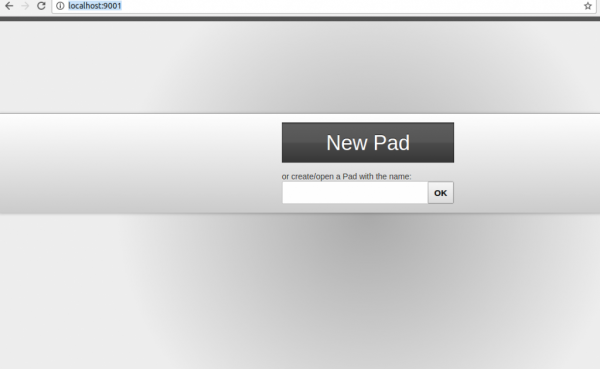
現在輸入使用者名稱並單擊確定按鈕。現在,它將彈出以下所示的螢幕 –
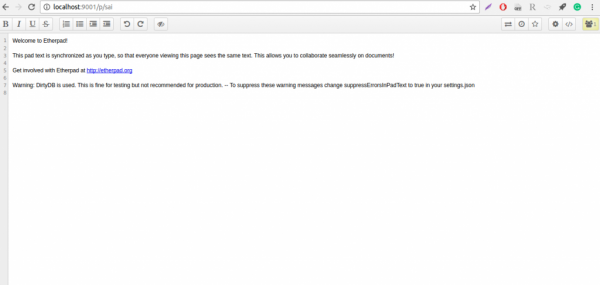
閱讀完本文後,你將能夠理解如何在 Ubuntu 上安裝 Etherpad Lite。在我們的下一篇文章中,我們將提供更多基於 Linux 的技巧和竅門。繼續關注!

更新日期: 2020 年 1 月 20 日
266 次瀏覽

廣告