
 資料結構
資料結構 網路
網路 RDBMS
RDBMS 作業系統
作業系統 Java
Java MS Excel
 iOS
iOS HTML
HTML CSS
CSS Android
 Python
 C 程式設計
 C++
C++ C#
C# MongoDB
 MySQL
MySQL Javascript
 PHP
PHP 物理
物理 化學
化學 生物
生物 數學
數學 英語
英語 經濟
經濟 心理學
心理學 社會學
社會學 時尚研究
時尚研究 法學研究
法學研究如何處理 Selenium 中的警報?
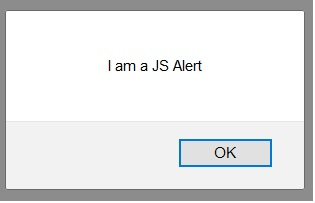
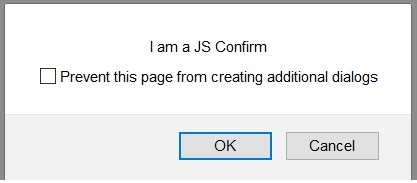
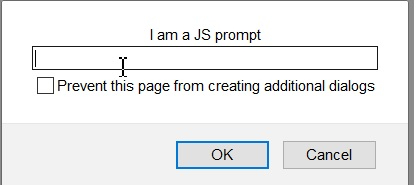
我們可以使用 Alert 介面在 Selenium webdriver 中處理警報。警報可以分為三種類型——一個允許使用者輸入文字的提示、一個普通警報和一個確認警報。
預設情況下,webdriver 只可以訪問主頁面,一旦出現警報,就可以使用 switchTo().alert() 方法將焦點 webdriver 控制權切換到該警報。
普通警報如下圖所示 −
確認警報如下圖所示 −
提示警報如下圖所示 −
要接受警報(點選警報中的確定按鈕),使用 switchTo().alert().accept() 方法。要消除警報(點選警報中的取消按鈕),使用 switchTo().alert().dismiss() 方法。
要提取警報文字,使用 switchTo().alert().getText() 方法。要在確認警報中輸入文字,使用 switchTo().alert().sendKeys() 方法。
需要輸入的文字作為引數傳遞給 sendKeys 方法。
示例
import org.openqa.selenium.By;
import org.openqa.selenium.WebDriver;
import org.openqa.selenium.WebElement;
import org.openqa.selenium.firefox.FirefoxDriver;
import java.util.concurrent.TimeUnit;
import org.openqa.selenium.Alert;
public class AlertHandle{
   public static void main(String[] args) {
      System.setProperty("webdriver.gecko.driver",
         "C:\Users\ghs6kor\Desktop\Java\geckodriver.exe");
      WebDriver driver = new FirefoxDriver();
      //implicit wait
      driver.manage().timeouts().implicitlyWait(5, TimeUnit.SECONDS);
      //URL launch
      driver.get("https://the-internet.herokuapp.com/javascript_alerts");
      // identify element
      WebElement c=driver.findElement(By.xpath("//button[text()='Click for JS Prompt']"));
      c.click();
      //shift to alert
      Alert a = driver.switchTo().alert();
      //get alert text
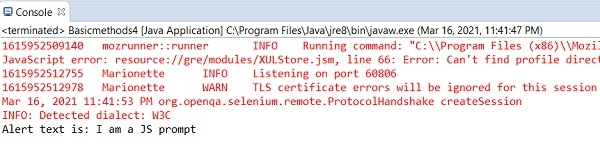
      String s = a.getText();
      System.out.println("Alert text is: " + s);
      //input text to alert
      a.sendKeys("Selenium");
      //dismiss alert
      a.dismiss();
      c.click();
      //accept alert
      a.accept();
      driver.quit();
   }
}
輸出

更新於: 06-Apr-2021
3K+ 瀏覽量

廣告