
 資料結構
資料結構 網路
網路 關係型資料庫管理系統
 作業系統
作業系統 Java
Java MS Excel
 iOS
iOS HTML
HTML CSS
CSS Android
 Python
 C 語言程式設計
 C++
C++ C#
C# MongoDB
 MySQL
MySQL Javascript
 PHP
PHP 物理學
物理學 化學
化學 生物學
生物學 數學
數學 英語
英語 經濟學
經濟學 心理學
心理學 社會學
社會學 時尚研究
時尚研究 法律研究
法律研究如何在 Tkinter Combobox 中獲取選定選項的索引?
如果您想建立一個下拉列表項並允許使用者選擇列表項,則可以使用 Combobox 小部件。Combobox 小部件允許您建立一個下拉列表,其中可以即時選擇專案列表。但是,如果您想獲取組合框小部件中所選專案的索引,則可以使用 **get()** 方法。**get()** 方法返回所選專案的整數,稱為專案的索引。
示例
讓我們舉個例子看看它是如何工作的。在這個例子中,我們在下拉列表中建立了一個星期幾的列表,並且每當使用者從下拉列表中選擇一天時,它都會列印並在 Label 小部件上顯示所選專案的索引。要列印索引,我們可以透過將給定的索引型別轉換為字串來連線字串。
# Import the required libraries
from tkinter import *
from tkinter import ttk

# Create an instance of tkinter frame or window
win = Tk()

# Set the size of the window
win.geometry("700x350")

# Create a function to clear the combobox
def clear_cb():
   cb.set('')

# Define Days Tuple
days= ('Sun','Mon','Tue','Wed','Thu','Fri','Sat')

# Function to print the index of selected option in Combobox
def callback(*arg):
   Label(win, text= "The value at index " + str(cb.current()) + " is" + " "+ str(var.get()), font= ('Helvetica 12')).pack()

# Create a combobox widget
var= StringVar()
cb= ttk.Combobox(win, textvariable= var)
cb['values']= days
cb['state']= 'readonly'
cb.pack(fill='x',padx= 5, pady=5)

# Set the tracing for the given variable
var.trace('w', callback)

# Create a button to clear the selected combobox text value
button= Button(win, text= "Clear", command= clear_cb)
button.pack()

win.mainloop()
輸出
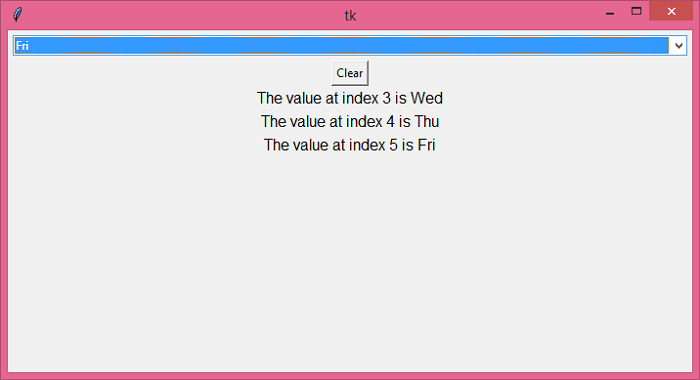
執行以上程式碼將顯示一個帶有日期列表的組合框小部件。每當您從列表中選擇一天時,它都會在標籤小部件上列印索引和相應的專案。

更新於:2021-12-16
10K+ 瀏覽量

廣告