
 資料結構
資料結構 網路
網路 關係資料庫管理系統 (RDBMS)
 作業系統
作業系統 Java
Java MS Excel
 iOS
iOS HTML
HTML CSS
CSS Android
 Python
 C語言程式設計
 C++
C++ C#
C# MongoDB
 MySQL
MySQL Javascript
 PHP
PHP 物理學
物理學 化學
化學 生物學
生物學 數學
數學 英語
英語 經濟學
經濟學 心理學
心理學 社會研究
社會研究 時尚研究
時尚研究 法律研究
法律研究如何使用Selenium獲取HTML表格中每個單元格的文字?
我們可以使用Selenium webdriver獲取HTML表格中每個單元格的文字。<table>標籤用於在html文件中定義表格。表格由<tr>表示的行和<td>表示的列組成。表頭由<th>標籤標識。
讓我們考慮一個表格,我們將從中獲取每個單元格的文字。
| 自動化工具 | 型別 | 連結 |
|---|---|---|
| Selenium | 開源 | https://www.selenium.org/ |
| UFT | 商業版 | 統一功能測試器 (UNified Functional Tester) |
| Ranorex | 商業版 | https://www.ranorex.com/ |
| TestComplete | 商業版 | TestComplete |
讓我們看看上面表格的HTML程式碼表示:
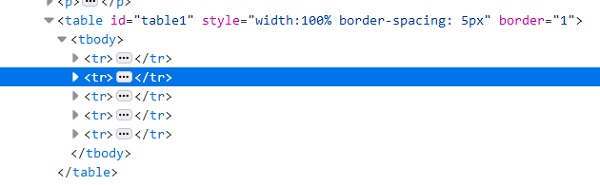
要檢索表格的行數,我們將使用:
List<WebElement> rows =driver.findElements(By.tagName("tr"));
int rws_cnt= rows.size();
要檢索表格的列數,我們將使用:
List<WebElement> cols =driver.findElements(By.tagName("td"));
int cols_cnt= cols.size();
示例
import org.openqa.selenium.By;
import org.openqa.selenium.WebDriver;
import org.openqa.selenium.WebElement;
import org.openqa.selenium.chrome.ChromeDriver;
import java.util.concurrent.TimeUnit;

public class TableCellValue{
   public static void main(String[] args) {
System.setProperty("webdriver.chrome.driver","C:\Users\ghs6kor\Desktop\Java\chromedriver.exe");
         WebDriver driver = new ChromeDriver();
         String u="https://sqengineer.com/practice-sites/practice-tables-selenium/";
         driver.get(u);
         driver.manage().timeouts().implicitlyWait(5, TimeUnit.SECONDS);
         // identify table
         WebElement t = driver.findElement(By.xpath("//*[@id='table1']/tbody"));
         // count rows with size() method
         List<WebElement> rws = t.findElements(By.tagName("tr"));
         int rws_cnt = rws.size();
         //iterate rows of table
         for (int i = 0;i < rws_cnt; i++) {
         // count columns with size() method
         List<WebElement> cols = rws.get(i).findElements(By.tagName("td"));
         int cols_cnt = cols.size();
         //iterate cols of table
         for (int j = 0;j < cols_cnt; j++) {
         // get cell text with getText()
         String c = cols.get(j).getText();
      System.out.println("The cell value is: " + c);
   }
}
      driver.quit();
   }
}
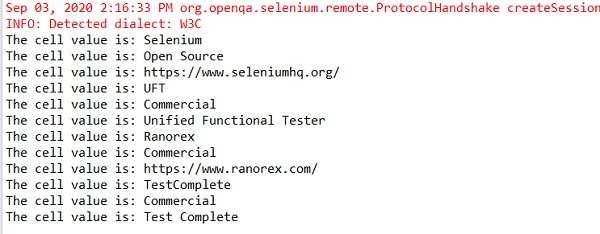
輸出

更新於:2020年9月18日
5K+ 次瀏覽

廣告