
 資料結構
資料結構 網路
網路 關係資料庫管理系統 (RDBMS)
 作業系統
作業系統 Java
Java MS Excel
 iOS
iOS HTML
HTML CSS
CSS Android
 Python
 C 程式設計
 C++
C++ C#
C# MongoDB
 MySQL
MySQL Javascript
 PHP
PHP 物理學
物理學 化學
化學 生物學
生物學 數學
數學 英語
英語 經濟學
經濟學 心理學
心理學 社會學
社會學 服裝學
服裝學 法學
法學如何在 JavaScript 中獲取物件的屬性描述符?
在本文中,我們將探討屬性描述符以及如何從物件中獲取這些值。 **Object.getOwnPropertyDescriptor** 方法返回一個物件,該物件描述給定物件中的特定屬性。JavaScript 物件可以透過多種方式建立,這些方式可以透過使用物件的屬性描述符來呼叫。
語法
Object.getOwnPropertyDescriptor(obj, prop
屬性描述符接受兩個引數作為輸入,如下所述:
**obj** - 物件指的是需要描述其屬性的物件名稱。
**prop** - 它定義了需要返回值的物件的特定屬性。
如果屬性存在,此方法將返回物件的屬性。
示例 1
在下面的示例中,我們建立了一個簡單的物件。建立物件後,我們使用屬性描述符查詢屬性的指定值。我們將使用 Object.getOwnPropertyDescriptor() 方法來返回與屬性相關的屬性和值。
# index.html
<!DOCTYPE html>
<html lang="en">
<head>
   <title>Property Descriptors</title>
</head>
<body>
   <h1 style="color: green;">
      Welcome To Tutorials Point
   </h1>
   <script>
      // Object
      const Obj = {
         property1: "Tutorials Point",
         property2: "Simply Easy Learning"
      };
      const descriptor1 = Object.getOwnPropertyDescriptor(Obj, 'property1');
      const descriptor2 = Object.getOwnPropertyDescriptor(Obj, 'property2');
      console.log(descriptor1.configurable);
      // expected output: true

      console.log(descriptor1.enumerable);
      // expected output: true

      console.log(descriptor1.value);
      // expected output: Tutorials Point

      console.log(descriptor2.value);
      // expected output: Simply Easy Learning
   </script>
</body>
</html>
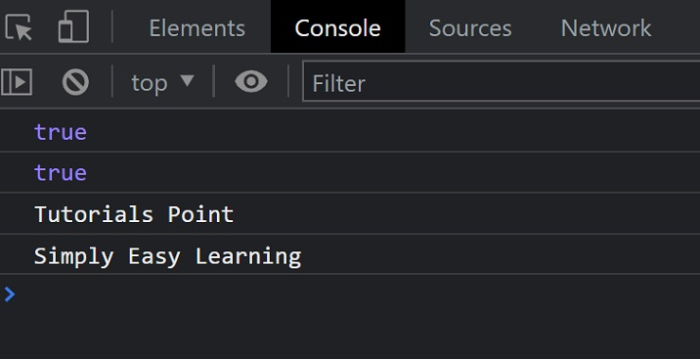
輸出
成功執行後,結果可以在控制檯中找到。
描述符
物件的屬性描述符使用以下屬性來定義每個屬性。
**value** - 這將返回與屬性關聯的值。
**writable** - 這指示屬性是否已更改。如果屬性已更改,它將返回 true。
**enumerable** - 如果屬性在相應物件的列舉期間可見,則返回 true。
**configurable** - 這指示是否可以配置屬性。
示例 2
# index.html
<!DOCTYPE html>
<html lang="en">
<head>
   <title>Property Descriptors</title>
</head>
<body>
   <h1 style="color: green;">
      Welcome To Tutorials Point
   </h1>
   <script>
      // Object
      const Obj = {
         property1: "Tutorials Point",
         property2: "Simply Easy Learning"
      };
      const descriptor1 = Object.getOwnPropertyDescriptor(Obj, 'property1');
      const descriptor2 = Object.getOwnPropertyDescriptor(Obj, 'property2');
      console.log(descriptor1);
      console.log(descriptor1);
   </script>
</body>
</html>
輸出


更新於:2022年4月26日
173 次瀏覽

廣告