
 資料結構
資料結構 網路
網路 RDBMS
RDBMS 作業系統
作業系統 Java
Java MS Excel
 iOS
iOS HTML
HTML CSS
CSS Android
 Python
 C 程式設計
 C++
C++ C#
C# MongoDB
 MySQL
MySQL JavaScript
 PHP
PHP 物理
物理 化學
化學 生物
生物 數學
數學 英語
英語 經濟
經濟 心理學
心理學 社會學
社會學 時尚
時尚 法律
法律如何使用 Selenium 查詢表中的特定行?
我們可以使用 Selenium WebDriver 查詢表中的特定行。表在 html 文件中使用 <table> 標記標識。每個表都包含一個 <tr> 標記來表示行,和一個 <td> 標記來表示列。若要遍歷表格行和列,我們使用 findElements() 方法。
要計算表中一共有多少行,我們可以使用可用於列表的 size() 方法 −
List <WebElement> l=driver.findElements(By.tagName("tr"));
int s= l.size();
要計算表中一共有多少列,我們可以使用可用於列表的 size() 方法 −
List <WebElement> m=driver.findElements(By.tagName("td"));
int t= m.size();
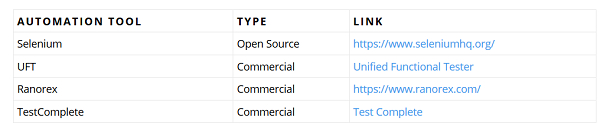
讓我們考慮一下下面的表,並獲取型別為 TYPE,自動化工具為 UFT 的值。
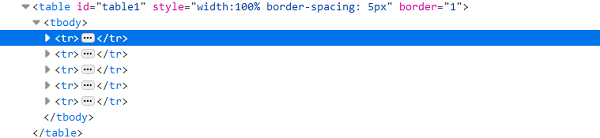
表中 html 結構的描述如下 −
示例
程式碼實現。
import org.openqa.selenium.By;
import org.openqa.selenium.WebDriver;
import org.openqa.selenium.WebElement;
import org.openqa.selenium.chrome.ChromeDriver;
import java.util.concurrent.TimeUnit;
public class TableHandling{
   public static void main(String[] args) {
      System.setProperty("webdriver.chrome.driver", "C:\Users\ghs6kor\Desktop\Java\chromedriver.exe");
      WebDriver driver = new ChromeDriver();
      String url = " https://sqengineer.com/practice-sites/practice-tables- selenium/";
      driver.get(url);
      driver.manage().timeouts().implicitlyWait(5, TimeUnit.SECONDS);
      // identify table
      WebElement mytable = driver.findElement(By.xpath("//table[@id='table1']/tbody"));
      //identify rows of table.
      List<WebElement> r_table = mytable.findElements(By.tagName("tr"));
      String b_xpath = "//table[@id='table1']/tbody/tr[";
      String a_xpath = "]/td[1]";
      //calculate rows number with size()
      int rs_c = r_table.size();
      //iterate rows of table and check matching condition
      for (int r = 2;r <= rs_c; r++) {
         String n = driver.findElement(By.xpath(b_xpath + r + a_xpath)).getText();
         if(n.contains("UFT")){
            // get text of matching cell
            String                   celtxt=driver.findElement(By.xpath("//table[@id='table1']/tbody/tr["+r+"]/td[2]")).getText();
            System.out.println("The cell data at particular row is:" + celtxt);
            break;
         }
      }
      driver.quit();
   }
}
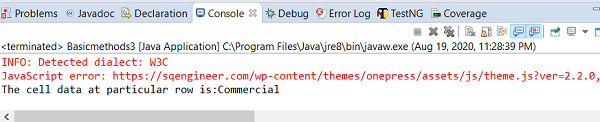
輸出

更新於: 28-8-2020
3K+ 瀏覽

廣告