
 資料結構
資料結構 網路
網路 關係型資料庫管理系統
 作業系統
作業系統 Java
Java MS Excel
 iOS
iOS HTML
HTML CSS
CSS Android
 Python
 C 語言程式設計
 C++
C++ C#
C# MongoDB
 MySQL
MySQL Javascript
 PHP
PHP 物理學
物理學 化學
化學 生物學
生物學 數學
數學 英語
英語 經濟學
經濟學 心理學
心理學 社會學
社會學 時尚研究
時尚研究 法律研究
法律研究如何在 JavaScript 中編碼和解碼 URL?
任何網站的 URL 都需要對 URI 和 URI 元件進行編碼和解碼,以便訪問或重定向使用者。 這是網頁開發中的一項常見任務,通常在向 API 發出 GET 請求並使用查詢引數時進行。 查詢引數也必須編碼到 URL 字串中,伺服器將對它進行解碼。 許多瀏覽器會自動編碼和解碼 URL 和響應字串。
例如,空格“ ”被編碼為 + 或 %20。
編碼 URL
可以使用以下 JavaScript 方法進行特殊字元的轉換:
encodeURI() 函式 - encodeURI() 函式用於編碼完整的 URI,即將其中的特殊字元轉換為瀏覽器可識別的語言。 一些未編碼的字元包括:(,/ ? : @ & = + $ #)。
encodeURIComponent() 函式 - 此函式編碼整個 URL,而不僅僅是 URI。 該元件還會對域名進行編碼。
語法
encodeURI(complete_uri_string )
encodeURIComponent(complete_url_string )
引數
complete_uri_string 字串 - 它包含要編碼的 URL。
complete_url_string 字串 - 它包含要編碼的完整 URL 字串。
以上函式返回編碼後的 URL。
示例 1
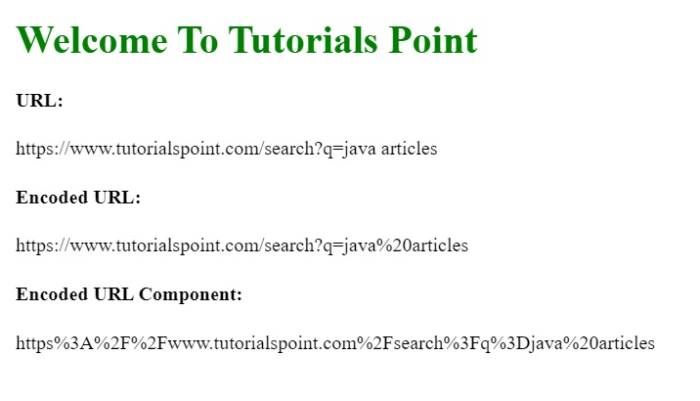
在下面的示例中,我們使用 encodeURI() 和 encodeURIComponent() 方法對 URL 進行編碼。
# index.html
<!DOCTYPE html>
<html lang="en">
<head>
   <title>Encoding URI</title>
</head>
<body>
   <h1 style="color: green;">
      Welcome To Tutorials Point
   </h1>
   <script>
      const url="https://tutorialspoint.tw/search?q=java articles";
      document.write('<h4>URL: </h4>' + url)
      const encodedURI=encodeURI(url);
      document.write('<h4>Encoded URL: </h4>' + encodedURI)
      const encodedURLComponent=encodeURIComponent(url);
      document.write('<h4>Encoded URL Component: </h4>' + encodedURLComponent)
   </script>
</body>
</html>
輸出
解碼 URL
可以使用以下方法解碼 URL:
decodeURI() 函式 - decodeURI() 函式用於解碼 URI,即將其中的特殊字元轉換回原始 URI 語言。
decodeURIComponent() 函式 - 此函式將完整 URL 解碼回其原始形式。 decodeURI 僅解碼 URI 部分,而此方法解碼 URL,包括域名。
語法
decodeURI(encoded_URI )
decodeURIComponent(encoded_URL
引數
encoded_URI URI - 它接收由 encodeURI() 函式建立的編碼 URL 作為輸入。
encoded_URL URL - 它接收由 encodeURIComponent() 函式建立的編碼 URL 作為輸入。
這些函式將返回編碼 URL 的解碼格式。
示例 2
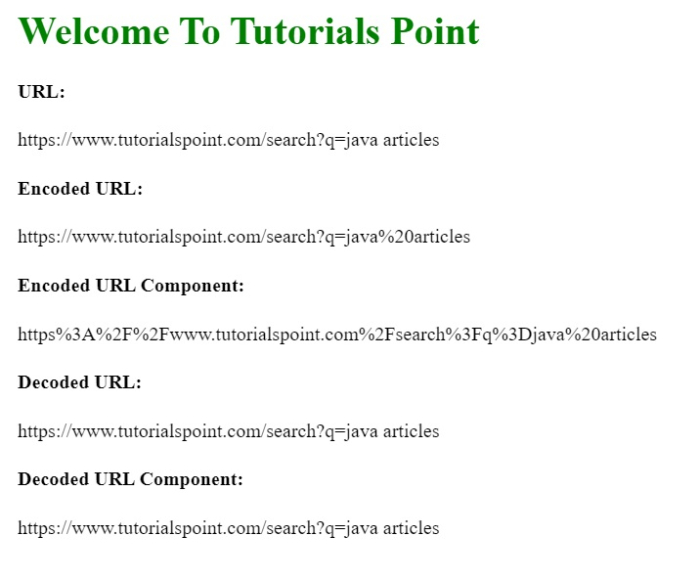
在下面的示例中,我們使用 decodeURI() 和 decodeURIComponent() 方法將編碼的 URL 解碼回其原始形式。
# index.html
<!DOCTYPE html>
<html lang="en">
<head>
   <title>Encode & Decode URL</title>
</head>
<body>
   <h1 style="color: green;">
      Welcome To Tutorials Point
   </h1>
   <script>
      const url="https://tutorialspoint.tw/search?q=java articles";
      const encodedURI = encodeURI(url);
      document.write('<h4>Encoded URL: </h4>' + encodedURI)
      const encodedURLComponent = encodeURIComponent(url);
      document.write('<h4>Encoded URL Component: </h4>' + encodedURLComponent)
      const decodedURI=decodeURI(encodedURI);
      document.write('<h4>Decoded URL: </h4>' + decodedURI)
      const decodedURLComponent = decodeURIComponent(encodedURLComponent);
      document.write('<h4>Decoded URL Component: </h4>' + decodedURLComponent)
   </script>
</body>
</html>
輸出

6K+ 次瀏覽
