
 資料結構
資料結構 網路
網路 關係型資料庫管理系統
 作業系統
作業系統 Java
Java MS Excel
 iOS
iOS HTML
HTML CSS
CSS Android
 Python
 C 程式設計
 C++
C++ C#
C# MongoDB
 MySQL
MySQL Javascript
 PHP
PHP 物理
物理 化學
化學 生物
生物 數學
數學 英語
英語 經濟學
經濟學 心理學
心理學 社會學
社會學 時尚研究
時尚研究 法律研究
法律研究如何在 C# ASP.NET WebAPI 中使用 URI 進行 Web API 版本控制?
一旦 Web API 服務公開,不同的客戶端應用程式就開始使用我們的 Web API 服務。隨著業務的增長和需求的變化,我們可能也需要更改服務,但服務的更改應以不破壞任何現有客戶端應用程式的方式進行。
這時 Web API 版本控制就派上用場了。我們將現有服務保持原樣,這樣就不會破壞現有的客戶端應用程式,並開發新客戶端應用程式可以使用的新版本服務。
實現版本控制的選項之一是使用 URI。下面是一個如何實現相同功能的示例。
示例
讓我們考慮一個學生控制器的版本 1 (V1),它具有以下操作方法。
學生模型 V1 −
namespace DemoWebApplication.Models{
   public class StudentV1{
      public int Id { get; set; }
      public string Name { get; set; }
   }
}
學生控制器 V1 −
using DemoWebApplication.Models;
using System.Collections.Generic;
using System.Linq;
using System.Web.Http;
namespace DemoWebApplication.Controllers{
   public class StudentV1Controller : ApiController{
      List<StudentV1> students = new List<StudentV1>{
         new StudentV1{
            Id = 1,
            Name = "Mark"
         },
         new StudentV1{
            Id = 2,
            Name = "John"
         }
      };
      [Route("api/v1/students")]
      public IEnumerable<StudentV1> Get(){
         return students;
      }
      [Route("api/v1/students/{id}")]
      public StudentV1 Get(int id){
         var studentForId = students.FirstOrDefault(x => x.Id == id);
         return studentForId;
      }
   }
}
在上面的示例中,我們使用了屬性路由來實現版本控制。上面示例的輸出如下所示:


現在假設在學生控制器中,業務僅為新使用者提出了新的更改,而現有使用者仍應使用版本 1。在這種情況下,我們必須引入版本 2 (V2)。
學生模型 V2 −
示例
namespace DemoWebApplication.Models{
   public class StudentV2{
      public int Id { get; set; }
      public string FirstName { get; set; }
      public string LastName { get; set; }
   }
}
學生控制器 V2 −
using DemoWebApplication.Models;
using System.Collections.Generic;
using System.Linq;
using System.Web.Http;
namespace DemoWebApplication.Controllers{
   public class StudentV2Controller : ApiController{
      List<StudentV2> students = new List<StudentV2>{
         new StudentV2{
            Id = 1,
            FirstName = "Roger",
            LastName = "Federer"
         },
         new StudentV2{
            Id = 2,
            FirstName = "Tom",
            LastName = "Bruce"
         }
      };
      [Route("api/v2/students")]
      public IEnumerable<StudentV2> Get(){
         return students;
      }
      [Route("api/v2/students/{id}")]
      public StudentV2 Get(int id){
         var studentForId = students.FirstOrDefault(x => x.Id == id);
         return studentForId;
      }
   }
}
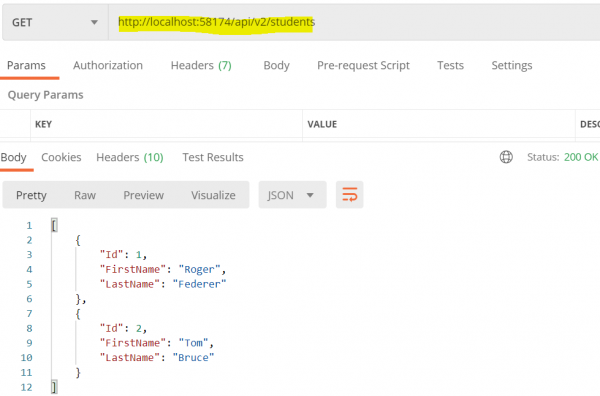
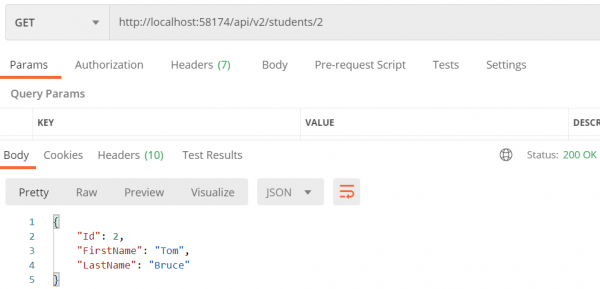
輸出
上面示例的輸出如下所示。

更新於: 2020-08-19
656 次瀏覽

廣告