
 資料結構
資料結構 網路
網路 關係型資料庫管理系統
 作業系統
作業系統 Java
Java MS Excel
 iOS
iOS HTML
HTML CSS
CSS Android
 Python
 C 程式設計
 C++
C++ C#
C# MongoDB
 MySQL
MySQL Javascript
 PHP
PHP 物理學
物理學 化學
化學 生物學
生物學 數學
數學 英語
英語 經濟學
經濟學 心理學
心理學 社會學
社會學 時尚研究
時尚研究 法律研究
法律研究如何使用 Swift 檢測震動手勢?
為了檢測 iOS UIKit 中的震動手勢,提供了三種不同的方法,我們一一來看一下。
方法 1 − 當震動手勢開始時。
override func motionBegan(_ motion: UIEvent.EventSubtype, with event: UIEvent?) {
// code you want to implement
}
方法 2 − 當震動手勢結束時。
override func motionEnded(_ motion: UIEvent.EventSubtype, with event: UIEvent?) {
// Code you want to implement.
}
方法 3 − 當震動手勢取消時。
override func motionCancelled(_ motion: UIEvent.EventSubtype, with event: UIEvent?) {
// code you want to implement.
}
現在,讓我們在 motionBegan 方法中新增一些程式碼,
override func motionBegan(_ motion: UIEvent.EventSubtype, with event: UIEvent?) {
   print(motion)
   if motion == .motionShake {
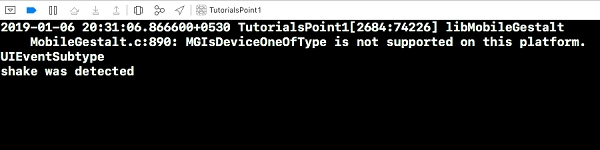
      print("shake was detected")
   }
}
還在 viewDidLoad() 方法中新增 “self.becomeFirstResponder()”。當我們在模擬器上執行 obve 程式碼並使用除錯來生成震動手勢時,下面就是生成的結果。我們可以根據自己的使用情況修改上面的程式碼,並且在我們應用程式中執行不同的操作。

更新於:29-6 月-2020
918 次瀏覽

廣告