
 資料結構
資料結構 網路
網路 關係資料庫管理系統
 作業系統
作業系統 Java
Java MS Excel
 iOS
iOS HTML
HTML CSS
CSS Android
 Python
 C 程式設計
 C++
C++ C#
C# MongoDB
 MySQL
MySQL Javascript
 PHP
PHP 物理學
物理學 化學
化學 生物學
生物學 數學
數學 英語
英語 經濟學
經濟學 心理學
心理學 社會學
社會學 時尚研究
時尚研究 法律研究
法律研究如何在 Angular 8 中建立自定義指令?
在 Angular 中,指令是最重要的元素之一。指令就像 Angular 框架中的元件一樣,是構建應用程式的基本模組。指令用於透過更改 DOM 元素的外觀、行為或佈局來修改 DOM。
指令用於提供或生成基於新 HTML 語法的功能,從而擴充套件 Angular 應用程式中 UI 的功能。每個指令都必須有一個選擇器,就像元件一樣。簡單來說,Angular 中的每個元件都是一個帶有自定義 HTML 模板的指令。
在 Angular 中,我們有指令來更改 HTML DOM 元素的行為或結構。指令分為三類。
元件指令
結構指令,例如 *ngIf、*ngFor、*ngSwitch
屬性指令,例如 *ngStyle、*ngClass
我們也可以建立自定義指令。
讓我們看看下面的示例。
自定義指令
建立自定義指令就像建立 Angular 元件一樣。要建立自定義指令,我們需要用 @Directive 裝飾器替換 @Component 裝飾器。
建立屬性自定義指令
讓我們以透過設定一些背景顏色來突出顯示選定 DOM 為例。讓我們為此建立自定義指令。
示例
首先,建立一個指令檔案。例如,在 src/app 資料夾中建立 show-highlight.directive.ts 檔案。
import { Directive, ElementRef } from "@angular/core";
@Directive({
   selector: "[highlightEle]"
})
export class ShowHighlightDirective {
   constructor(private elementRef: ElementRef) {
      this.elementRef.nativeElement.style.color = "green";
   }
}
這裡,ElementRef 幫助我們訪問 DOM 元素。選擇器,即 highlightEle,我們可以在應用程式的任何地方使用這個選擇器。如果在應用程式的任何地方都有相同的突出顯示功能,我們可以簡單地使用此選擇器。
建立指令後,我們需要在 app.module.ts 檔案中匯入它。例如,
import { BrowserModule } from "@angular/platform-browser";
import { NgModule } from "@angular/core";
import { AppComponent } from "./app.component";
import { ShowHighlightDirective } from "./show-highlight.directive";
@NgModule({
   declarations: [AppComponent, ShowHighlightDirective],
   imports: [BrowserModule],
   providers: [],
   bootstrap: [AppComponent]
})
export class AppModule {}
在這裡,我們將服務類作為提供程式匯入。在 @NgModule 中,我們有四個部分。
宣告 - 定義匯入的元件和指令
匯入 - 定義匯入的模組
提供程式 - 定義匯入的服務
引導 - 定義要顯示資料的根元件
現在,讓我們在元件中使用 hightlightEle 選擇器。
在 app.component.html 檔案中
<div>
   <p highlightEle>Custom Attribute directive</p>
</div>
輸出
Custom Attribute directive
You have successfully created custom directive
自定義結構指令
我們有結構指令 *ngIf。現在,我們要實現相同的功能作為自定義指令。讓我們看看下面的示例
在 src/app 中建立一個名為 custom-if.directive.ts 的指令。
在 custom-if.directive.ts 檔案中新增如下程式碼。例如,
import { Directive, ViewContainerRef, TemplateRef, Input } from "@angular/core";
@Directive({
   selector: "[customIf]"
})
export class customIfDirective {
   customIf: boolean;
   constructor(
   private viewContainer: ViewContainerRef,
   private templateRef: TemplateRef<any>
   ) {}
   @Input()
   set customIf(condition) {
      this.customIf = condition;
      this.updateView();
   }
   updateView() {
      if (this.customIf) {
         this.viewContainer.createEmbeddedView(this.templateRef);
      } else {
         this.viewContainer.clear();
      }
   }
}
這裡,ViewContainerRef 和 TemplateRef 例項,我們用來操作 DOM。我們使用 @Input 裝飾器建立了屬性繫結。每當單擊複選框更改條件時,setter 函式將被呼叫。如果條件為真,則使用 createEmbeddedView 將資料新增到 HTML 模板中,否則清除 HTML 元素。
現在,讓我們將指令匯入 app.module.ts。例如,
import { BrowserModule } from "@angular/platform-browser";
import { NgModule } from "@angular/core";
import { FormsModule } from "@angular/forms";
import { AppComponent } from "./app.component";
import { customIfDirective } from "./custom-if.directive";
@NgModule({
   declarations: [AppComponent, customIfDirective],
   imports: [BrowserModule, FormsModule],
   providers: [],
   bootstrap: [AppComponent]
})
export class AppModule {}
我們在主模組上方添加了指令。讓我們在 app.component.html 檔案中使用建立的指令選擇器。例如,
<h1>Custom structural directive</h1>
Show Me
<input type="checkbox" [(ngModel)]="check" />
<div *customIf="check">
Using the custom directive
</div>
<div *ngIf="check">
Using the ngIf directive
</div>
在 app.component.ts 檔案中定義 show 值。例如
import { Component } from "@angular/core";
@Component({
   selector: "app-root",
   templateUrl: "./app.component.html",
   styleUrls: ["./app.component.css"]
})
export class AppComponent {
   check = false;
}
輸出

當我們單擊複選框時,輸出將顯示如下
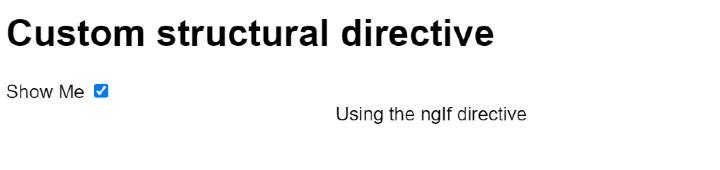
像這樣,我們可以建立自己的指令,並在應用程式的任何地方使用它。
從上面我們可以看出,指令可以用來在 DOM 元素上實現任何自定義邏輯。指令有助於我們重用程式碼。Angular 也提供了一些內建指令。我們可以根據需要建立自己的指令。

326 次瀏覽
